Operator’s Manual: Standard 360a Model Y (360y) Label Applicator
23
360y HMI Applicator Display
Label Profile Setup
1. Estimate the rise and flat areas of the product and estimate a web ratio. For a convex oval, like in Figure [61], the web ratio
needs to be less than 100% because the applicator labels the flat area slower than the rise areas.
2. Label several products under normal labeling conditions and observe the labels. Fine-tune the values of the rise and flat areas
by making the following adjustments:
3. If the leading edges of the labels are applied in the same spot on the products, go on to Step 4.
a. If the leading edges of the labels are placed at various positions on the products, the rise area is too short. Slightly
increase the rise area and run more products.
b. Repeat until the leading edge of the label is placed consistently.
4. If the leading edges of the label are applied at the required position on the product, go on to Step 5.
a. If the leading edge of the label is applied at the incorrect position, adjust the label placement, or re-position the
product detect sensor.
b. Repeat until the leading edge of the label is applied at the required position on the product.
5. If there are no wrinkles or bubbles in the first half of the applied labels go on to Step 6.
a. If a wrinkle or bubble appears anywhere from the top to the bottom of the first half of the label, the rise area is too
long. Slightly decrease the rise area and repeat until the wrinkle in the first half of the label is removed.
6. If there is no wrinkle in the center of the label go on to Step 7.
a. If a wrinkle appears anywhere from the top to the bottom at the center of the label, either the web ratio is too high,
or the flat area is too short. Note the web ratio setting and adjust that first.
b. Slightly decrease the web ratio and repeat until the wrinkle is removed.
7. If the labels are applied with no wrinkles the setup is complete.
a. If a horizontal wrinkle appears from the leading to the trailing edge, the flat area is too long.
b. Slightly decrease the flat area and repeat until the wrinkle is removed.
Label Placement
Label Placement is the delay in seconds (if time based) or distance in inches (if encoder based) between the product detect signal and
the start of the label apply sequence. This label placement value mirrors the label placement located on the Main Menu. It is placed
here so the operator can adjust it without backing out to the Main Menu.
Detector Lockout
Detector Lockout is the time in seconds (if time based), or distance in inches (if encoder based) the applicator ignores multiple product
detect signals after one is received. This is used for odd-shaped products that can set off multiple product detect signals with one
product, such as an egg carton.
Application Setup—Tamp and Blow
Applicators
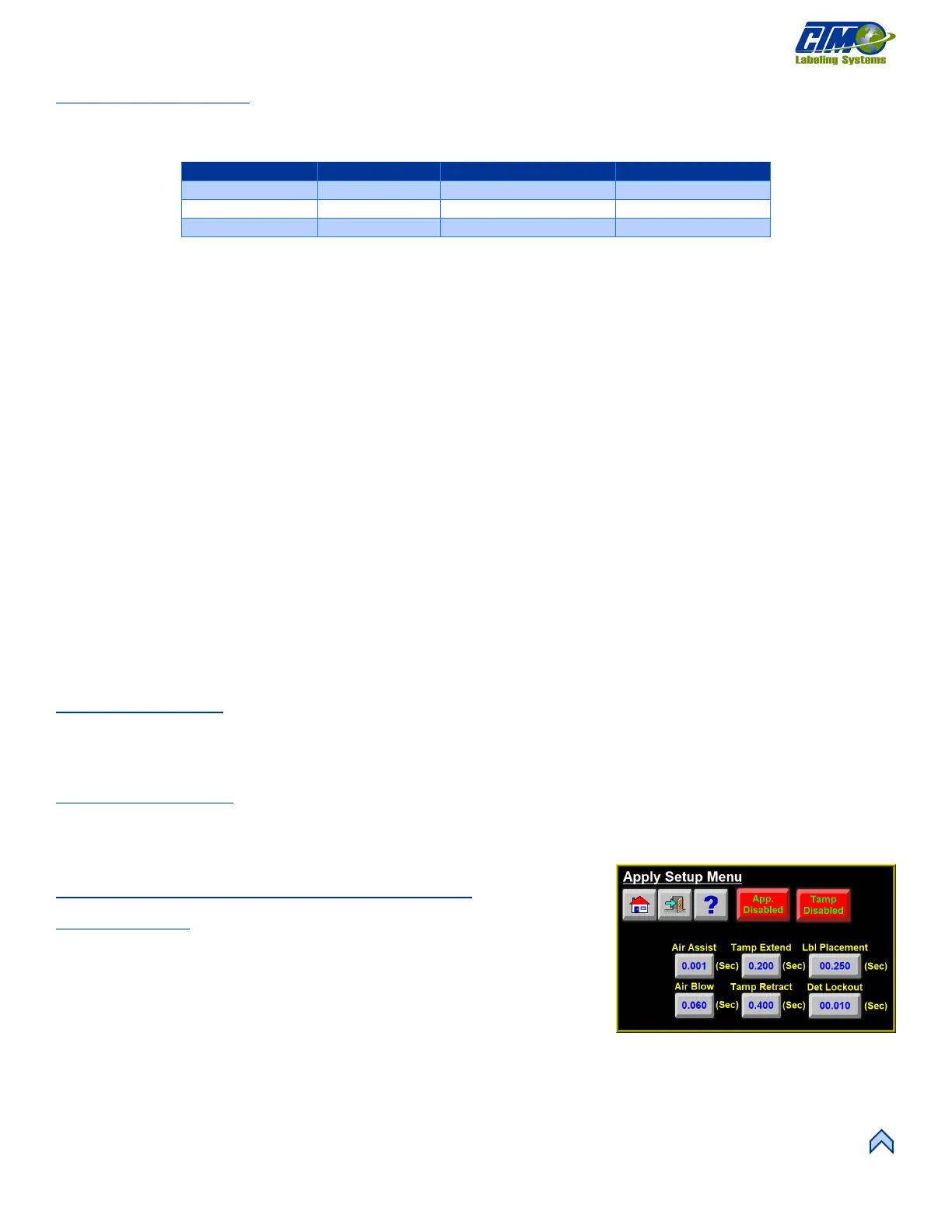
This menu [62] allows access to the following variables:
• Air Assist: Time in seconds the assist valve remains on.
• Air Blow: Time in seconds the blow valve remains on.
• Tamp Extend: Time allotted for the tamp slide or rotary actuator to extend.
After the timer is finished the air blast starts and the label pad begins to return
home.
• Tamp Retract: Time allotted for the tamp slide or rotary actuator to retract to the home position. Once the timer is completed
the next label begins feeding onto the label pad.
• Label Placement: Same as seen in the Application Setup—Merge section.
• Detector Lockout: Same as seen in the Application Setup—Merge section.
[62] Apply Setup Menu—Tamp and Blow
Applicators



 To Next Page