Operator’s Manual: Standard 360a Model Y (360y) Label Applicator
27
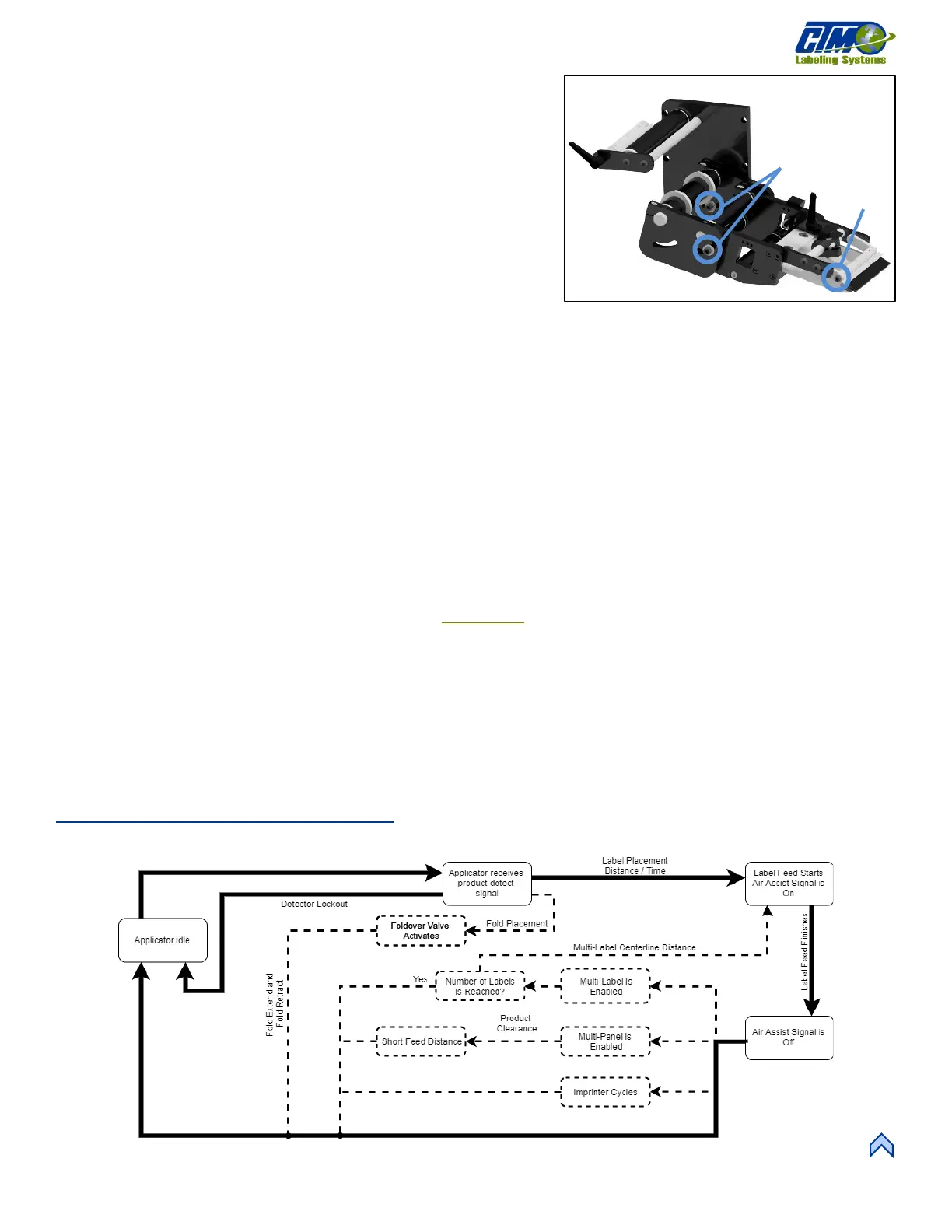
[77] Merge Assembly Flow Chart
APPLICATOR SETUP
Merge Applicator Setup
The Merge nose assembly [76] is used to apply labels to products moving on a
conveyor. A label is fed onto the surface of the product at the same speed that
the product is moving. This assembly allows the labels to be wiped onto the
product and includes a brush at the end of the assembly.
When setting up a merge applicator for the first time follow the below steps to
ensure all settings are correct:
1. Starting at the Main Menu, tap Setup Menu > Setup Passcode >
Configuration Menu > Top Right-Hand Corner > Special
Options Passcode >Apply Mode and tap the Up or Down arrow to choose Merge.
2. Go back one screen and tap Applicator Hand. Choose either Right or Left for the configuration, or dispensing direction.
a. Any options not compatible with a merge are turned off.
b. If the dispense direction changes, and the Applicator Hand menu is exited, the applicator forces the operator to cycle
the power to the applicator before any other changes can be made.
3. Loosen the socket head cap screws [76A] with a
3
/
16
allen wrench on the Merge nose assembly to position the peel edge so
it’s between
1
/
8
in. and
1
/
2
in. away from the product at approximately 20° to the product surface.
4. Loosen the screw above the applicator brush [76B] so that it lightly touches the product. It should be angled so that the label
is supported as it is fed out.
NOTE: The applicator brush is used to aid in the tacking of the label to the product. It is not made to be a wipe down.
5. Set the label stop so that the label flags past the peel edge but misses the passing product. If the label stop hits a passing
product the label could tack without the applicator cycling.
a. Complete a label sensor auto teach. See the Auto Teach
section in the Sensor Teach section.
b. Change the value manually. Start at the Main Menu and tap Setup Menu > Setup Passcode > Label Feed
Setup > Label Stop.
6. Set the web speed to match the speed of the product.
a. Start at the Main Menu and tap Setup Menu > Setup Passcode > Label Feed Setup > Web Speed.
b. If encoder-based the encoder options should be set so that the displayed speed in the Product Setup portion of the
display is correct.
7. Turn on all applicator options needed for application (multilabel, overspeed, etc.).
Merge Applicator Flow Chart
Figure [77] represents the cycle of a merge applicator. Some cycle-affecting options are depicted by dotted lines. Any step that has
multiple arrows leading to it indicates that multiple steps must be complete prior to advancing.
[76] Merge Nose Assembly (Right-Hand)



 To Next Page