Operator’s Manual: Standard 360a Model Y (360y) Label Applicator
24
360y HMI Applicator Display
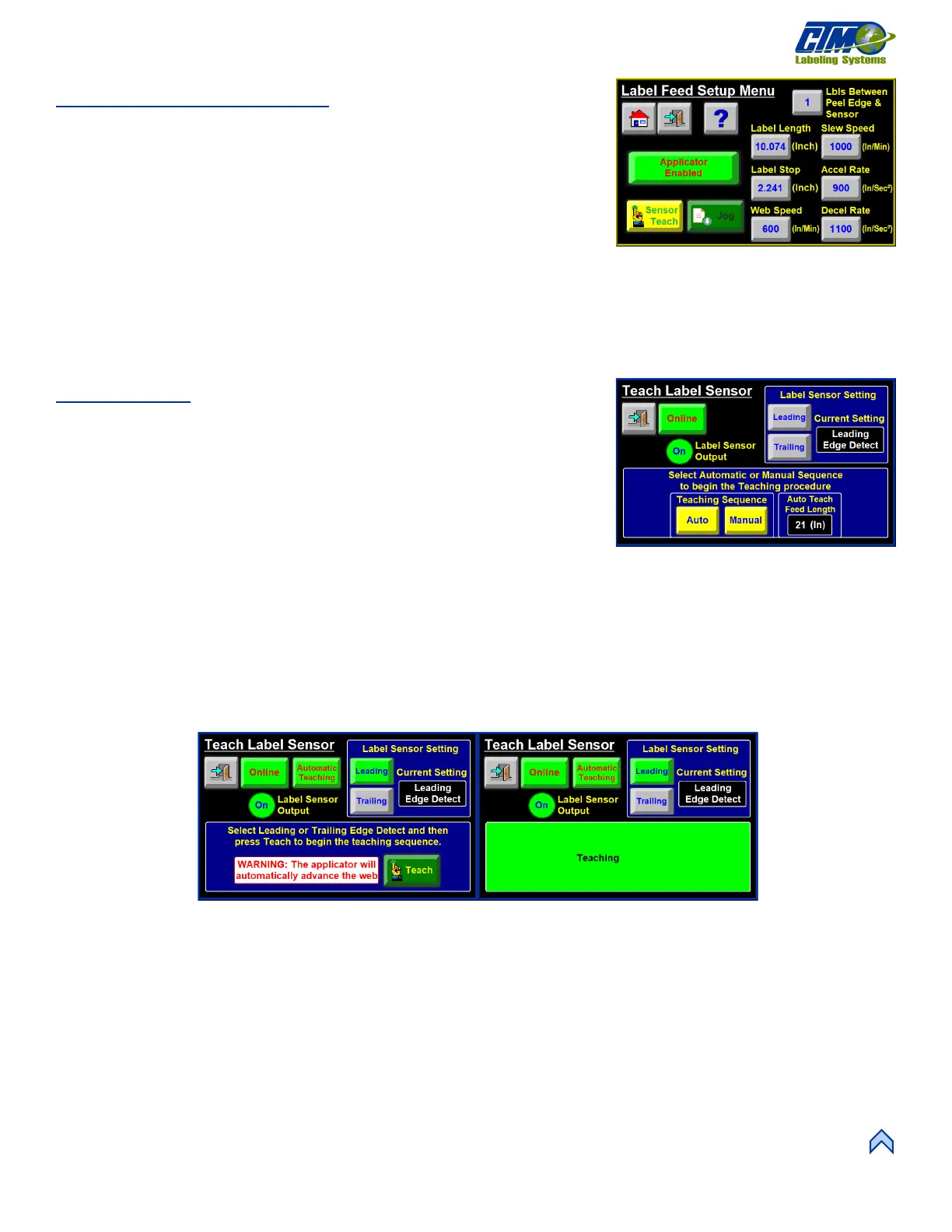
Label Feed Setup Menu
This menu [63] allows access to the following variables and buttons:
• Sensor Teach: Reteaches the Label Length and Label Stop values.
• Labels Between Peel Edge and Sensor: Number of labels between the sensor
and peel edge including the label at the sensor.
• Label Length: Length of the label, in inches, from the leading edge of one
label to the next.
• Label Stop: Distance in inches the web liner moves after the label gap is seen.
• Web Speed: Speed in inches per minute the web liner moves during a label apply or jog cycle.
• Slew Speed: Speed of the web when the applicator is doing a missing label move or multi-panel label flag.
• Accel. Rate: Rate in inches per second squared the web sped increases to the commanded speed
• Decel. Rate: Rate in inches per second squared the web speed decreases when the move is stopped.
Sensor Teach
The Teach Label Sensor menu [64] allows the operator to do a manual or auto teach of
the label sensor. The sensor can be taught to detect the leading edge or the trailing edge
of the label. Edge detection should only change when the label stop value is too low or
when the label stop value causes the label sensor to be right at the edge or label gap
while at the label stop position.
The label sensor has a sensor output, which is an indicator that changes colors based on
the output of the label sensor.
• Set to leading edge, the output is light blue when the sensor is looking at the
labels.
• Set to trailing edge, the light is light blue if looking at the gap.
Tap either the Auto button or the Manual button to begin a Teaching Sequence.
Auto Teach:
Auto Teach automatically sets the label sensor sensitivity and calculates the label length and label stop values. The following steps
detail the Auto Teach routine. Ensure the labels are webbed up correctly and the nip roller is closed before continuing.
1. Tap the edge detection best suited for the labeling sequence: Leading Edge or Trailing Edge [65A].
NOTE: In this example, leading edge detection is used.
2. Tap the Teach button [65B]. The applicator automatically advances the web liner, and the bottom part of the screen says
Teaching [66].
[63] Label Feed Setup Menu



 To Next Page