Operator’s Manual: Standard 360a Model Y (360y) Label Applicator
29
Air Blow Air Assist Setup
The air assist tube blows a stream of air onto the label to force it up against the blow box grid during the label feed. The air assist
starts to blow when the web liner starts to move and stops when the label is on the grid. The extended air assist time allows the air
assist to blow after the label feed to help stabilize the label. The following steps detail the setup of the air assist tube:
1. Adjust the air assist tube by loosening the screw right next to it. Adjust it so it’s blowing into the center of the label and
ensure that the label feeds out against the grid properly.
2. Adjust the Air Assist valve on the valve bank to 10-15 PSI by turning the knob directly above it. This is a typical setting,
but it may be changed as needed.
3. If a longer air assist is needed to help position the label, from the Main Menu tap Setup Menu > Setup Passcode >
Application Setup Menu > Web Speed > Air Assist. Enter a value between .000sec.-1sec.
Air Blow Air Blast
• The air blast transfers the label from the grid to the product and is a function of time and air pressure.
• The air blast pressure is regulated by the air blast regulator assembly located on the valve bank and is typically set to 40-50
PSI.
• The adjustable air blast timer can be set between .005sec.-1sec. This adjustment can be found by tapping Setup Menu >
Setup Passcode > Application Setup Menu > Web Speed > Air Assist
Air Blow Flow Chart
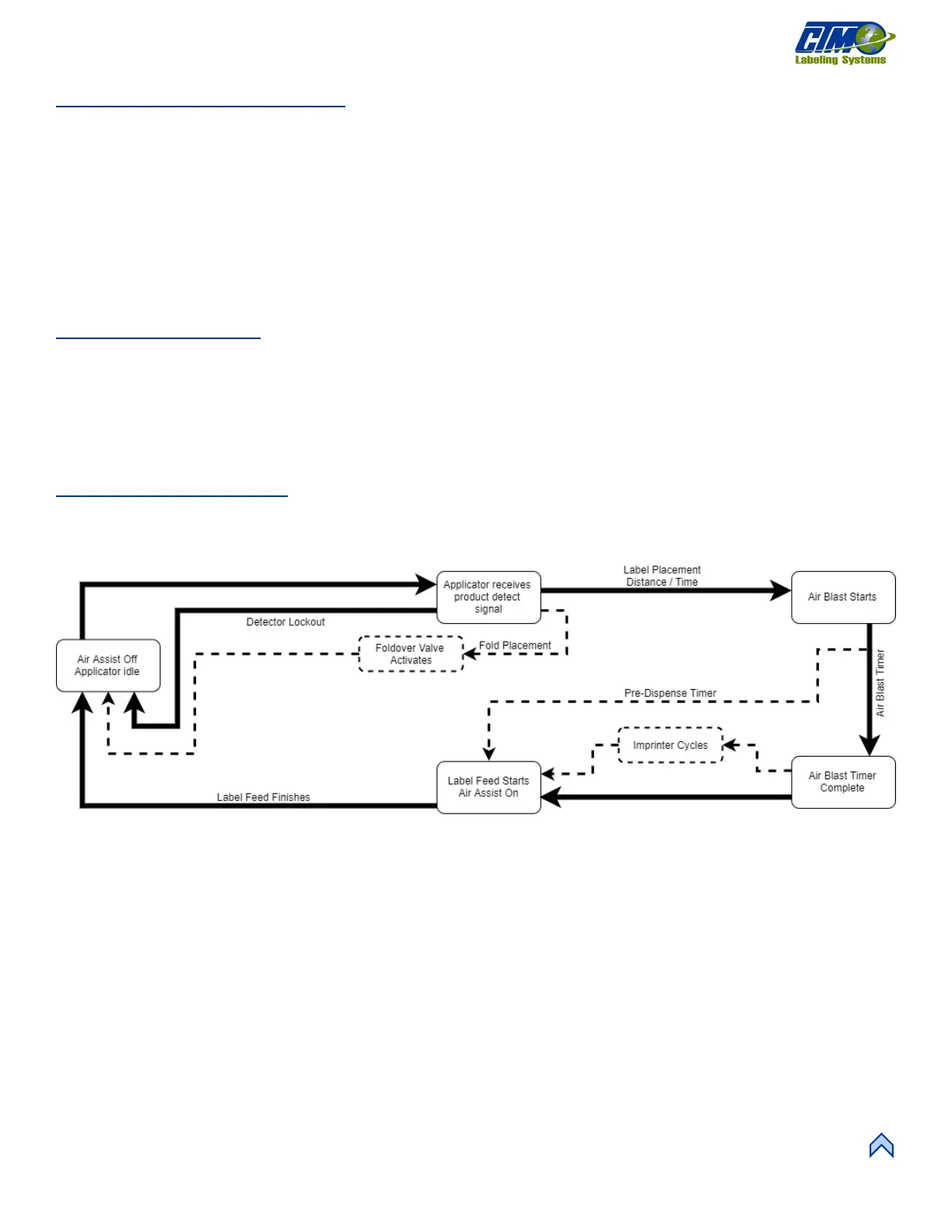
Figure [80] represents the cycle of an air blow applicator. Some cycle-affecting options are depicted by dotted lines. Any step that has
multiple arrows leading to it indicates that multiple steps must be complete prior to advancing. Not all options are shown as not all
options effect the cycle.
[79] Air Blow Assembly Flow Chart



 To Next Page