Operator’s Manual: Standard 360a Model Y (360y) Label Applicator
20
360y HMI Applicator Display
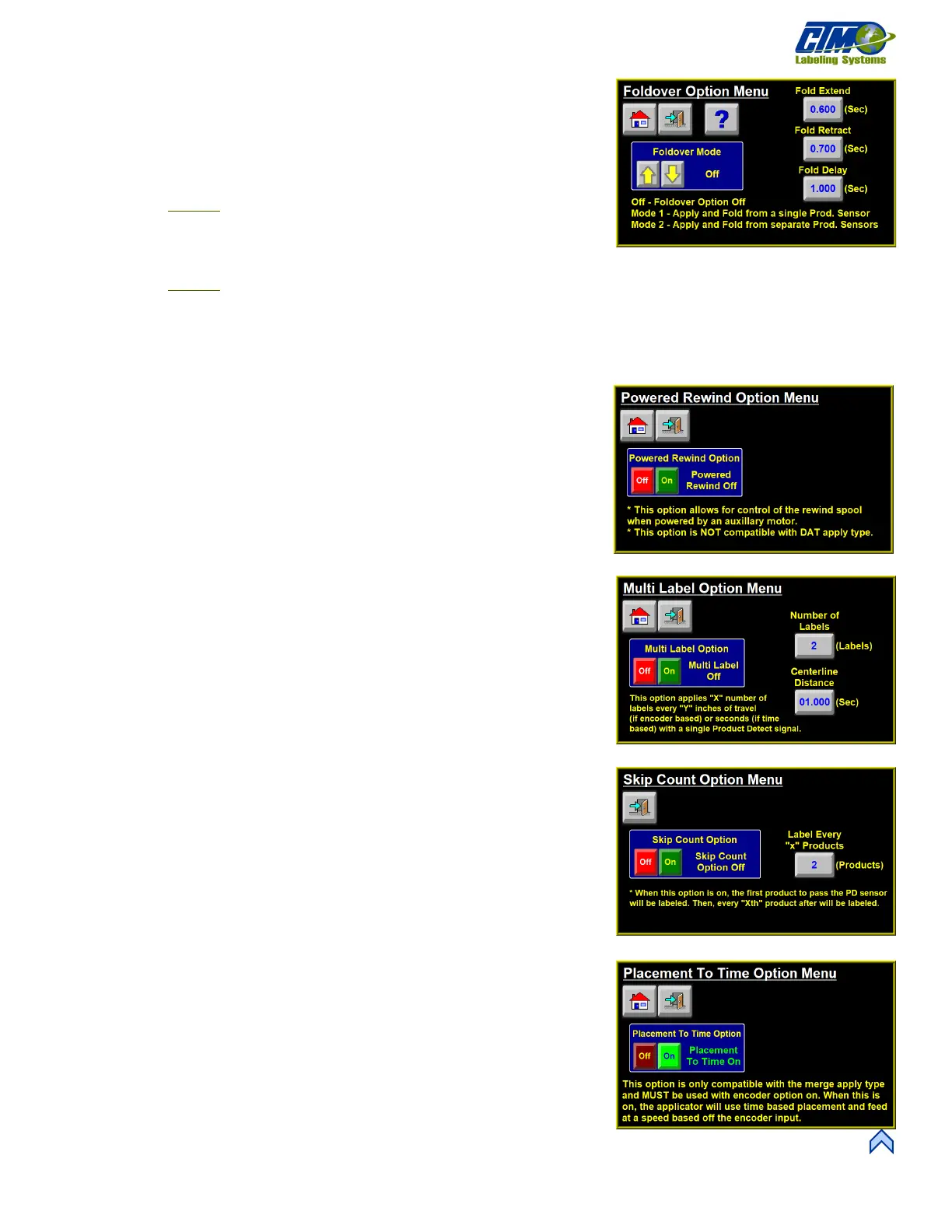
Foldover Option Menu
This menu [47] allows the applicator to control a fold station as part of the labeling
sequence. If the foldover option is enabled, the operator can change the foldover
parameters without disabling the applicator.
• Mode Select: The foldover option has 2 different modes to use:
o Mode 1: Starts the foldover sequence after the applicator product
detect sensor is turned off. This allows for the use of one product
detect sensor for apply and feed. The product detect signal must be a
leading edge signal.
o M
ode 2: The applicator applies labels based off the product detect signal and begins the foldover sequence based on
a second fold product detect sensor. Both sensors can be set to trailing edge.
• Fold Delay: Amount of time, or distance if encoder-based, the applicator waits to begin the fold sequence. This starts when
the product detect turns off for Mode 1 or when the fold product detect is active in Mode 2.
• Fold Extend: Amount of time the applicator activates the fold valve to extend the foldover. This should be set high enough to
ensure the label is fully wiped.
• Fold Retract: Amount of time the applicator waits after deactivating the fold
valve before it completes its cycle.
Powered Rewind Option Menu
This menu [48] Allows the applicator to control a motor attached to the rewind
mandrel. This motor-driven rewind is used in high-speed applications or applications
where a larger amount of waste material is collected on the rewind. Powered rewind is
a factory installed option.
Multi-Label Option Menu
This menu [49] Allows the applicator to apply multiple labels per the product detect
signal using the multi-label option. Multi-label causes the applicator to detect a product
as normal, wait the placement, and apply a label. After the apply is done it waits the
centerline distance and applies another label until the number of labels has been met. If
the label rate from multi-label is faster than what the applicator dispenses, a warning
occurs in the status box at the Main Menu.
• Number of Labels: Number of labels, including the original apply, that the
applicator applies based off a single product detect.
• Centerline Distance: Time, or distance if encoder based, the applicator places
the label. This is measured off a centerline-to-centerline basis of the labels.
Skip Count
This menu [50] enables the applicator to skip an “x” number of products that will not
be labeled. The applicator always labels the first product and skips the next “x – 1”
products. The status box on the Main Menu changes to reflect what increment the skip
counter is currently at.
• Label Every “x” Products: Enter the number you want to represent as “x” in
the variable. For example, if “3” is entered, the applicator will label the first
product, skip two product detects and label the fourth product.
Label to Placement Time Menu
This menu [51] allows the operator to turn the Placement to Time Option on and
off. Placement to time allows the applicator to be encoder-based for its web speed
while having a time-based label placement. Used commonly on systems that wrap the
label around products.
[49] Multi-Label Option Menu
[47] Foldover Option Menu
[51] I/O Diagnostics Menu



 To Next Page