Maintenance Manual: Standard 360a Model Y (360y) Label Applicator
4
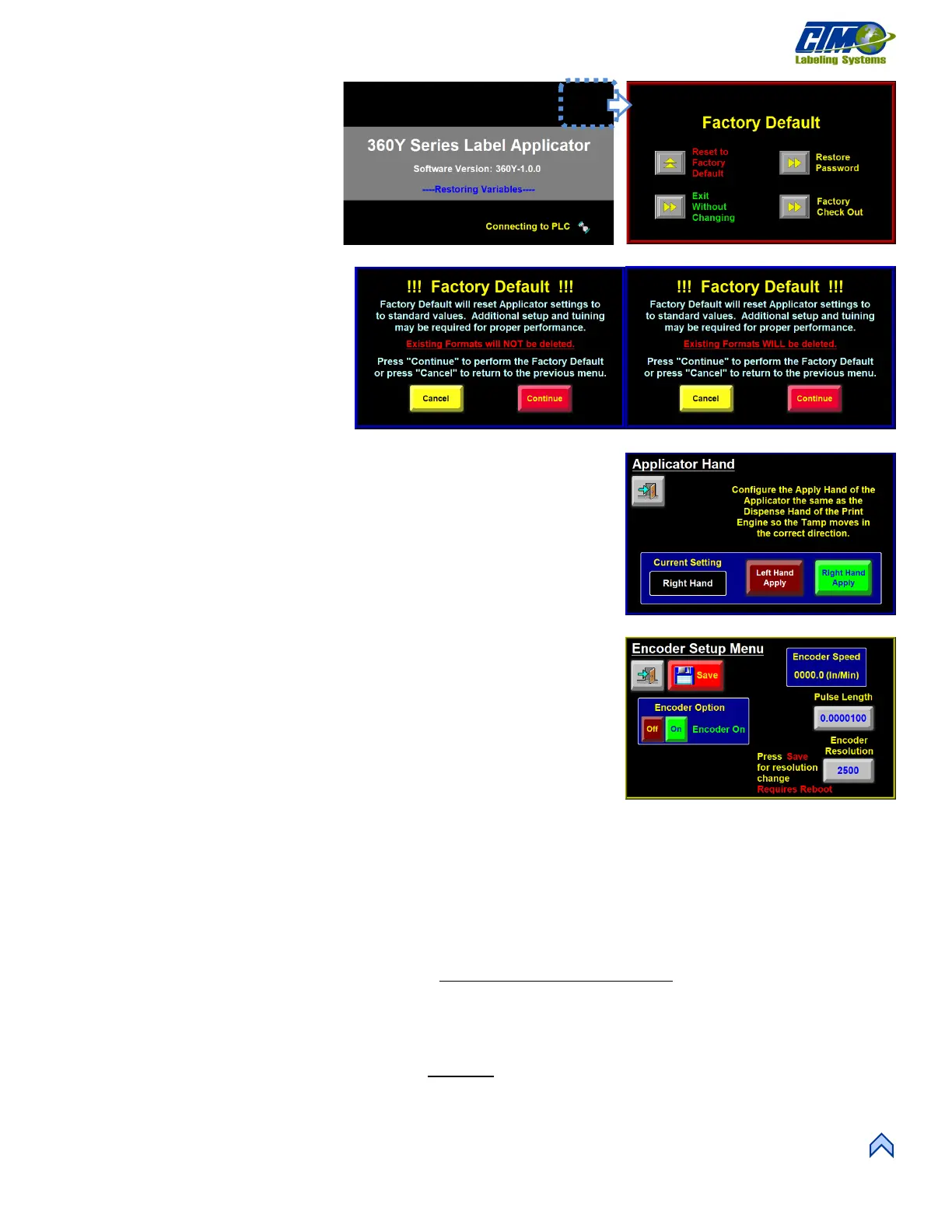
Factory Default Menu
The Factory Default menu [10B] gives the
operator the option to do a partial reset or a
complete reset. A partial reset [11] saves
the existing formats, and a complete reset
[12] clears all existing formats.
The factory default screen can be accessed
from the power-up screen [10A]. After
power-up, a countdown starts which is the
amount of time the operator must tap the
upper right-hand corner of the screen. This
prompts the operator to type in a passcode to
bring up the Factor Setup screen [10B]. The
Factory Setup screen gives the option to
Factory Default, Restore Main Password, and
Factory Checkout.
Applicator Hand
This screen [14] gives the operator the option
to change between Left-Hand and Right-Hand configurations. If changing hand
configurations, the operator is forced to cycle power to the applicator.
Encoder Setup Menu
This Menu [14] gives the operator access to the Encoder Resolution and Pulse
Length variables along with the ability to turn the Encoder Option on and off. Any
changes made to these variables requires a save and reboot for the changes to take effect.
The applicator has a differential quadrature incremental encoder interface with times
four interpolation built into the controller board. This means the encoder has four pins,
two positive and two negative. The encoder connector, located on the rear panel, has 5
VDC supply to power the encoder. The Encoder Wiring Diagram and pin-out
information appear in the Drawings document and should be consulted for user-supplied
encoders. Factory encoders generate 2500 pulses per revolution.
• Encoder Option: Keys turn this option on and off. If on, the lamp to the left of
the keys is green. While the encoder is on, label placement is in inches and not
seconds.
• Encoder Resolution: Number of encoder pulses for one revolution.
NOTE: In some applicator systems, the encoder speed varies significantly
around an average value. This can be problematic with merge
applicators, low-resolution encoders, and low conveyor speeds where
fewer encoder pulses are captured during the velocity calculation
interval.
• Encoder Speed: Visual display of the velocity obtained from the encoder port.
= (/ ) ∗ ( )
• Pulse Length: Distance the product travels per pulse of the encoder. Pulse length is calculated using the following formula:
=
(
)
∗
• Pulse Length Example: An encoder is mounted to a conveyor drive pulley and the circumference of that pulley is 18.75in.
Therefore, the product on the conveyor will travel 18.75in. per revolution of the encoder. The encoder is a factory-installed
encoder generating 2500 pulses per revolution.
=
. "
(
)
∗
=. /
• Placement Compensation: Number that reduces the label placement based off the encoder velocity. When products are
moving fast, the label dispense must begin sooner to compensate for the acceleration time of the label to the product. The
following explains how to set up placement compensation for the different applicators.
[12] Partial Factory Default
[11] Complete Factory Default
[10] Power-On Factory Default



 To Next Page