Configuring System Information 255
–
other
—Indicates that the value is in the form of a platform specific ASCII string containing info
that identifies the device. For example: ASCII string contains serialNumber appended/prepended
with system name.
Configuring ISDP Using CLI Commands
For information about the CLI commands that perform this function, see the following chapter in the
CLI Reference Guide
:
• ISDP Commands.
Cache Table
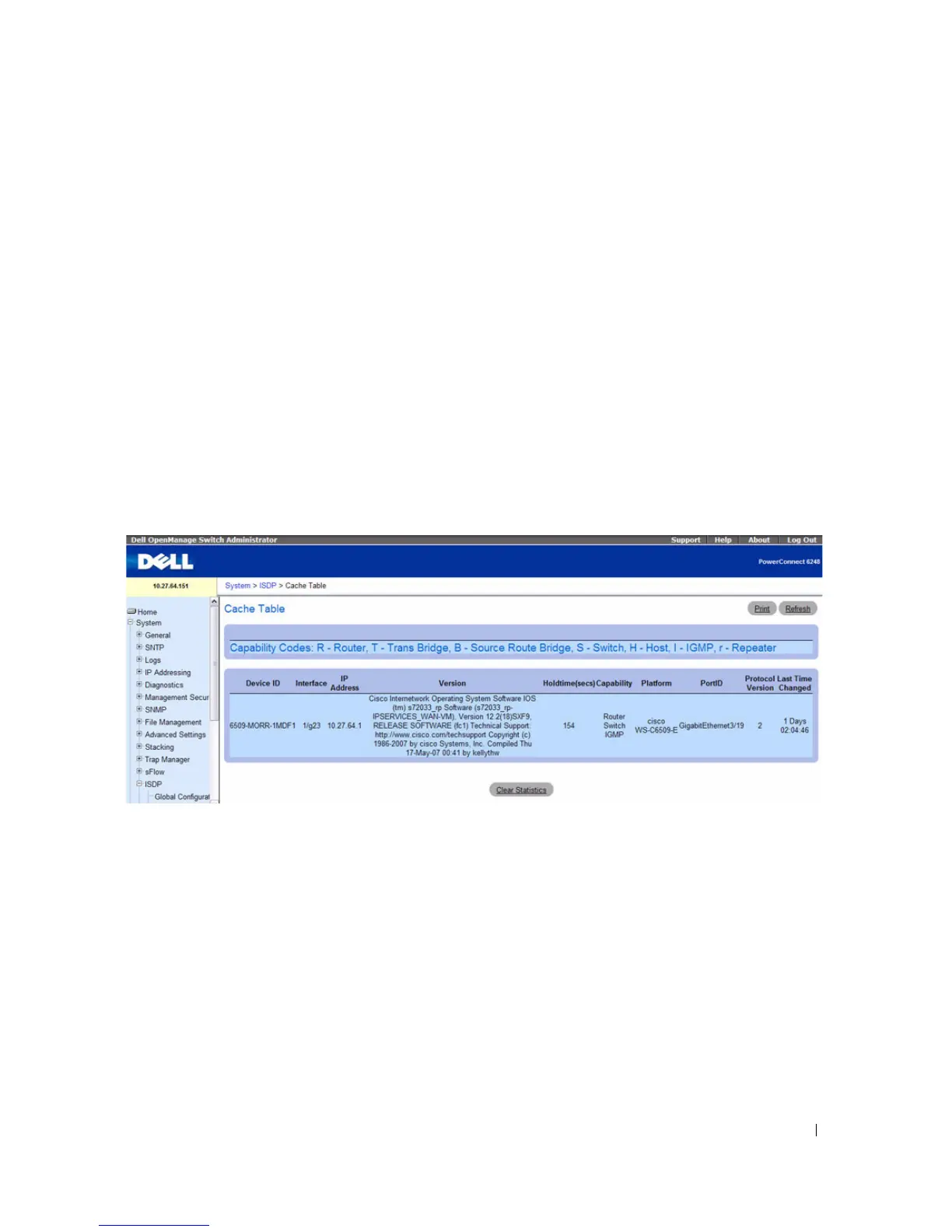
From the ISDP Cache Table page, you can view information about other devices the switch has
discovered through the ISDP.
To access the ISDP Cache Table page, click System > ISDP > Cache Table in the navigation tree.
Figure 6-128. ISDP Cache Table
The ISDP Cache Table page contain the following fields:
•
Device ID
— Displays the string with Device ID which is reported in the most recent ISDP message.
•
Interface
— Displays the interface that this neighbor is attached to.
•
IP Address
— The (first) network-layer address that is reported in the Address TLV of the most
recently received ISDP message.
•
Version
— Displays the Version string for the neighbor.
•
Holdtime
— Displays the ISDP holdtime for the neighbor.
•
Capability
— Displays the ISDP Functional Capabilities for the neighbor.
•
Platform
— Displays the ISDP Hardware Platform for the neighbor.
•
Port ID
— Displays the ISDP port ID string for the neighbor.



 To Next Page