Configuring Switching Information 275
MAC ACL Rule Configuration
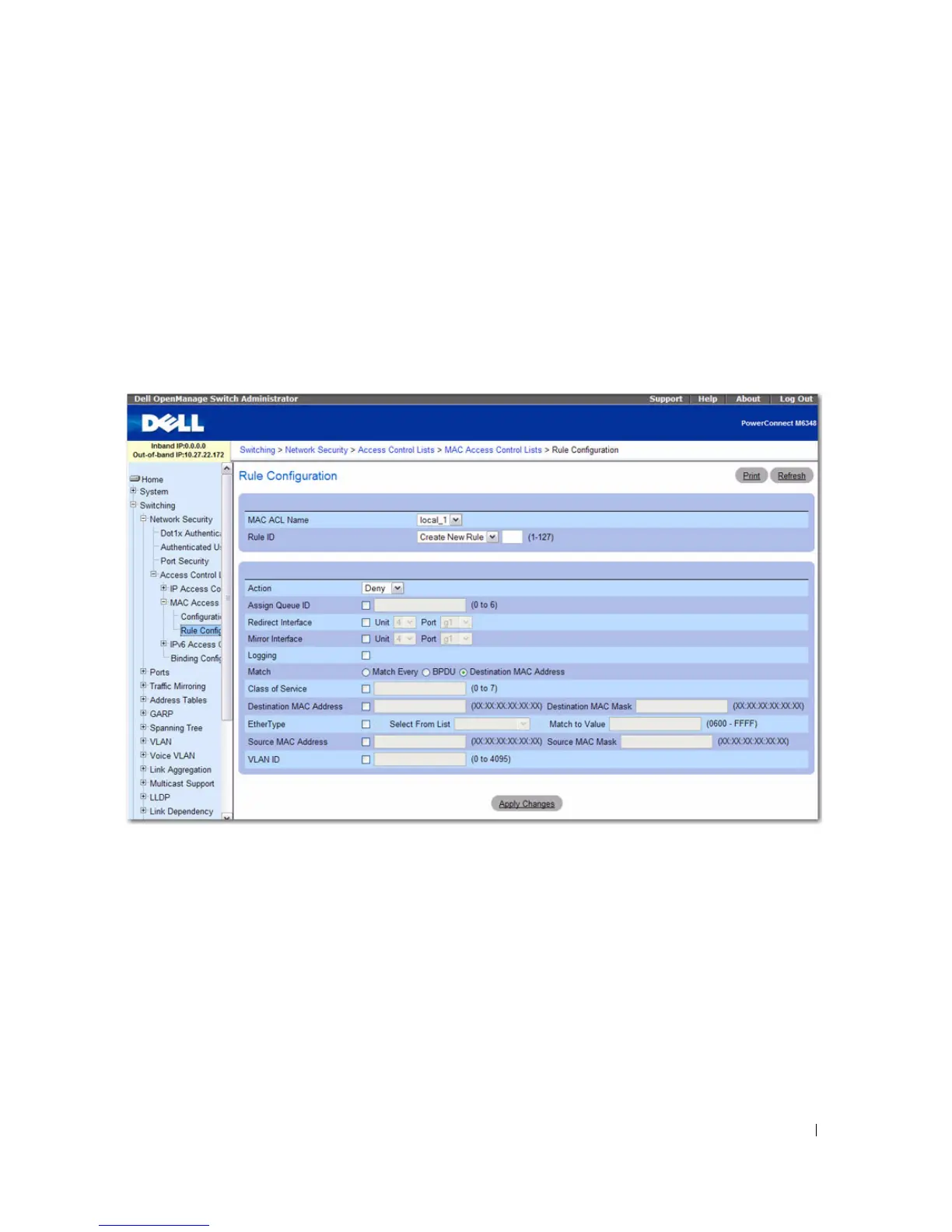
Use the MAC ACL Rule Configuration page to define rules for MAC-based ACLs. The access list
definition includes rules that specify whether traffic matching the criteria is forwarded normally or
discarded. A default 'deny all' rule is the last rule of every list.
To display the MAC ACL Rule Configuration page, click Switching > Network Security > Access
Control Lists > MAC Access Control Lists > Rule Configuration in the tree view.
Figure 7-13. MAC ACL - Rule Configuration
The MAC ACL Rule Configuration page contains the following fields:
•
MAC ACL Name
— Specifies an existing MAC ACL. To set up a new MAC ACL use the MAC ACL
Configuration page.
•
Rule Id
— Selects or creates a user-defined ACLs. Enter an existing Rule ID, or create a new one by
selecting Create from the drop-down menu and entering the desired new Rule ID in the field next to
it. The new ID is created once Apply Changes is clicked.
•
Action
— Selects the ACL forwarding action, which can be one of the following values:
–
Permit
— Forwards packets which meet the ACL criteria.
–
Deny
— Drops packets which meet the ACL criteria.



 To Next Page