390 Configuring Switching Information
DAI VLAN Configuration
Use the DAI VLAN Configuration page to select the DAI-capable VLANs for which information is to be
displayed or configured.
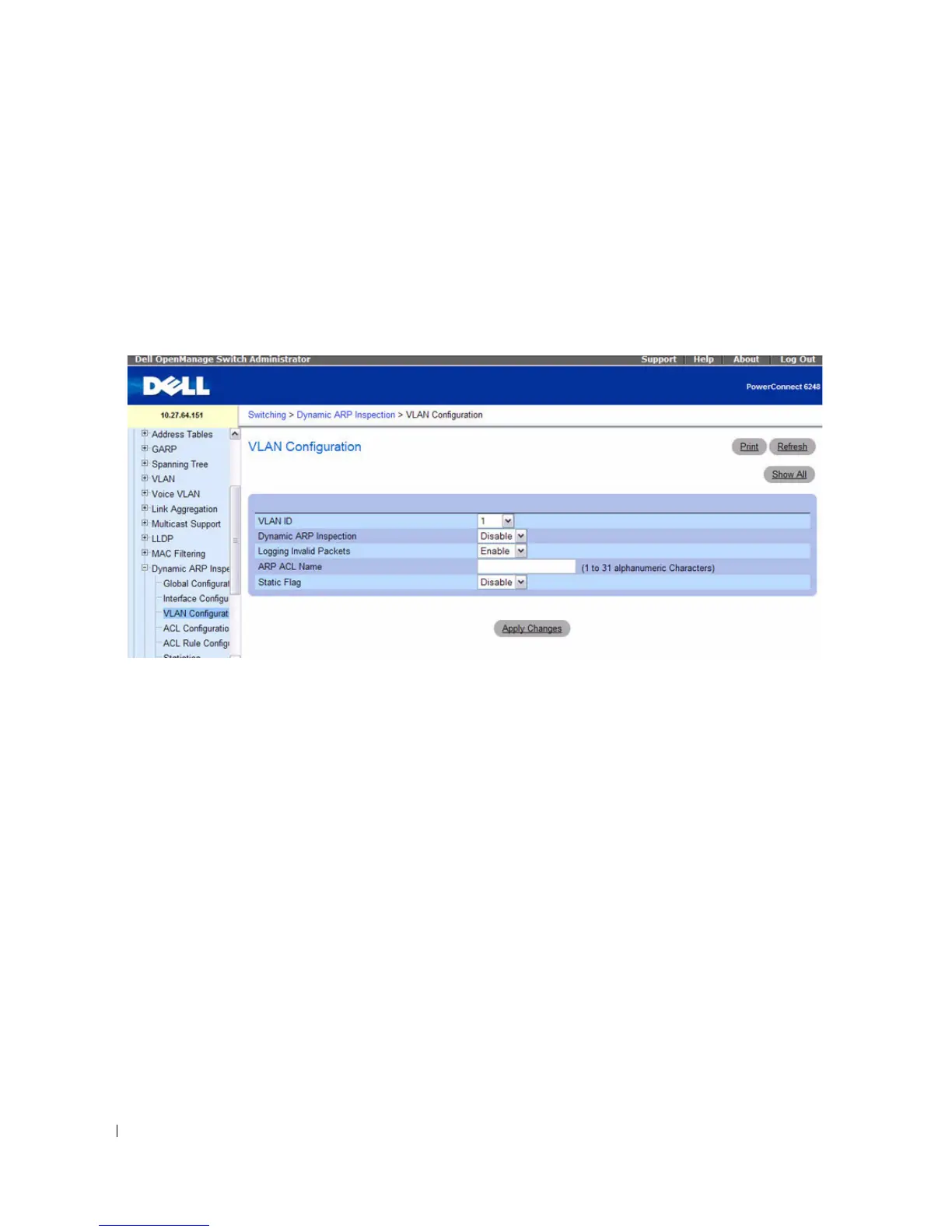
To display the DAI VLAN Configuration page, click Switching > Dynamic ARP Inspection > VLAN
Configuration in the navigation tree.
Figure 7-103. Dynamic ARP Inspection VLAN Configuration
The Dynamic ARP Inspection VLAN Configuration page contains the following fields:
•
VLAN ID
— Select the VLAN ID for which information is to be displayed or configured.
•
Dynamic ARP Inspection
— Select whether Dynamic ARP Inspection is Enabled or Disabled on this
VLAN. The default is Disable.
•
Logging Invalid Packets
— Select whether Dynamic ARP Inspection logging is Enabled or Disabled
on this VLAN. The default is Disable.
•
ARP ACL Name
— The name of the ARP Access List. A VLAN can be configured to use this ARP
ACL containing rules as the filter for ARP packet validation. The name can contain 1-31 alphanumeric
characters.
•
Static Flag
— Use this flag to determine whether the ARP packet needs validation using the DHCP
snooping database, in case the ARP ACL rules do not match. If Enabled, then the ARP Packet will be
validated by the ARP ACL Rules only. If Disabled, then the ARP Packet needs further validation by
using the DHCP Snooping entries. The default is Disable.



 To Next Page