Configuring Switching Information 415
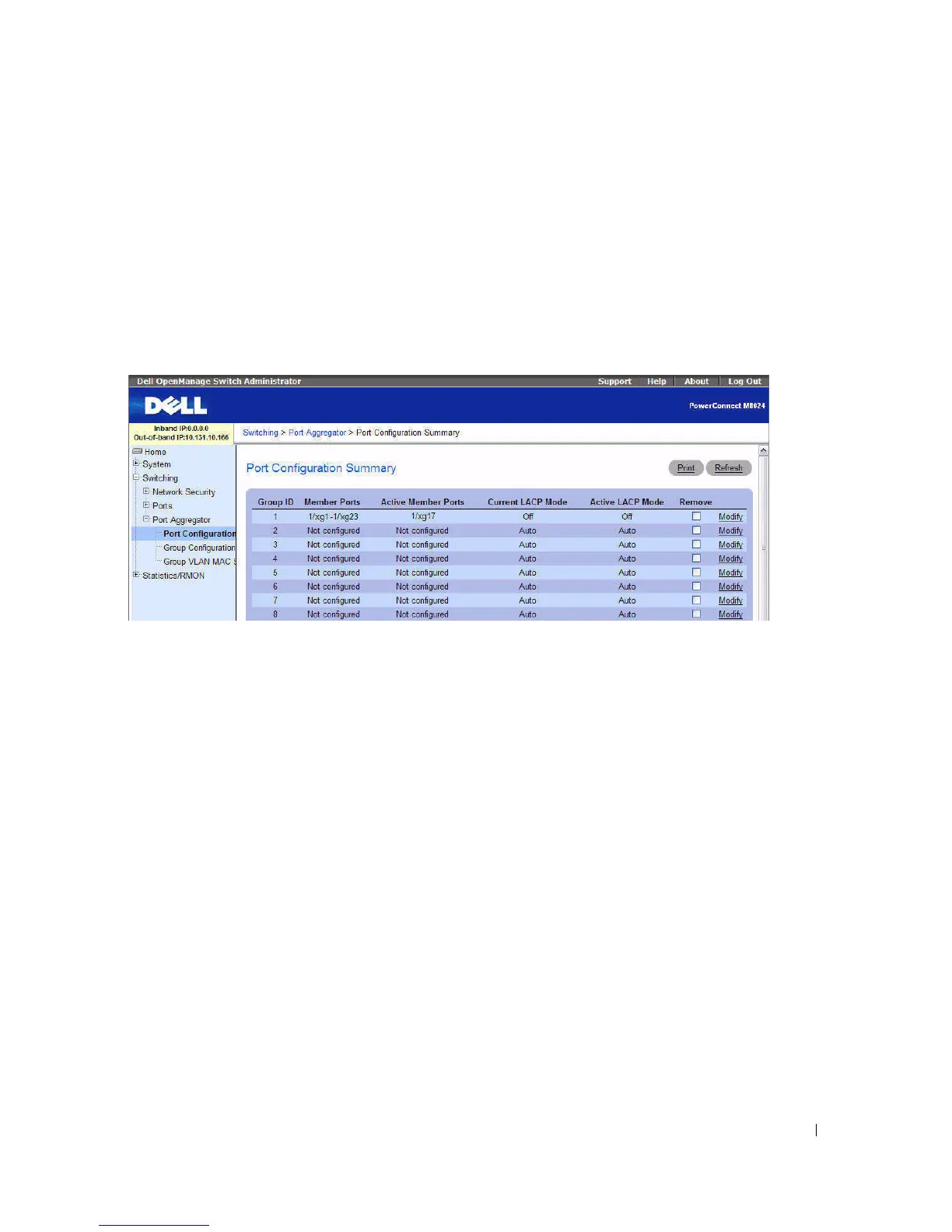
Port Configuration Summary
Use the Port Configuration Summary page to view information about the port members and LACP
modes for the aggregator groups. From the Port Configuration Summary page, you can access the Port
Configuration page.
To display the Port Configuration Summary
page, click Switching > Port Aggregator > Port
Configuration Summary in the tree view.
Figure 7-129. Port Configuration Summary
The Port Configuration Summary
page contains the following fields:
•
Group ID
— Lists the ID for the aggregator group. The group ID range is 1–8. For switches that are
not in a stack, the group ID range is 1–8. For stacked switches, the group ID range is 1–72.
•
Member Ports
— Identifies which ports are members of the group. By default, all ports are members of
Group 1.
•
Active Member Ports—
Indicates which ports within the aggregator group have an active link. The link
is active (UP) when the port is administratively enabled and operational.
•
Current LACP Mode
— Displays the LACP mode configured on the port, which can be Auto, Static,
or Off.
•
Active LACP Mode —
Displays the LACP mode that the group is currently operating in, which might
be different than the Current LACP Mode depending on the partner switch.



 To Next Page