476 Configuring Routing
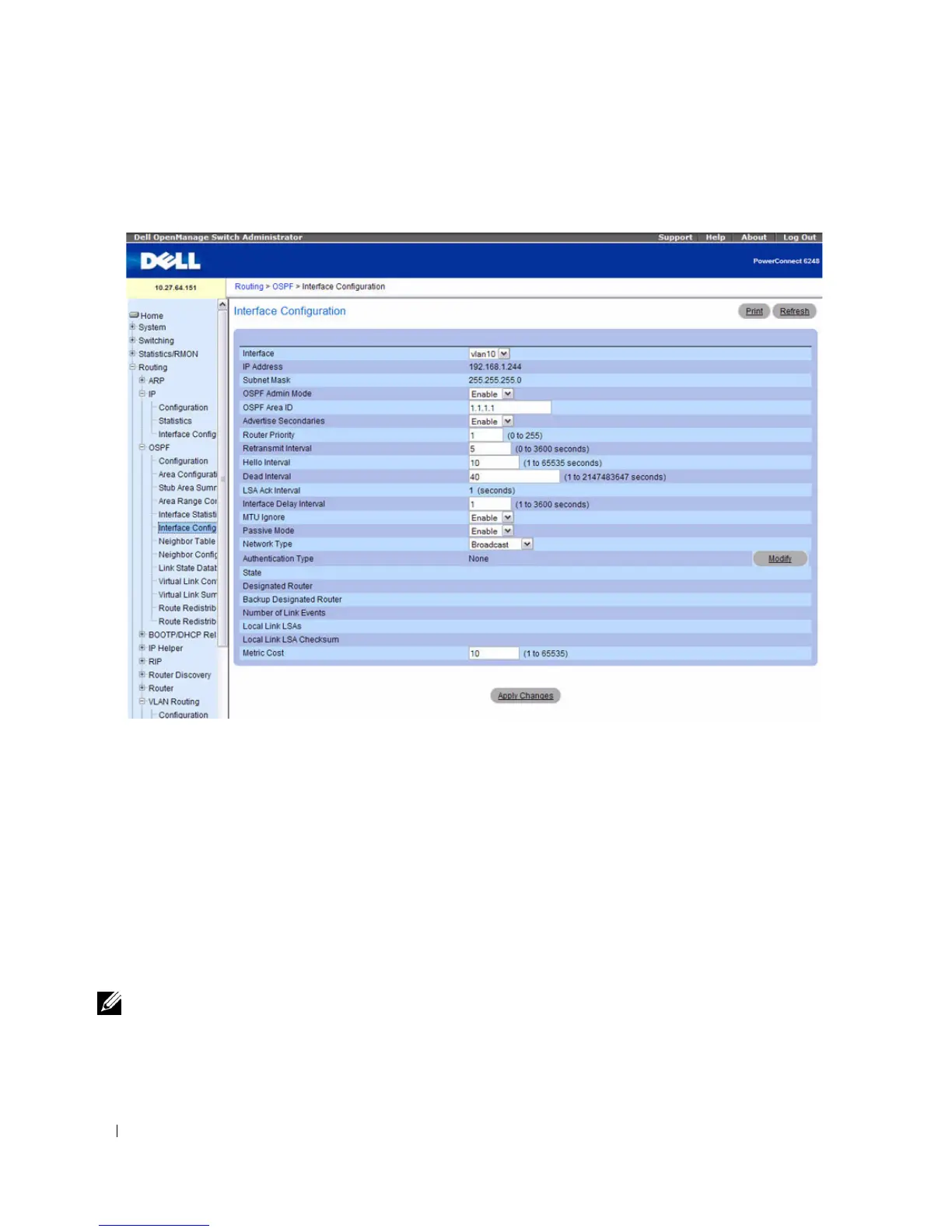
Figure 9-11. OSPF Interface Configuration
The OSPF Interface Configuration page contains the following fields:
•
Interface
— Select the interface for which data is to be displayed or configured from the drop-down
menu.
•
IP Address
— Displays the address of the VLAN Interface.
•
Subnet Mask
— Displays the subnet mask of the VLAN Interface.
•
OSPF Admin Mode
— You may select
Enable
or
Disable
from the drop-down menu. The default
value is
Disable
. You can configure OSPF parameters without enabling OSPF Admin Mode, but they
have no effect until Admin Mode is enabled. The following information is displayed only if the Admin
Mode is enabled:
State
,
Designated Router,
Backup Designated Router
,
Number of Link Events
,
LSA
Ack Interval
, and
Metric Cost
. For OSPF to be fully functional, you must enter a valid IP Address and
Subnet Mask through the IP Interface Configuration page.
NOTE: Once OSPF is initialized on the router, it remains initialized until the router is reset.
•
OSPF Area ID
— Enter the 32-bit integer in dotted decimal format that uniquely identifies the OSPF
area to which the selected router interface connects. If you assign an Area ID which does not exist, the
area is created with default values.


 To Next Page