486 Configuring Routing
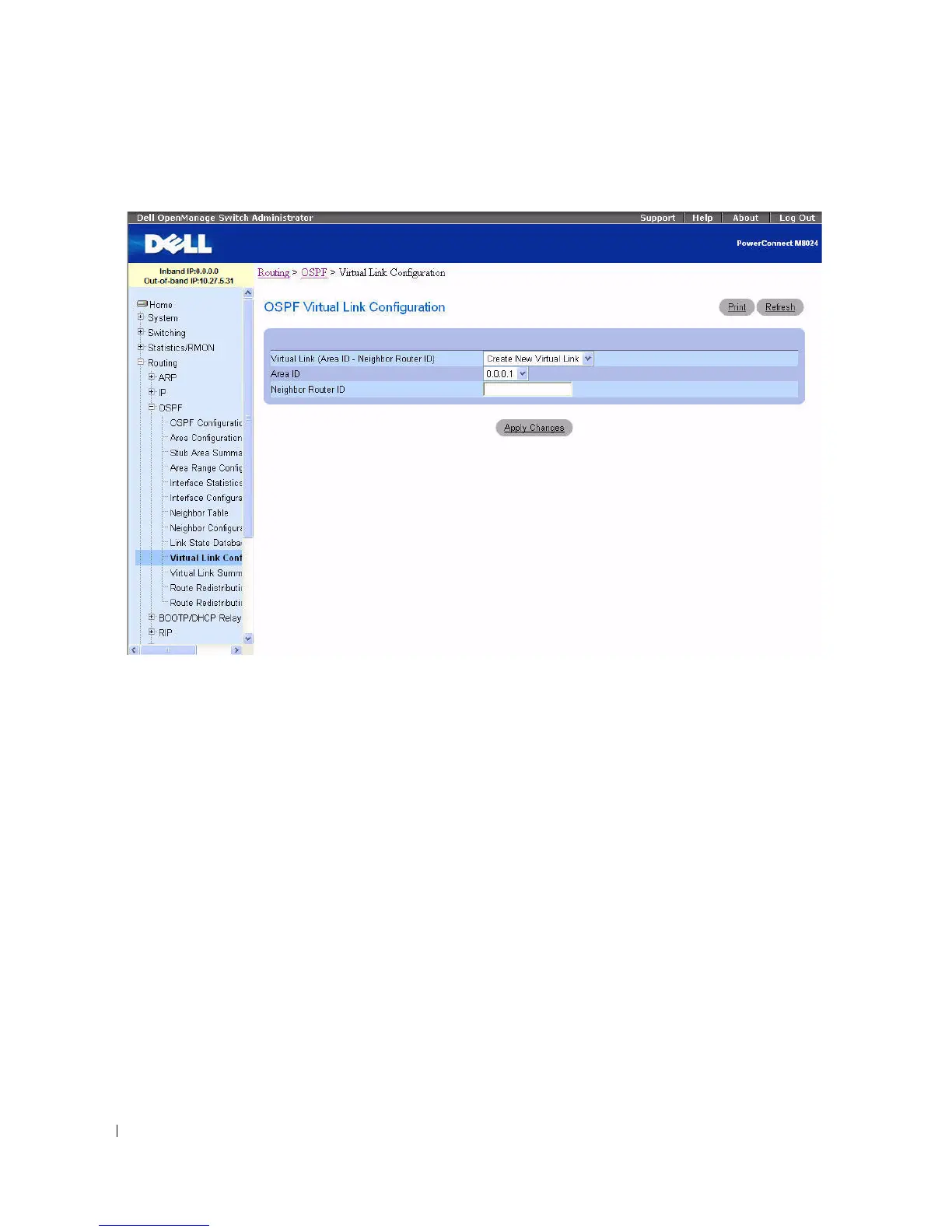
Figure 9-15. OSPF Virtual Link Configuration - Create
The OSPF Virtual Link Configuration pages contain the following fields:
•
Virtual Link (Area ID - Neighbor Router ID)
— Select the virtual link for which you want to display
or configure data. It consists of the Area ID and Neighbor Router ID. To create a new virtual link,
select
Create New Virtual Link
from the drop-down menu to define a new virtual link. When
Create
New Virtual Link
is selected, the following fields appear:
–
Area ID
— The 32-bit integer in dotted decimal format that uniquely identifies the area to which
a router interface connects.
– Neighbor Router ID — The 32-bit integer in dotted decimal format that uniquely identifies the
neighbor router that is part of the virtual link.
•
Hello Interval
— Enter the OSPF hello interval for the specified interface in seconds. This parameter
must be the same for all routers attached to a network. Valid values range from 1 to 65535. The default
is 10 seconds.
•
Dead Interval
— Enter the OSPF dead interval for the specified interface in seconds. This specifies
how long a router waits to see a neighbor router's Hello packets before declaring that the router is
down. This parameter must be the same for all routers attached to a network. This value should a
multiple of the Hello Interval (for example, 4). Valid values range from 1 to 65535. The default is 40
seconds.


 To Next Page