Chapter 3 Connect the Back End
90 Storage Center SC8000 Controller Deployment Guide
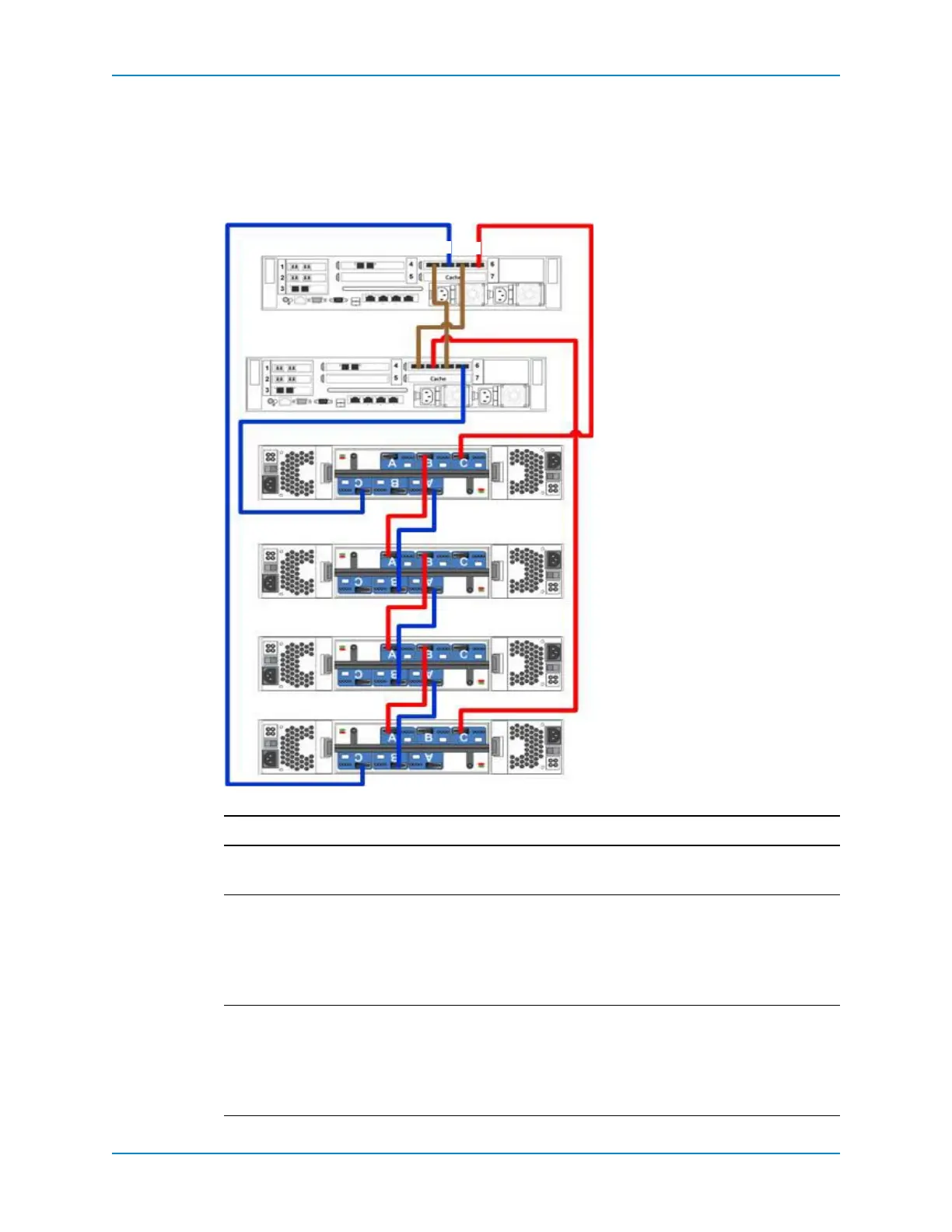
Dual Controllers, Four Enclosures, Single Chain
Thisillustration showstwoSC8000controllerswithoneSASIOCardcabledtofourSAS
enclosures.Inasingle‐chainconfiguration,useSASports2and4tocreatearedundantIPC
connection.WhenyouconfiguretheseportsusingtheIOportwizard,settheportPurpose
toUnknown.
Figure 83. Dual SC8000 Controllers, Four Enclosures, One IO Card, One Chain
Path Connections
IPC 1 ControllerA:slot6,port2→Controller B:slot6,port4.
2 ControllerB:slot6,port2→Controller A: slot6,port 4.
Chain1:ASide 1 ControllerA:slot6,port1→Enclosure1:topSBB,portC.
2Enclosure1,topSBB,portB→Enclosure2,topSBB,portA.
3Continue
todaisy‐chainenclosures:topSBB,portB→nextenclosuredown:
topSBB,port A.
4Enclosure4:topSBB,portC→Controller B: slot6,port3.
Chain1:BSide 1 ControllerB:slot6,port1→Enclosure 1: bottomSBB,portC.
2Enclosure1:bottomSBB,portA→Enclosure 2:bottomSBB,port
B.
3Continuetodaisy‐chainenclosures:bottomSBB,portA→nextenclosure
down:bottomSBB,portB.
4Enclosure4:bottomSBB,portC→Controller A:slot6,port 3.
Enclosure 1
Enclosure 2
Enclosure 3
Enclosure 4
Controller B
Controller A
421
3



 To Next Page