EN-SASx6x12/24 Enclosures
Dell Compellent 27
EN-SASx6x12/24 Back-Panel Features and Indicators
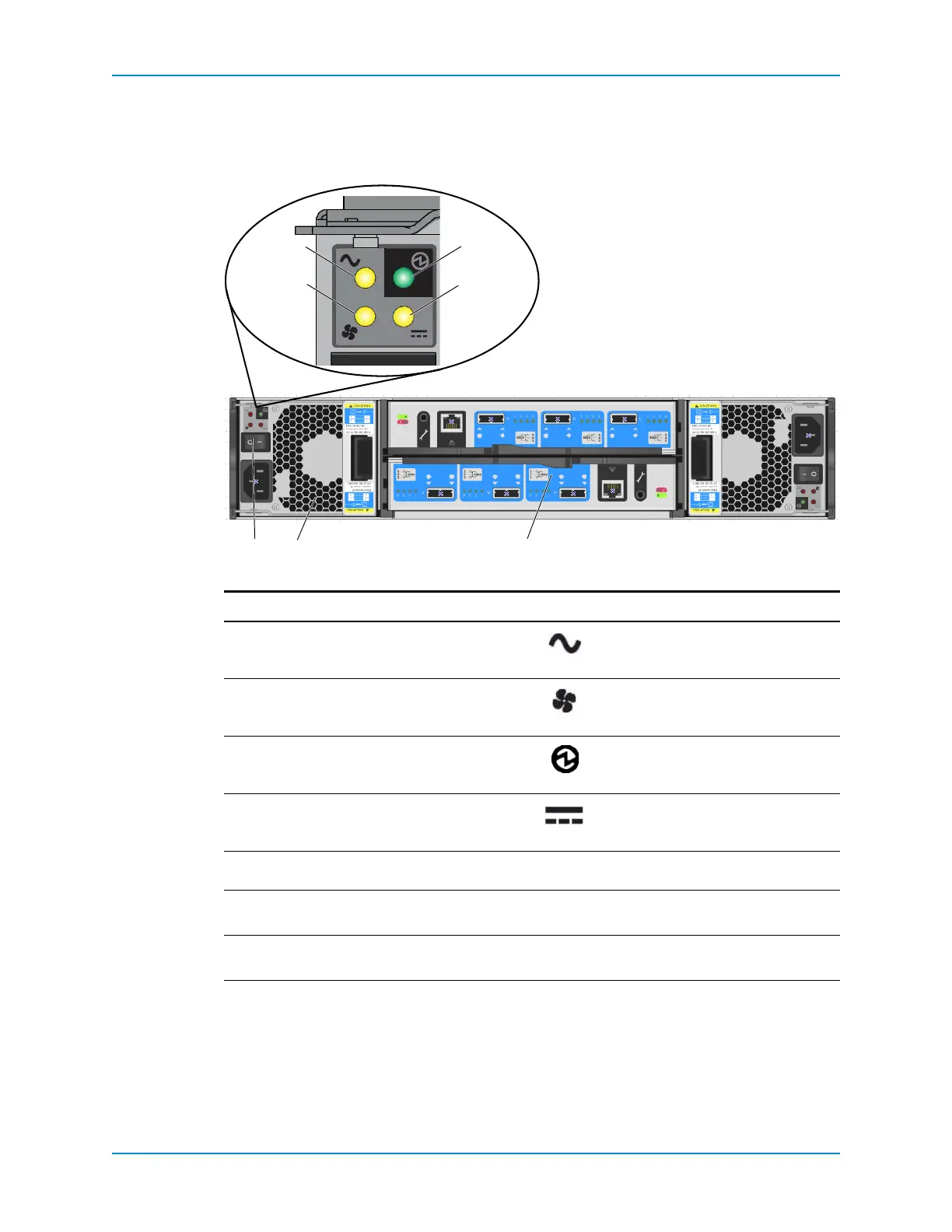
Theenclosurebackpanelprovidescontrolstopowerupandresettheenclosure,indicators
toshowtheenclosurestatus,andconnectionsforback‐endcabling.
Figure 26. SAS Enclosure Rear View — Controls and Indicators
Item Name Icon Description
1ACpowerindicator • Green:Normaloperation
• Amber:NoACpower
2Fanindicator • Green:Normaloperation
• Amber:Fanfailure
3PCMstatusindicator • Green:Normaloperation
• Amber:Powersupplyfailure
4DCpowerindicator • Green:Normaloperation
• Amber:NoDCpower
5
Powerswitch — Controlspowerfortheenclosure
6
PowerCoolingModule(PCM)—
oneof
two
—Containsfansthatprovidecoolingfor
theenclosure
7
StorageBridgeBay(SBB)—oneoftwo — SeeEN‐SASx6x12/24SBBModule
FeaturesandIndicatorsonpage 28



 To Next Page