SC280 SAS Enclosures
Dell Compellent 17
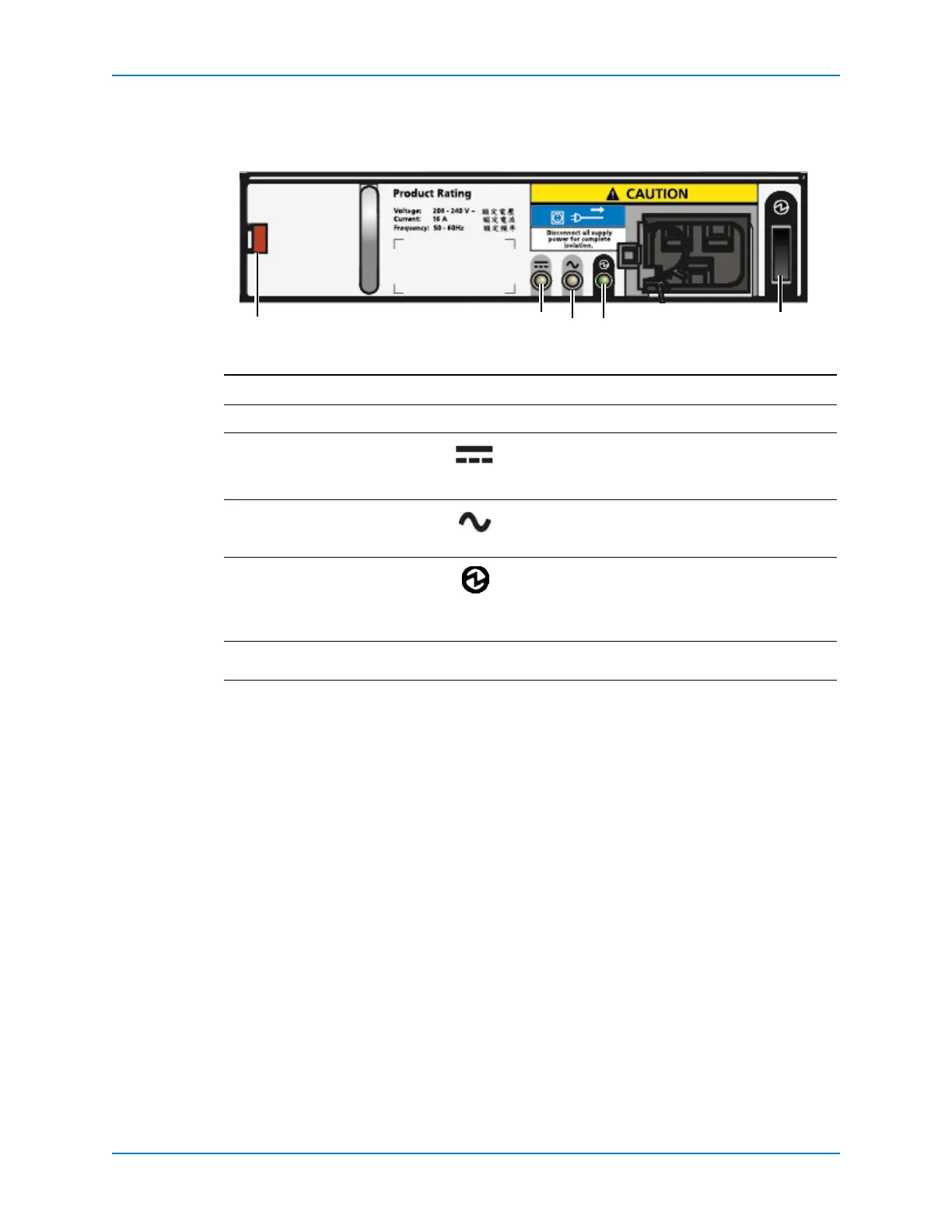
SC280 Power Supply Unit Features and Indicators
SC280enclosuresincludetwoPowerSupplyUnits(PSUs)intwointerfaceslots.
Figure 13. SC280 PSU Features and Indicators
SeparateanduniqueconditionsareindicatedifallthreeLEDsareinthesamestate:
IfallthreeLEDsareoff,thenthereisnoACpowertoeitherPSU.
IfallthreeLEDsareon,thentheGeneralEnclosureManagement(GEM)softwarehas
lostcommunicationwiththePSU.
Item Name Icon Description
1Releaselatch —
2PSUfaultindicator • Amber(steady)—PSUfault,PSUnotsupplying
power
• Amber(flashing)—PSUfirmwareisdownloading
3ACpowerindicator • Amber(steady)—ACpowerisnotdetected
• Amber(flashing)—PSUfirmwareisdownloading
4PowerOKindicator • Green(steady)—ThisPSUisprovidingpower
• Green(flashing)
—ACpowerispresent,butthis
PSUisinstandbymode(theotherPSUisproviding
power)
5
Powerswitch — Controlspowerfortheenclosure.



 To Next Page