Install IO Cards the Controller(s)
Dell Compellent 35
Install IO Cards the Controller(s)
Beforeyoumount thecontroller(s)inarack,installtheIOcards.
Open the Cover
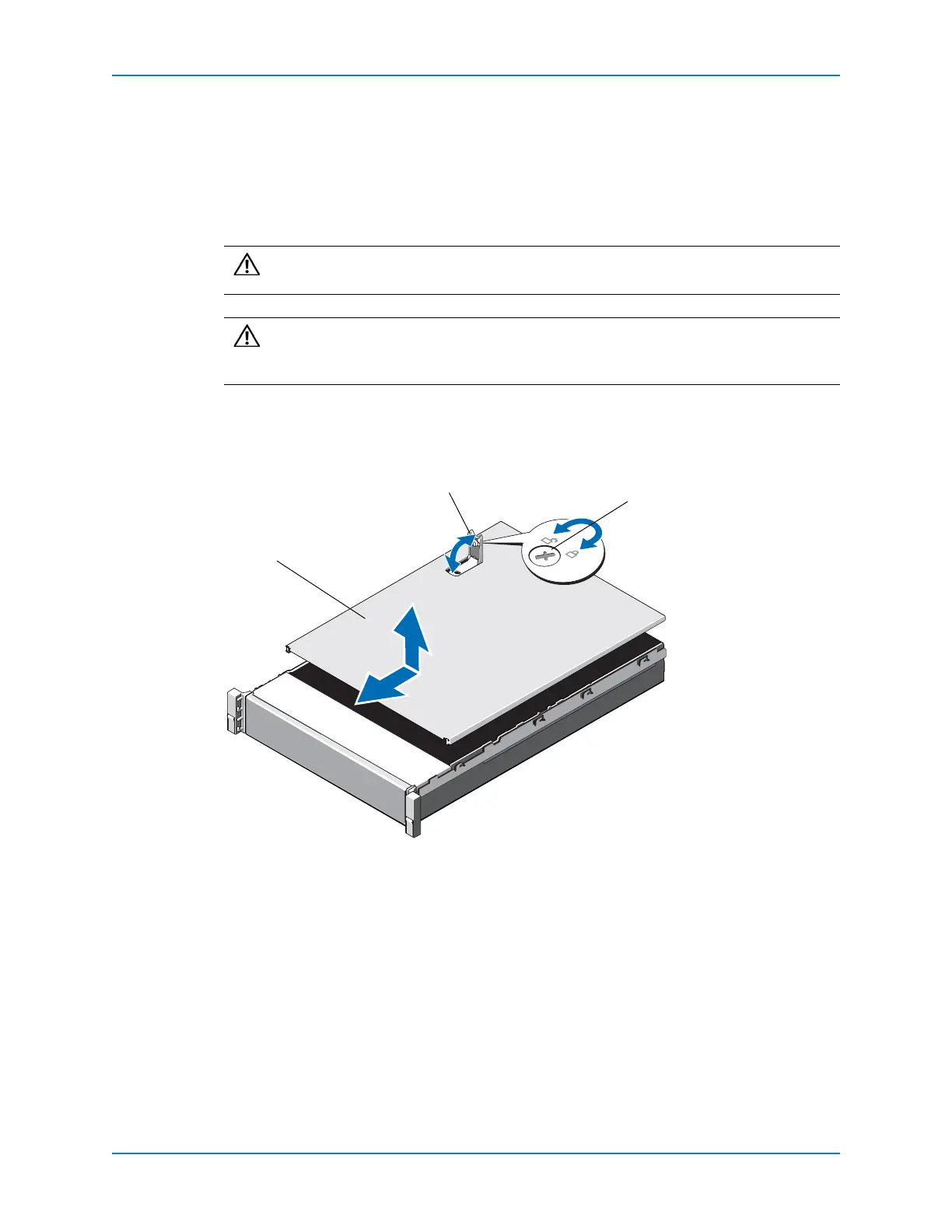
Openthecovertogainaccesstotheinsideofthecontroller.
1 Rotatethelatchreleaselockcounterclockwisetotheunlockedposition.
2 Liftthelatchontopofthecontrollerandslidethecoverback.
3 Graspthecoveronbothsides,andcarefullyliftthecoverawayfromthecontroller.
Figure 32. Opening the Cover
Caution: Donotoperatethecontrollerwithoutthecover,exceptwhenreplacing
coolingfans.
Caution: Donotslidethecontrollerintoarackwiththecoveropen.Riser 2
containsachassisintrusiondetectionswitchthatcanbe easilydamagedwhen
slidingacontrollerintotherackwiththecoveropen.
1 Controller cover
2 Latch
3 Latch release lock



 To Next Page