Install Enterprise Plus Drives in SC200/220 Enclosures
Dell Compellent 53
Install Enterprise Plus Drives in SC200/220 Enclosures
SC200/220enclosuresareshippedwithdisksinstalledand/oremptydriveblanksin
unusedslots.Thefollow inginstructionsshowtheinstallationoftheDellEnterprisePlus
driveforreferenceonly.
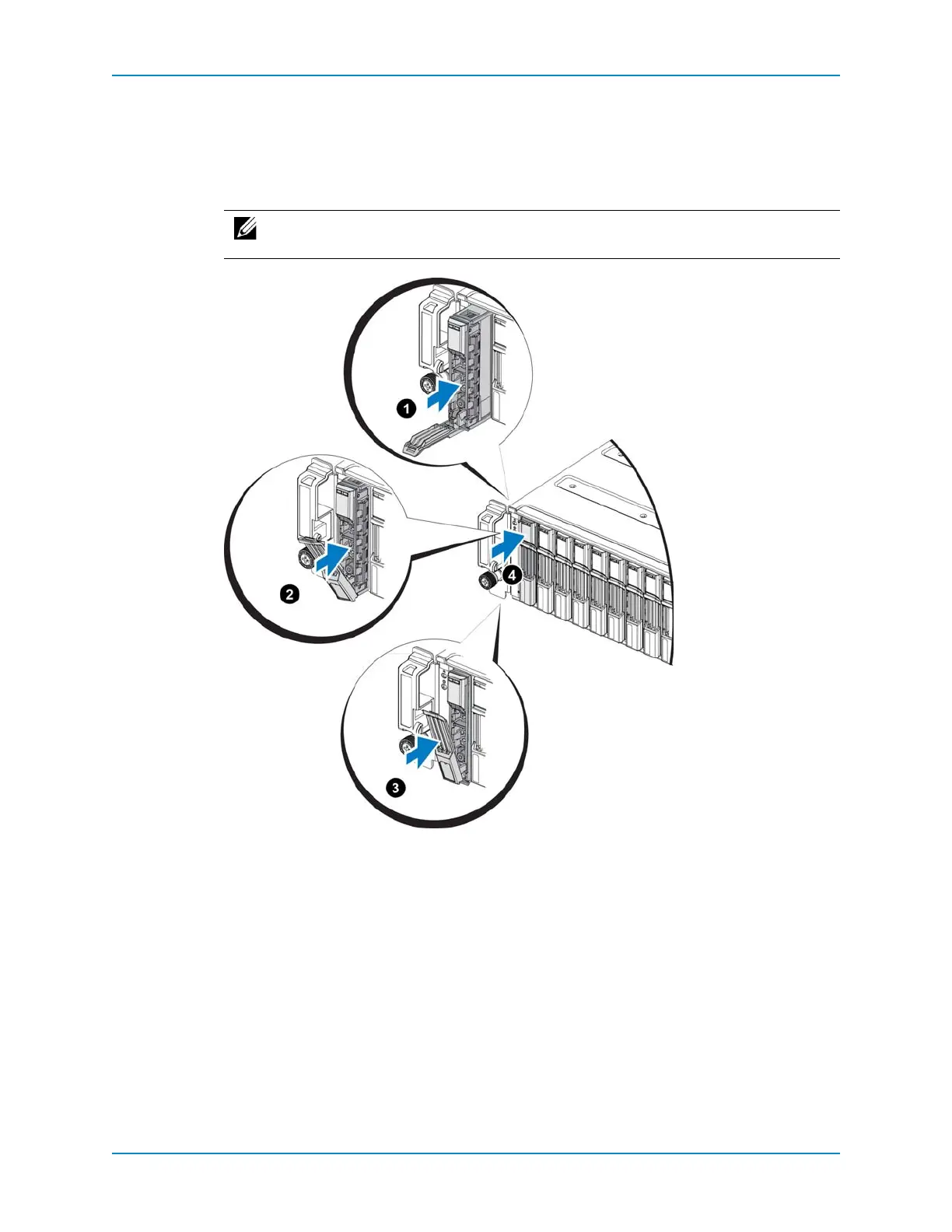
Figure 51. Installing a Drive
1 Inserttheharddrivecarrierintotheharddrivebay.
2 Slidethedriveintothebayuntilthecarriercontactsthe
backplane.
3 Closetheharddrivecarrierhandletolocktheharddriveinplace.
4 Continue topushfirmlyuntilyouhearaclickandthehandlefullyengages.
5 Whentheenclosureisturnedonandthedrivesspinup,makesurethatthedriveLEDs
areon(green),indicatingnormal
conditions.
See Also
SC200/220EnterprisePlusDrivesonpage 24
SC200/220DriveNumberingonpage 25
Note: DellEnterprisePlusdrivesandEnterpriseSolidStateDrives(ESSDs)can
onlybeinstalledinSC200/220enclosures.



 To Next Page