Chapter 1 Introduction
16 Storage Center SC8000 Controller Deployment Guide
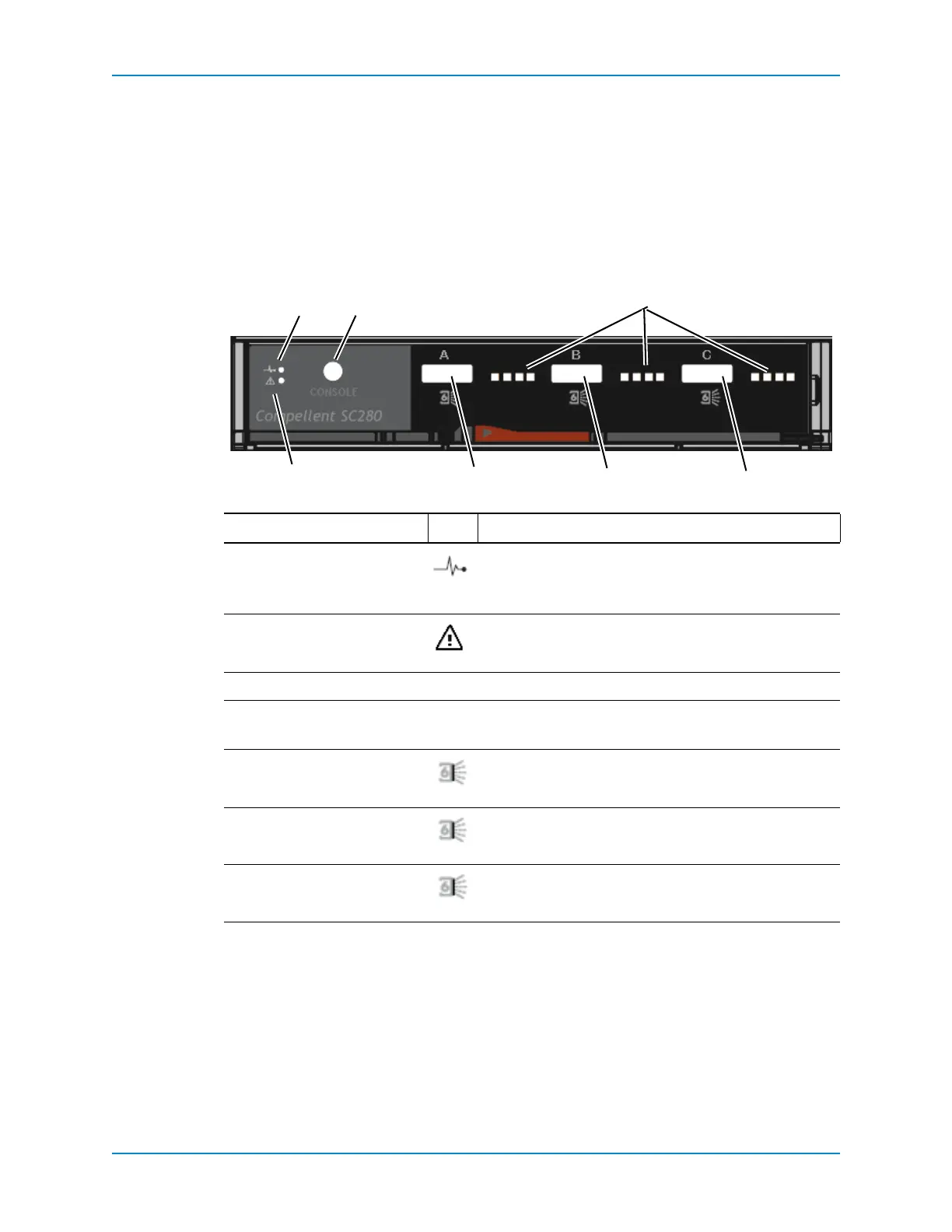
SC280 EMM Features and Indicators
SC280enclosuresincludetwoEnclosureManagementModules(EMM)intwointerface
slots.EachEMMIOModuleincludesanEEPROMthatholdsdatadescribingthefunction
andcapabilityoftheEMMmodule.EachEMMmodulecan discoverthetypeand
capabilitiesofitspartnerEMMmodulewithintheenclosure.Incompa tibleconfigurations
result
inanenclosuresystemalarm.
Eachporthasfourseparatelyarbitratedphysical lanes.AgreenLEDind ica testhestatusof
eachlane.TheIOModuleandFaultindicatorsprovidestatusasdescribedbelow.
Figure 12. IO Module Indicators
Item Name Icon Description
1Powerindicator • Green(steady):ModuleOK.
• Green(flashing):Vitalproductdata(VPD)fault.
• Off:Modulefault.
2IOModulefault
indicator
Amber:IOmoduleerror.
3Console —Factoryuseonly.
4 LaneLEDs — • SolidGreen:Connected,Noactivity.
• Flashing:Activity.
5SASportA(in) Connectstootherenclosures.
6SASportB(out) Connectstootherenclosures.
7SASPortCThe
C‐portalwaysconnectstothecontroller.



 To Next Page