Chapter 1 Introduction
20 Storage Center SC8000 Controller Deployment Guide
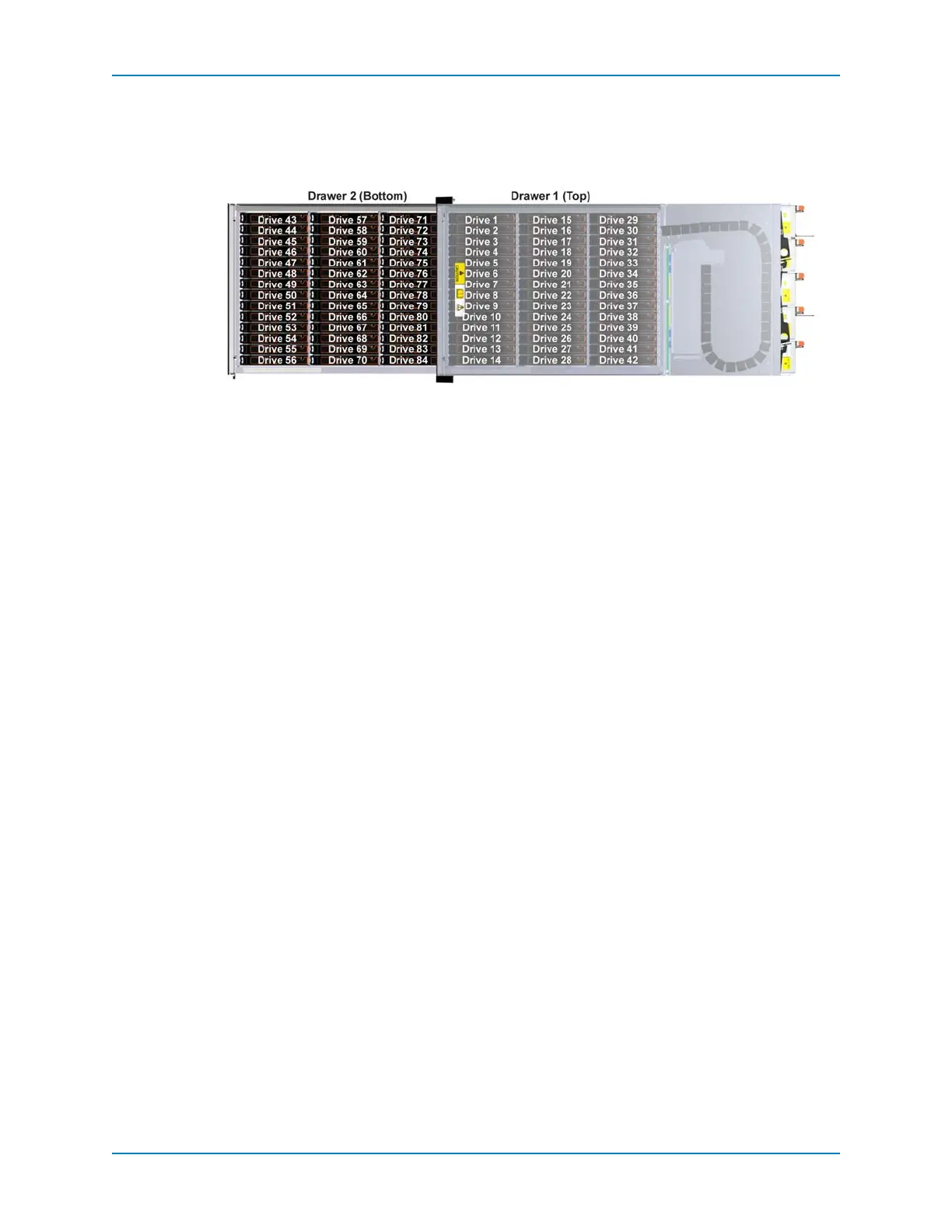
SC280 Drive Numbering
SC280drivesarelocatedintwodrawers,eachcontainingthreerowsofdrives.Thedrives
arenumbered1–42indrawer1,fromfronttobackandlefttoright,and43–84indrawer2.
Figure 16. Hard Drive Numbering
SC200/220 SAS Enclosures
SASenclosuresholddrivesfordatastorageandconnecttothecontrollersthrough
back‐endports.TheStorageCenterSC200andSC220are2UsizeSASenclosures.The
SC200enclosuresupportsupto123.5‐inchharddrivesinstalledinafour‐column,three‐
rowconfiguration.TheSC220enclosuresupportsup
to242.5‐inchharddrivesinstalled
verticallyside‐by‐side.TheSC200andSC220enclosuresshipwithtwopowersupply/
coolingfanmodulesandtworedundantenclosuremanagementmodules(EMMs).
ThefollowingrequirementsapplytoSC200andSC220enclosures:
SC200andSC220enclosurescannotbe connectedtothesamechainasanyother
enclosures.
ControllersmustberunningStorageCenterOS6.2orlatertodetectSC200andSC220
enclosures.



 To Next Page