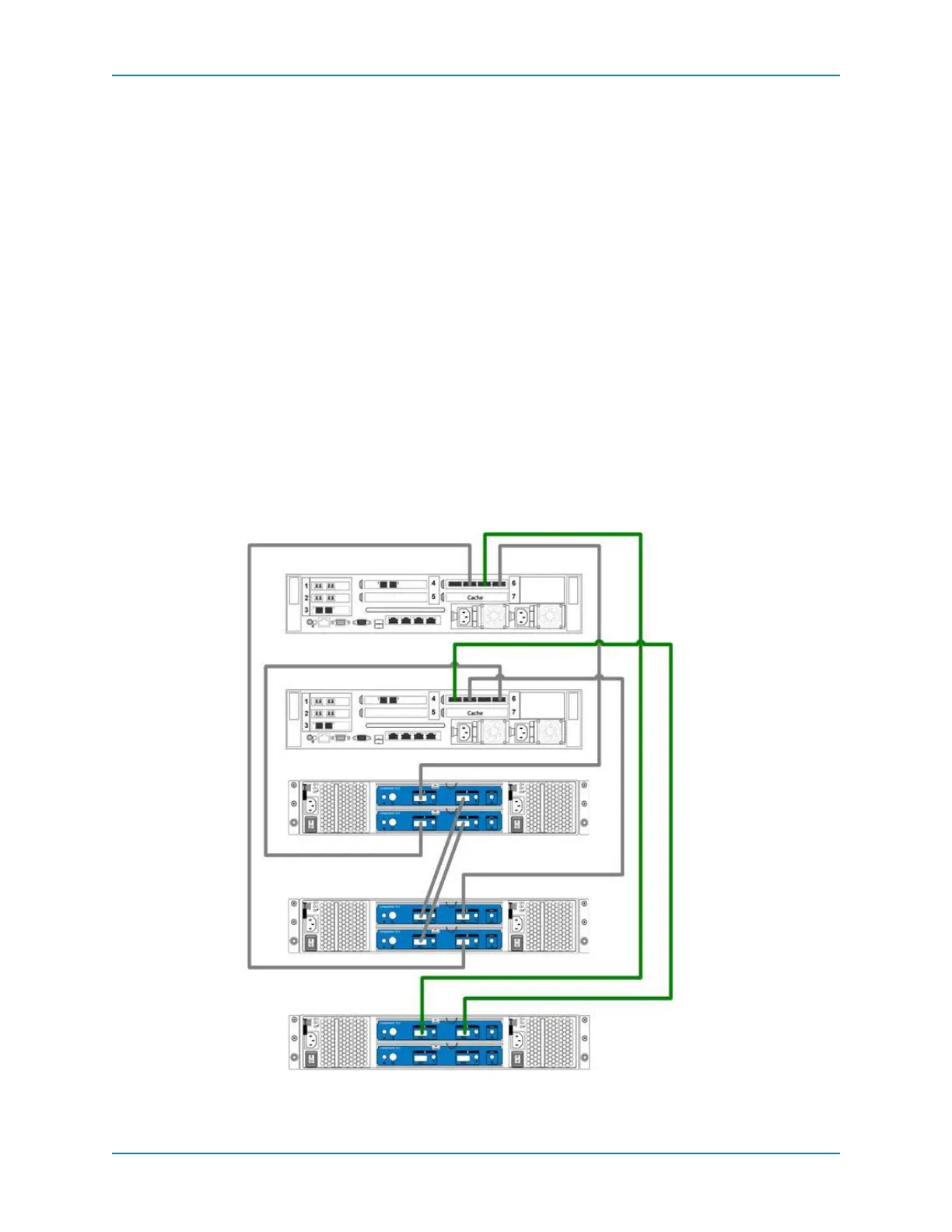
Adding SC200/220 Enclosures
Dell Compellent 191
Adding a Second SAS Enclosure, Second Chain
Inadual‐controller,singleSASenclosureconfiguration,controllerredundancyiscreated
usingcross‐overcables(IPC)fromcontrollerports2tocontrollerports4.Asecondchain
performsthesameredundancyastheIPCcross‐overcables.
Add an Enclosure
Addanewenclosurewhilemaintainingredundancy.
1 Powerontheenclosuresbeingadded.Whentheenclosuresspinup,makesurethatthe
frontpanelenclosureandpowerstatusLEDsshownormaloperation.
2 RemovethetwoIPCcablesfromtheControllers,ports2and4.
3 Connect:ControllerA,port2→new Enclosure 3:
top,portA.
4 ConnectEncl osure3:top,portB→ControllerB,port4.
5 IntheStorageCenterSystemManager,selectStorageManagement→System→
Setup→ConfigureLocalPorts.
6 Makesurethat:
SlotandslotportsareUpandthePurposeissettoback‐end.
TargetCountequalsthenumberofaddeddrives,demonstratingthatthecontroller
recognizesthenewenclosures.
Figure 122. Adding an SC200/220 SAS Enclosure, Step 1
Enclosure 1
Enclosure 2
Controller A
Controller B
Enclosure 3



 To Next Page