SC280 SAS Enclosures
Dell Compellent 13
SC280 Enclosure Front Panel Features and Indicators
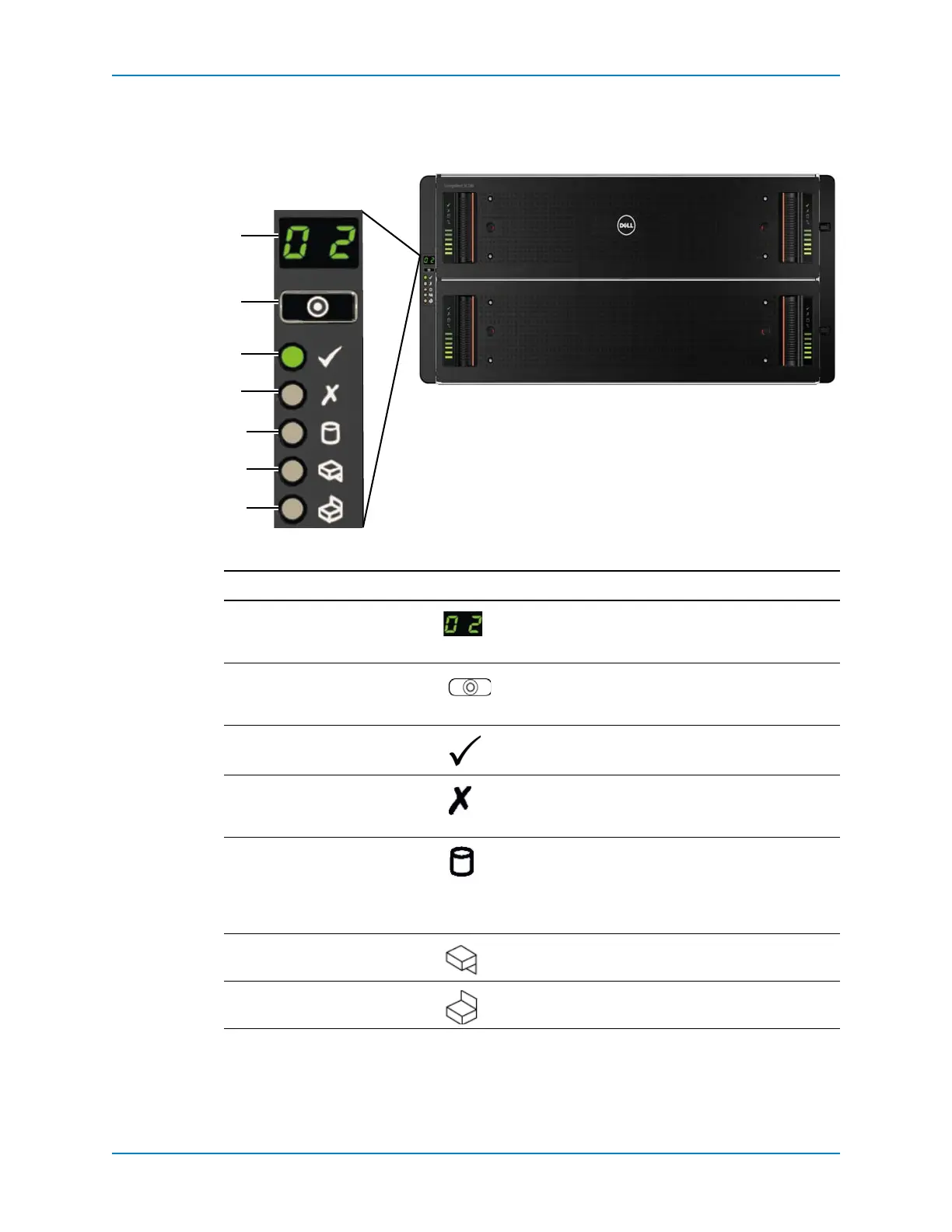
Theoverallenclosurestatusisshownonapanellocatedonthelef tsideoftheenclosure.
Figure 9. SC280 Enclosure Front Panel Features and Indicators
Item Feature/Indicator Icon Description
1UnitIDdisplay Anumericaldisplayoftheenclosureunit
identificationnumber.ThisnumberissetbyStorage
Center.
2Inputswitch Notcurrentlyused(thoughitcanbeusedtosetthe
UnitIDDisplay,theIDisautomaticallyresetbythe
StorageCenter).
3Systempowerindicator • Amber:Enclosureisinstandby(notoperational).
• Green:Enclosureison(operational).
4Modulefault Amber:Hardwarefault(PCMfault,Fanfault,SSB
modulefault.Checkindicatorsonindividual
modules).
5Logicalstatusindicator Amber:changeofstatusorfaultfromsomethingother
thantheenclosureitself(thismaybefromaninternal
orexternalRAIDcontrollerorHBA,
butisusually
associatedwithadiskdriveasindicatedbyitsown
faultLED).
6DrawerFault1 Amber:drive,cable,orsideplanefaulthasoccurredin
drawer1.
7DrawerFault2 Amber:drive,cable,orsideplanefaulthasoccurredin
drawer2.



 To Next Page