Chapter 5 Set up the Storage Center Software
146 Storage Center SC8000 Controller Deployment Guide
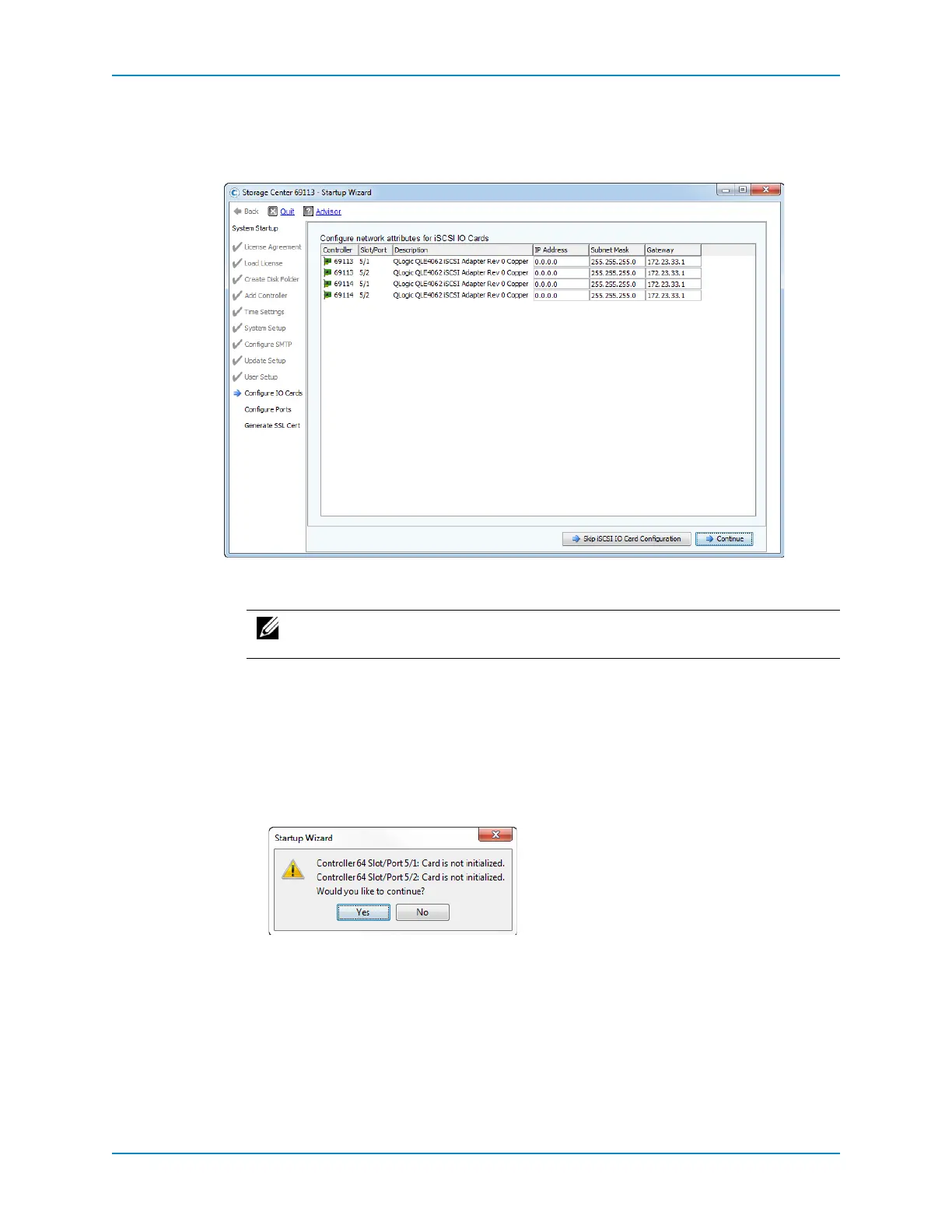
Configure IO Cards
TheConfigureIOCards pageappearsiftheStorageCenterdetectsiSCSIIOcards.Usethis
pagetoconfigurenetworksettingsfor iSCSIIOcards.
1 (Optional)ClickSkipiSCSIIOCardConfigurationtoconfigurenetworksettingsfor
theiSCSIIOcardslater.TheConfigurePortspageappears.
2 ForeachiSCSIIO
cardthatisused,completetheIPAddress,aSubnetMask,and
Gatewayfields.UninitializediSCSIIOcardshaveanIPAddressof0.0.0.0andwillbe
listedonawarningspageinthenextstep.
3 Whenyouarefinished,clickContinue.
Ifnomessagesaregenerated,iSCSIIOcardconfigurationissavedandthe
ConfigurePortspageappears.
Ifthereareissues,amessageappears.
ClickNotogobackandcorrecttheIPAddress,SubnetMask,and/orGateway
addressforcardsthatgeneratederrorsand/orwarnings.
ClickYestoignorethemessageandcontinue.TheConfigurePortspageappears.
Note: DellCompellent recommendsthat youconfigureiSCSIIOcardsduring
setup.



 To Next Page