Chapter 4 Connect the Front End
106 Storage Center SC8000 Controller Deployment Guide
Prerequisites
EachcontrollermusthavetwoavailableFCfront‐endports.
Steps
1 ConnecteachFCservertobothFCfabrics.
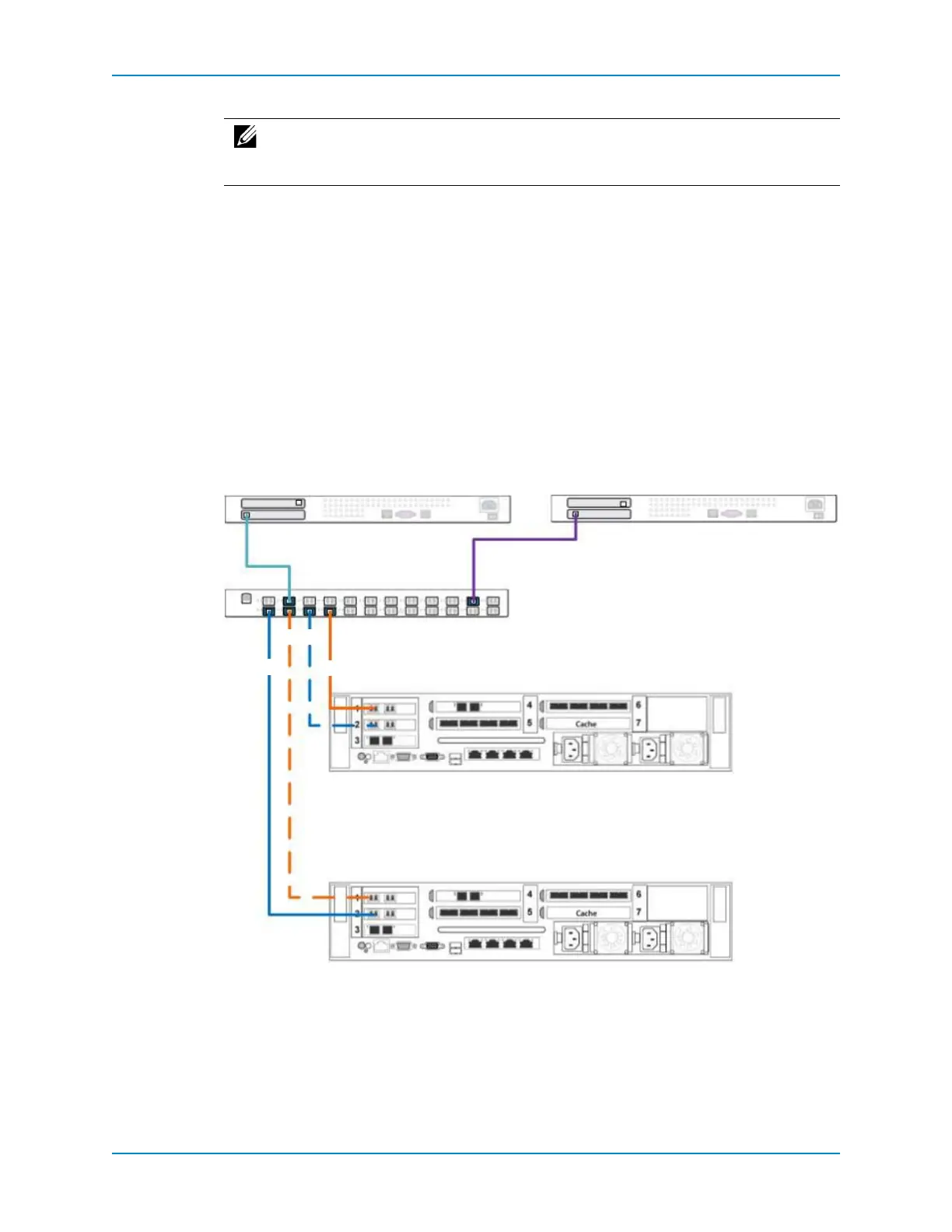
2 Connectfaultdomain1(showninorange)tofabric1.
PrimaryportP1:ControllerA,slot1,port1→Fabric1
ReservedportR1:ControllerB,slot1,port1→Fabric1
3 Connectfaultdomain2(showninblue)tofabric1.
PrimaryportP2:ControllerB,slot2,port1→Fabric1
ReservedportR2:ControllerA,slot2,port1→Fabric1
4 ConfigureFCzoningtomeetthelegacymodezoningrequirements.
Figure 92. Dual-controller with Single-Fabric FC in Legacy Mode
See Also
FibreChannelZoningonpage 10 2
Note: Topreventaportorcablefailurefromblockingaccesstovolumesmappedto
acontroller,connecttwoadditionalfaultdomainssothateachcontrollerhastwo
primarypathstotheFCfabric.
P1
R2
P2
R1
Controller A
Fabric 1
Server 1
Controller B
Server 2
1 2
1 2



 To Next Page