92
BHT-1300B series
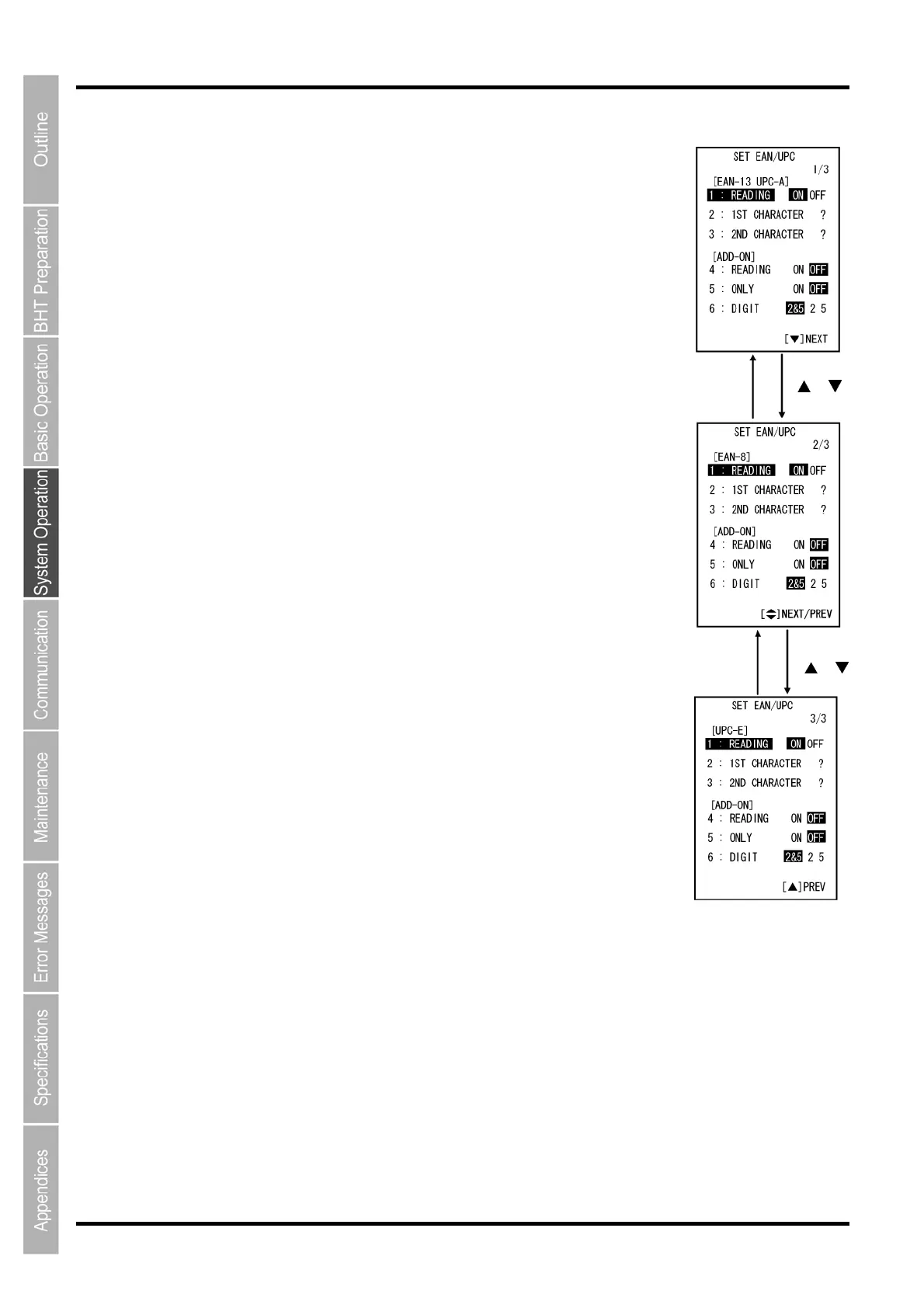
“1: EAN/UPC”: Detailed settings for EAN/UPC
1. Select “1: EAN/UPC” at the SET BARCODE menu and then press the
ENT key. The SET EAN/UPC screen is displayed.
EAN/UPC 1/3
(EAN-13/UPC-A set)
“1: READING”:
Enable/Disable EAN-13/UPC-A
“2: 1ST CHARACTER”:
“3: 2ND CHARACTER”:
Allocate “?, 0–9” to the first and second characters of EAN-13/UPC-A
(country flags) .
If “0–9” is allocated at the menu, limitation is set for the BHT to read only
when the allocated numeric characters match the first and second numeric
characters of EAN-13/UPC-A. The BHT will carry on reading endlessly if “?”
is allocated.
(Add-on set of EAN-13/UPC-A)
“4: READING”:
Enable/Disable EAN-13/UPC-A with add-on.
“5: ONLY”:
If this is set to ON, limitation is set for the BHT to read EAN-13/UPC-A with
add-on only. If this is OFF, the limitation is disabled.
“6: DIGIT”:
“2&5”: Enable 2-digit or 5-digit add-on reading.
“2” Enable 2-digit add-on reading.
“5” Enable 5-digit add-on reading.
EAN/UPC 2/3
(EAN-8 set)
“1: READING”:
Enable/Disable EAN-8
“2: 1ST CHARACTER”:
“3: 2ND CHARACTER”:
Allocate “?, 0–9” to the first and second characters of EAN-8 (country flags).
If “0–9” is allocated at the menu, limitation is set for the BHT to read only
when the allocated numeric characters match the first and second numeric
characters of EAN-8. The BHT will carry on reading endlessly if “?” is allocated.
(EAN-8 add-on set)
“4: READING”:
Enable/Disable EAN-8 with add-on.
“5: ONLY”:
If this is set to ON, limitation is set for the BHT to read EAN-8 with add-on only. If this is OFF, the
limitation is disabled.
“6: DIGIT”:
“2&5”: Enable 2-digit or 5-digit add-on reading.
“2” Enable 2-digit add-on reading.
“5” Enable 5-digit add-on reading.
Changeover with
[
] [ ] key
Changeover with
[
] [ ] key



 To Next Page