Chapter 8 Advanced Copy Management
8.2 Functions in the Action Area for Advanced Copy
ETERNUS Web GUI User’s Guide
213
Copyright 2011 FUJITSU LIMITED P2X0-1090-02ENZ0
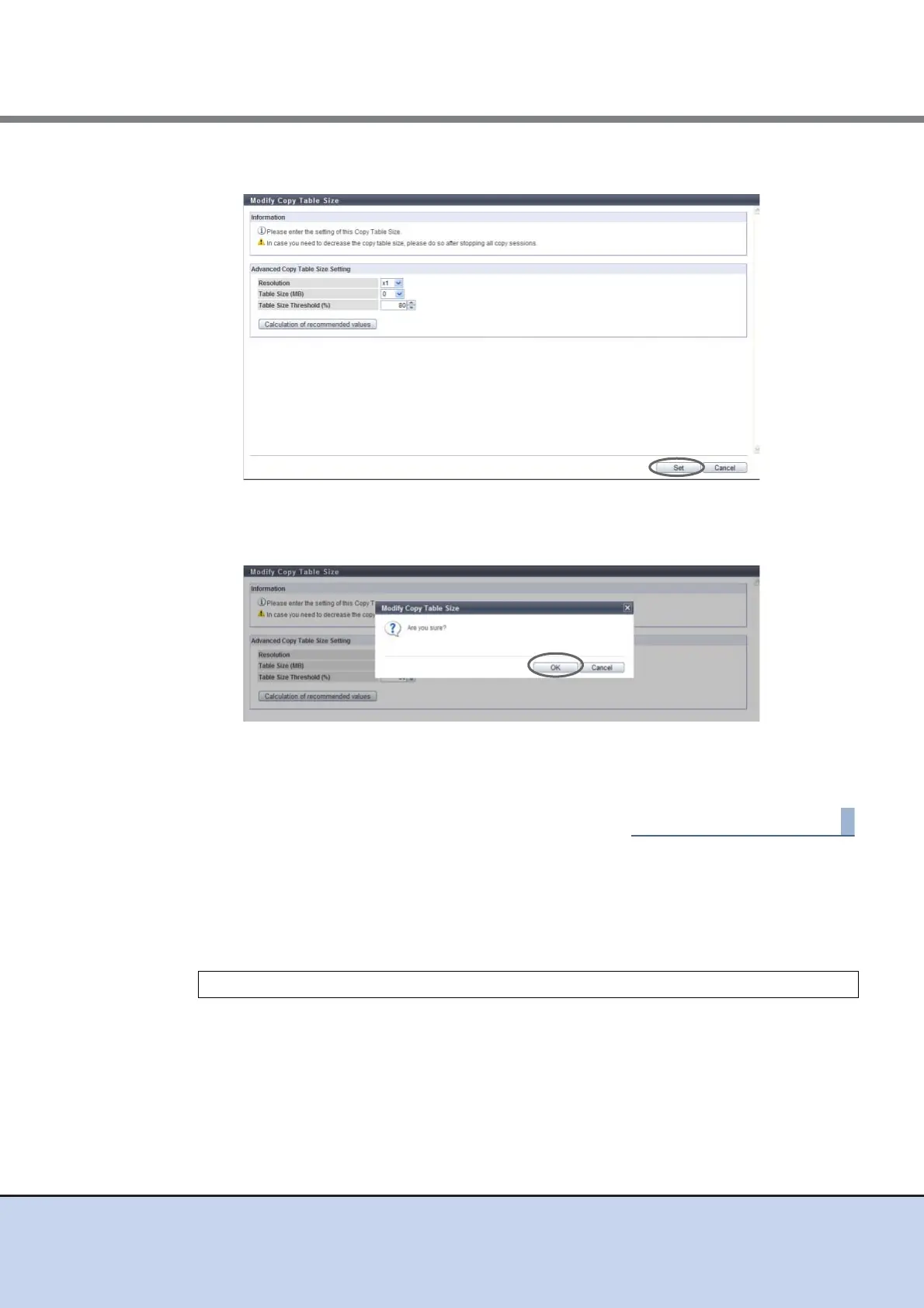
5 Click the [Set] button.
→ A confirmation screen appears.
6 Click the [OK] button.
→ Setting of the copy table size starts.
7 Click the [Done] button to return to the [Setting] screen.
■ How to Calculate the Copy Table Size
A dedicated memory area is required for Advanced Copy management and is allocated as a
table size. The table size and resolution settings are determined by the copy capacity and the
number of sessions (volumes) that will be run simultaneously.
S1: Refers to the table size (MB) for EC/REC and for OPC/QuickOPC/SnapOPC/SnapOPC+
without OPC Restoration.
S2: Refers to the table size (MB) for OPC/QuickOPC/SnapOPC/SnapOPC+ with OPC Restora-
tion.
(Table size (S)) [MB] = (S1) + (S2)



 To Next Page