Chapter 9 Connectivity Management
9.2 Functions in the Action Area for Connectivity
ETERNUS Web GUI User’s Guide
356
Copyright 2011 FUJITSU LIMITED P2X0-1090-02ENZ0
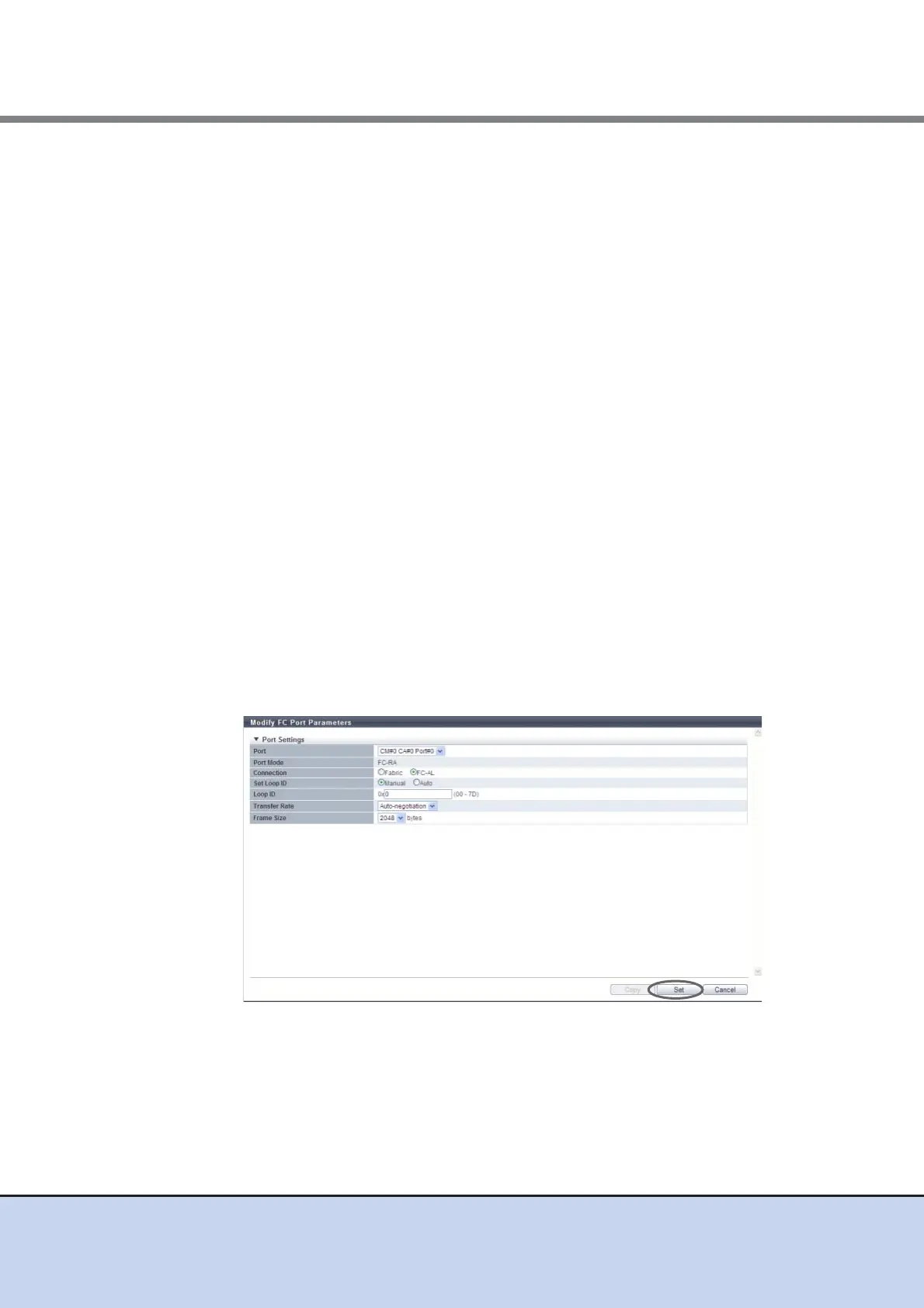
• Set Loop ID
When the "Connection" is "FC-AL", select "Manual" or "Auto" to specify the Loop ID.
"Loop ID" is an identification number of a node in a loop.
• Loop ID
- Manual
When the "Set Loop ID" is "Manual", enter the Loop ID.
The Loop ID must have a value that is different from the values of all the ports
(including the host adapters) that are connected to the ETERNUS DX Disk storage
system.
The following input conditions apply:
• 0x00 - 0x7D
• Up to 2 digit
- Automatic
When the "Set Loop ID" is "Auto", select "Ascending" or "Descending".
• Transfer Rate (Gbit/s)
Select the transfer speed.
- Auto-negotiation
- 2 Gbit/s
- 4 Gbit/s
- 8 Gbit/s
• Frame Size (bytes)
Select the frame size of the target port.
"Frame Size" specifies the length of the communication information.
- 2048
- 1024
- 512
→ A confirmation screen appears.



 To Next Page