5.7 CD-ROM/CD-RW/DVD (Media Player) Installation
The term media player in this manual refers to any of the options: CD-ROM, CD-RW or
DVD. The following instructions show how to install a media player upgrade, where
none was previously installed. If the media player is being replaced, due to failure, refer
to the maintenance section of this manual.
1. Remove the front cover (see section 5.1.1).
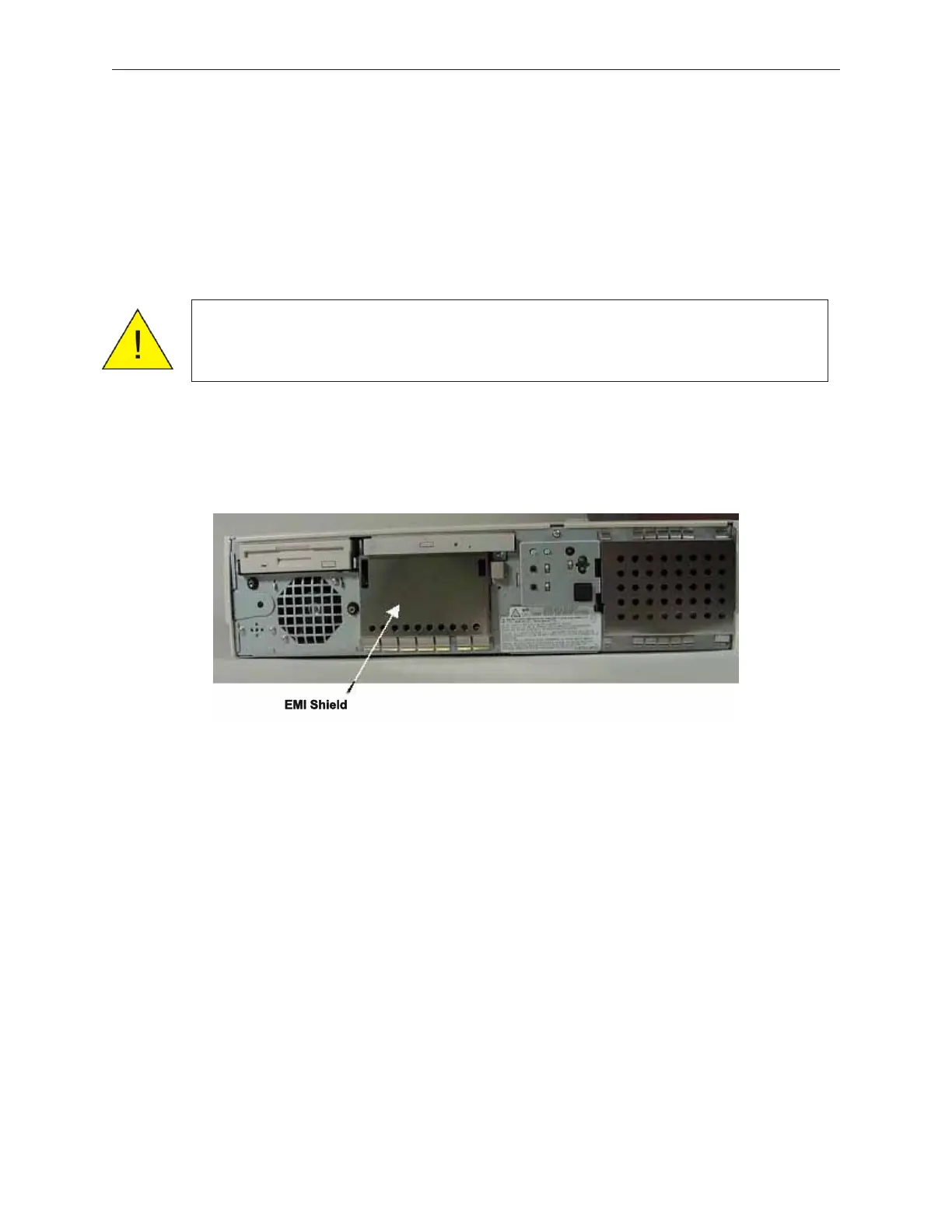
2. Remove EMI shield. This picture shows the media player already in place.
3. Disconnect power and signal cables from the Retail I/O, TeamCOMBO or TeamUSB
board at the back of the unit.
4. Remove side cover (left) (see section 5.1.2).
5. Remove the top cover (see section 5.1.4)
6. Remove the screw from the perforated filler plate (not shown) that occupies the space
intended for the media player.
7. Remove Retail I/O, TeamCOMBO or TeamUSB Board. (see section 7.13)
90000291 Rev 3.0 5-27
TeamPoS 2000 MAINTENANCE MANUAL
Caution: To prevent electric shock, confirm that the AC cable is removed
from the AC outlet anytime the covers are removed. Be sure to
observe all ESD precautions and power off procedures.



 To Next Page