使用说明书 Operation Instruction
3
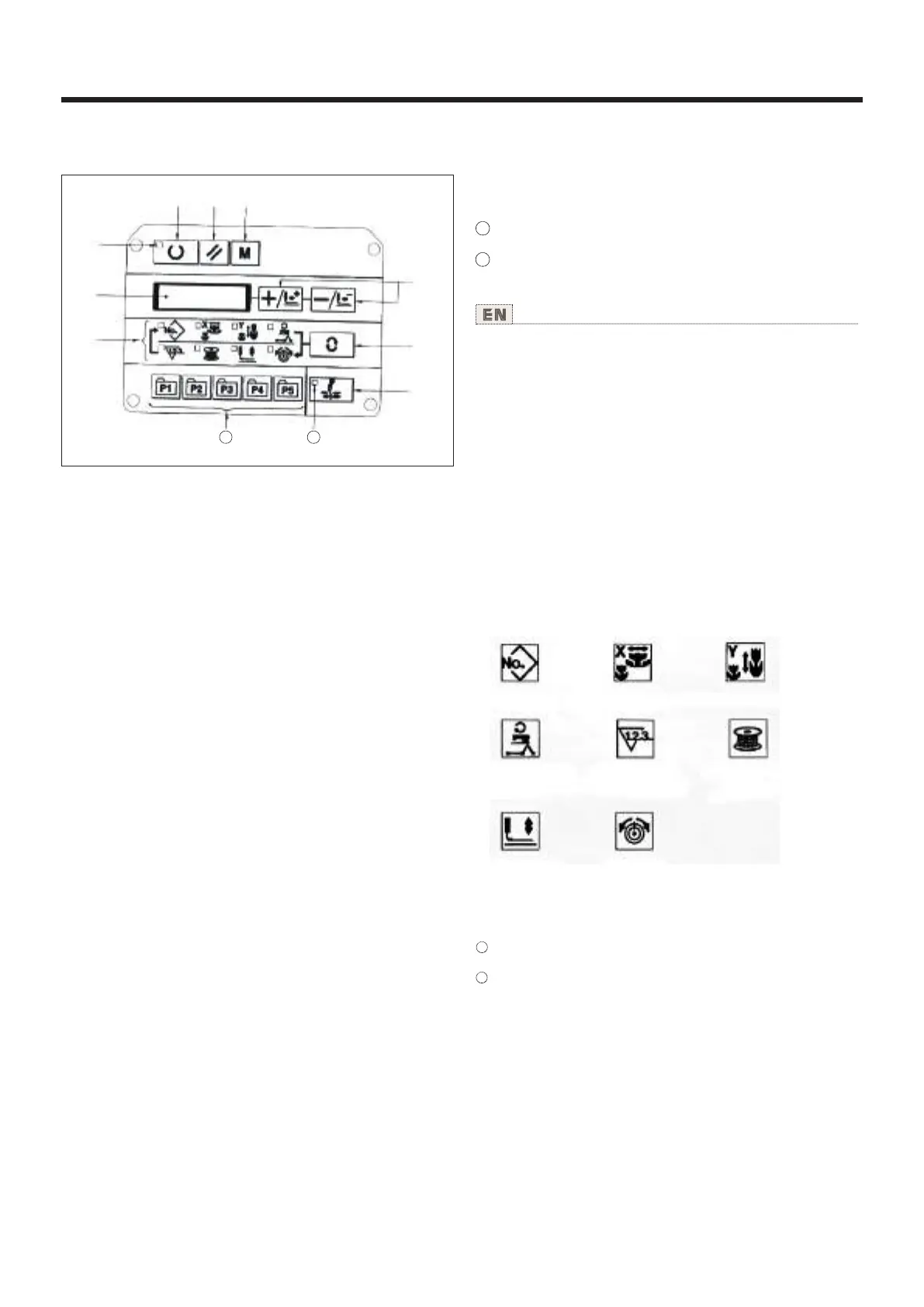
① Ready” key
This key changes over the setting state from the panel to
the sewing state where the sewing machine actually operates.
② Sewing LED
This LED goes off at the time of setting state and lights up at the
time of sewing state. Changeover can be performed with “Ready” key.
③ “Reset” key
This key is used for canceling error or returning the sel value to
the initiaI value.
④ “Mode” key
This key makes the setting mode of the memory switch.
⑤ “+/Feed forward” key and “-/Feed backward” key
This key is used for changing pattern No. and X/Y scale. and feed
forward/feed backward.
⑥ “Selection” key
This key selects the item to be set. Item selection LED of the
selected item and the set value are displayed.
⑦ Data indication LED
This LED indicates the set values of the selected items such as
pattern NO. ,X/Y scale, etc.
⑧ Item selection LED
LEDs of the selected items light up.
“
⑨ Needle thread clamp ON/OFF key
This key selects effective/ineffective of needle thread clamp. When
it is effective, needle thread clamp display LED lights up. (Note 1)
Needle thread clamp display LED
When this LED lights up, needle thread clamp operates.
Needle thread clamp display LED
This key registers the pattern. When this key is pressed. the
pattern registered here can sew immediately. X/Y scale, sewing
position, etc. can be changed and registered.
⑨
⑨
⑨ 抓线ON/OFF键
可以选择抓线功能的有效/无效。有效时,抓线显
示LED亮灯。
抓线显示LED
亮灯时,进行抓线动作。
图案登记键
等级图案。登记后的图案,只要一按此键就可以
立即进行缝制。
⑨
⑨
①
② ④③
⑤
⑥
⑦
⑧
⑨
11 10
11
10
11
10
Pattern NO.
X scale Y scale
Max. speed
limitation
Sewing
counter
Bobbin
winder
Work clamp
foot lowering
Therad
tension



 To Next Page