EasyManua.ls Logo

Hioki 3390 - Page 119

Hioki 3390
204 pages
Print Icon
To Next Page IconTo Next Page
To Previous Page IconTo Previous Page
Loading...
7.5 Measurement Data Saving
111
89
7
Chapter 7 Data Saving and File Operations
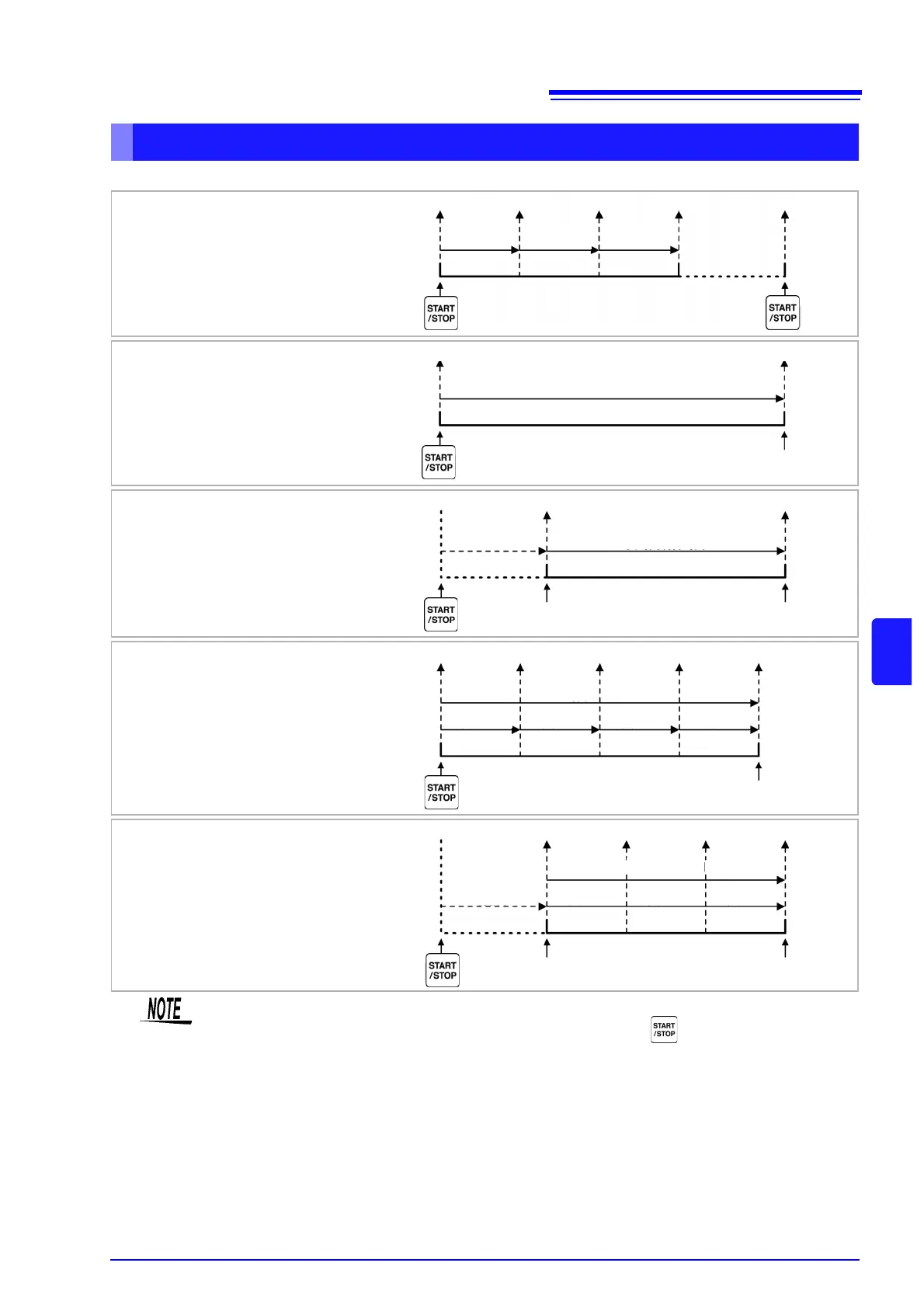
Timing controls available for auto-saving are as follows.
Auto-Saving Operations
Interval Timing Control
Save Save Save Save
Interval Interval Interval
Timer Control
Save Save
Timer Setting
Auto Stop
Real-Time Clock Timing
Control
Save Save
Waiting Time Between Clock Start/Stop Settings
Auto Start
Specified Start Time
Auto Stop
Specified Stop Time
Timer + Interval Timing
Control
Save Save Save SaveSave
Timer Setting
Interval Interval Interval Interval
Auto Stop
Clock + Interval Timing
Control
Save Save SaveSave
Waiting
Interval Interval Interval
Auto Start
Specified Start Time
Auto Stop
Specified Stop Time
Time Between
Clock Start/Stop
Settings
Settings cannot be changed while timing controls are enabled. Also, when auto-ranging is
enabled along with timing control, the range that is active when is pressed remains fixed.
The all data is saved in the same file under timing control.
When integration is reset, data is saved to a new file at the next start time.
When the timer stop time and the interval ending time do not match, the timer stop time has
priority, and the last interval is truncated.
When the clock control stop time and the interval ending time do not match, the clock control
stop time has priority, and the last interval is truncated.
When the storage media becomes full during auto-saving, an error is displayed and saving
stops. In that case, auto-saving can be resumed (using an automatically named file with the
same name) by replacing the CF card with another (formatted) CF card.
See To OFF the interval. (p. 92)

Table of Contents

Other manuals for Hioki 3390

Related product manuals