4 - 37
2. Astigmatism Correction
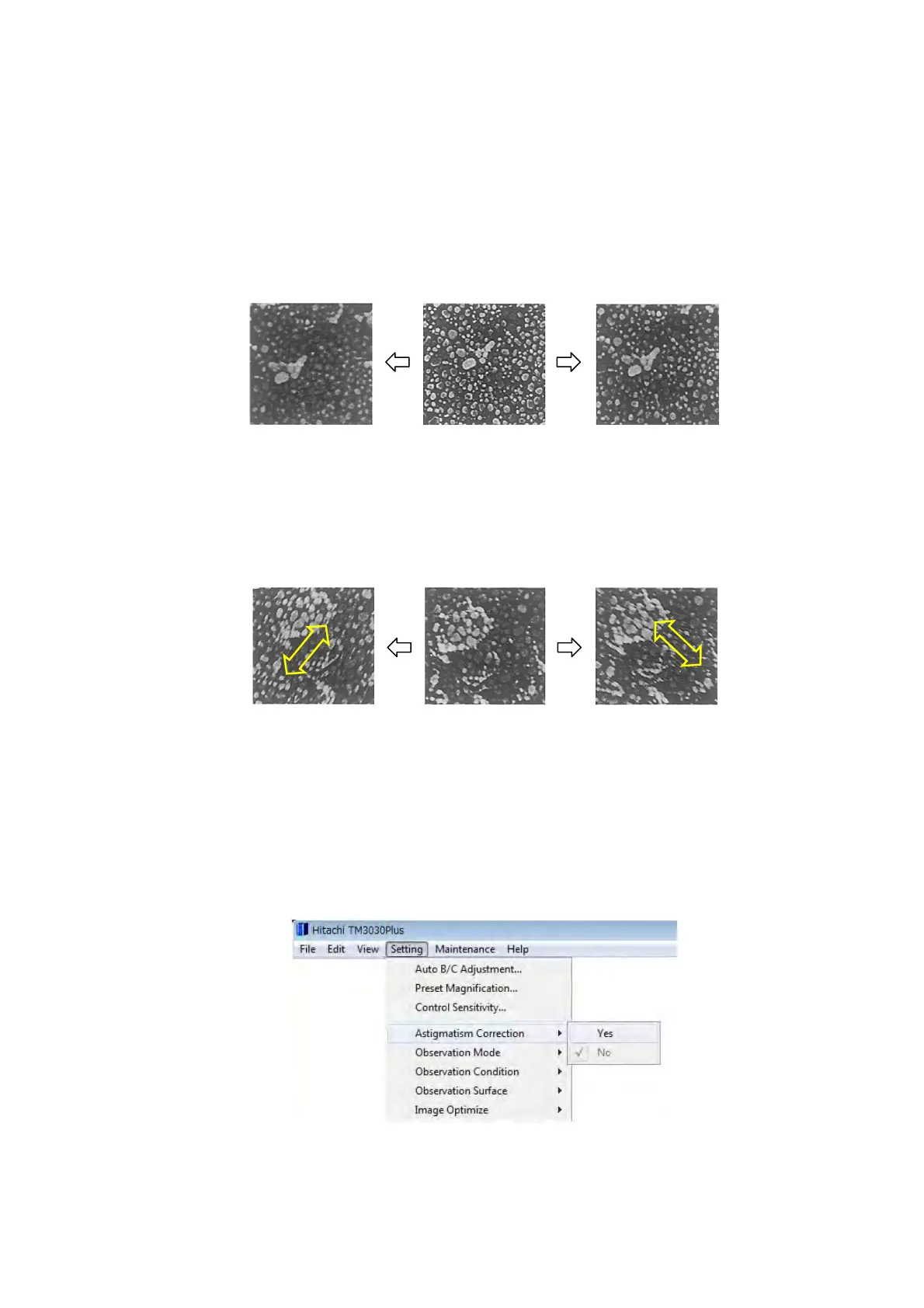
If the electron beam irradiating specimen surface is not circular, even a circular specimen
can look elliptic. or it can look blurred even after accurate focusing. This phenomenon is
referred to as astigmatism and affects the imaging more adversely at a high
magnification.
In the absence of astigmatism, when the focus is moved back and forth from an optimal
point (see 4.2.11 1c.), the image shows blurred concentric circles as in the figure below:
Figure 4.2.11-5 Image without Astigmatism
In the presence of astigmatism, the image runs in one direction by moving the focus back
and forth (see 4.2.11 1c. ), as in the figure below:
Figure 4.2.11-6 Image Showing Astigmatism
If astigmatism is present, it can be corrected as described below. For ease in correction,
perform astigmatism correction and fine focusing alternately.
2a. Select [Yes] from [Astigmatism Correction] in the [Setting] menu,
Figure 4.2.11-7 Astigmatism Correction Menu
Optimal point
(A)



 To Next Page