4 - 39
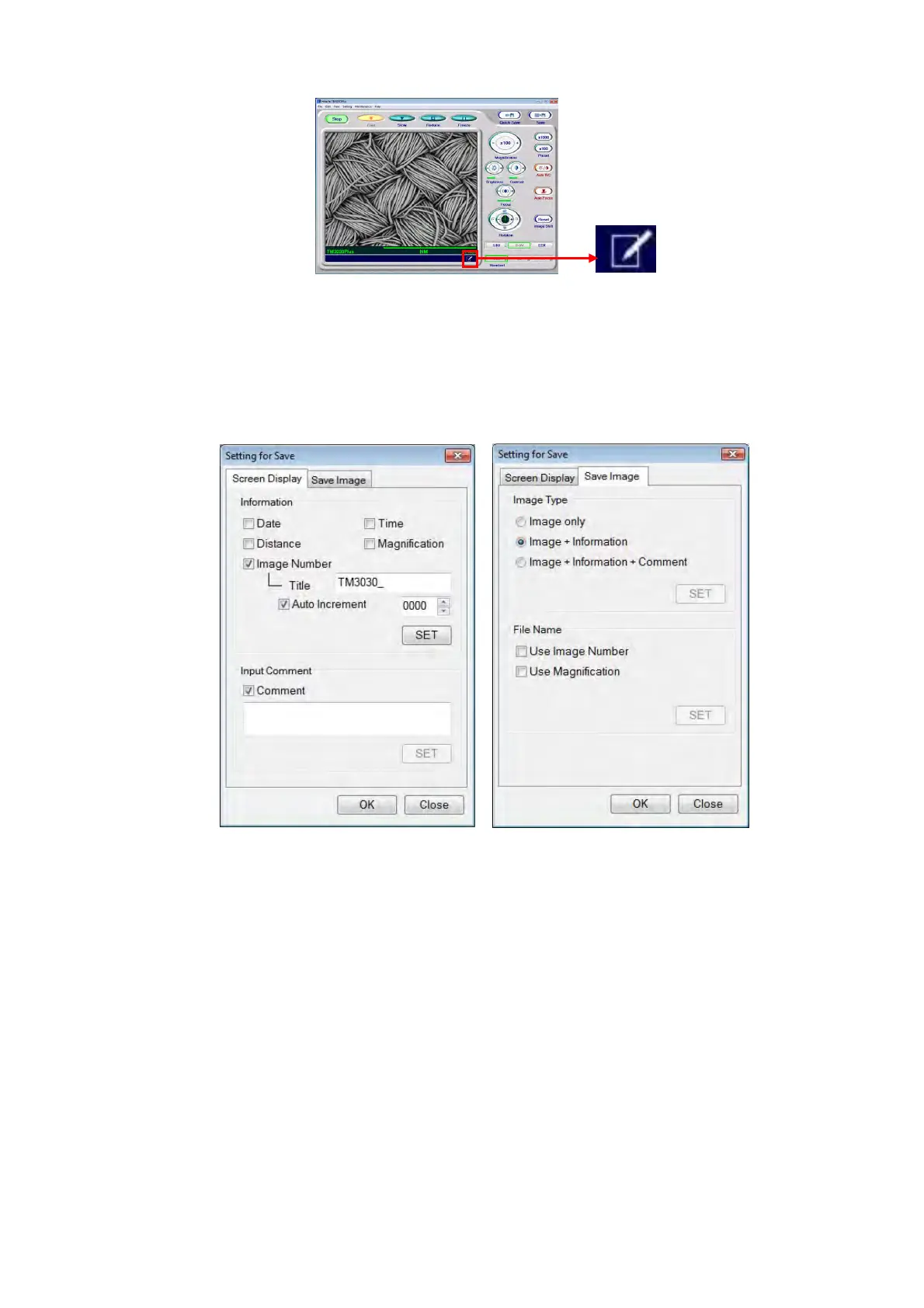
Figure 4.2.12-1 Edit Button
1b. The Setting for Save window appears. On this window, specify information view / hide
settings, edit any comment entry, and select the type of image save. For the details,
refer to 4.3.25 Edit Button.
Figure 4.2.12-2 Setting for Save Window
1c. Click the [SET] button to determine the settings. After that, click the [OK] button to
close the Setting for Save window.
2. Click either the [Save] button (see 4.3.15) or the [Quick Save] button (see 4.3.14) to
capture images.
3. After image capture, the Save Image window appears. Enter a file name, and save the
data by selecting the destination of save and the type of file (JPEG, bitmap or TIFF).
When not saving the file, click the [Cancel] button. During the save processing, [Freeze]
is selected in [View mode settings area]. After completion of the processing, the frozen
image is displayed. To restart observation, select any button other than [Freeze].



 To Next Page