n° 00/0024
23/05/2011
IP Cleaning SpA div. Floor care - via Cartesio 39 42040 Villa Bagno RE
Tel. 0039 0522 266000 - Fax 0039 0522 642045 - info@ipcleaning.com
1/2
Operative instruction
Istruzioni operative
PLDC01972
Model / Modello
CT 230 Release SoftWare 2.00.9
SUBJECT / SOGGETTO
USER PROGRAMMING / PROGRAMMAZIONE UTENTE
default values
version
DISC BRUSH
version
ROLLER BRUSH
ENGLISH ENGLISH
Program 1
Pressure 020
Program 1
Pressure 020
Program 1
Brushes ON
Program 1
Brushes ON
Program 1
Suction ON
Program 1
Suction ON
Program 1
Water 2
Program 1
Water 2
Program 1
AutoPowerOFF ON
Program 1
AutoPowerOFF ON
Program 2
Pressure 040
Program 2
Pressure 030
Program 2
Brushes ON
Program 2
Brushes ON
Program 2
Suction ON
Program 2
Suction ON
Program 2
Water 3
Program 2
Water 4
Program 2
AutoPowerOFF ON
Program 2
AutoPowerOFF ON
Program 3
Pressure 060
Program 3
Pressure 040
Program 3
Brushes ON
Program 3
Brushes ON
Program 3
Suction ON
Program 3
Suction ON
Program 3
AUTO
Program 3
Water 3
Program 3
AutoPowerOFF ON
Program 3
AutoPowerOFF ON
PARAMETER MODIFICATION OUT OF THE
DEFAULT VALUE, COULD CAUSE AN
INCORRECT WORKING OF THE MACHINE:
CONTACT IPC TECHNICAL DPT, BEFORE ANY
MODIFICATION.
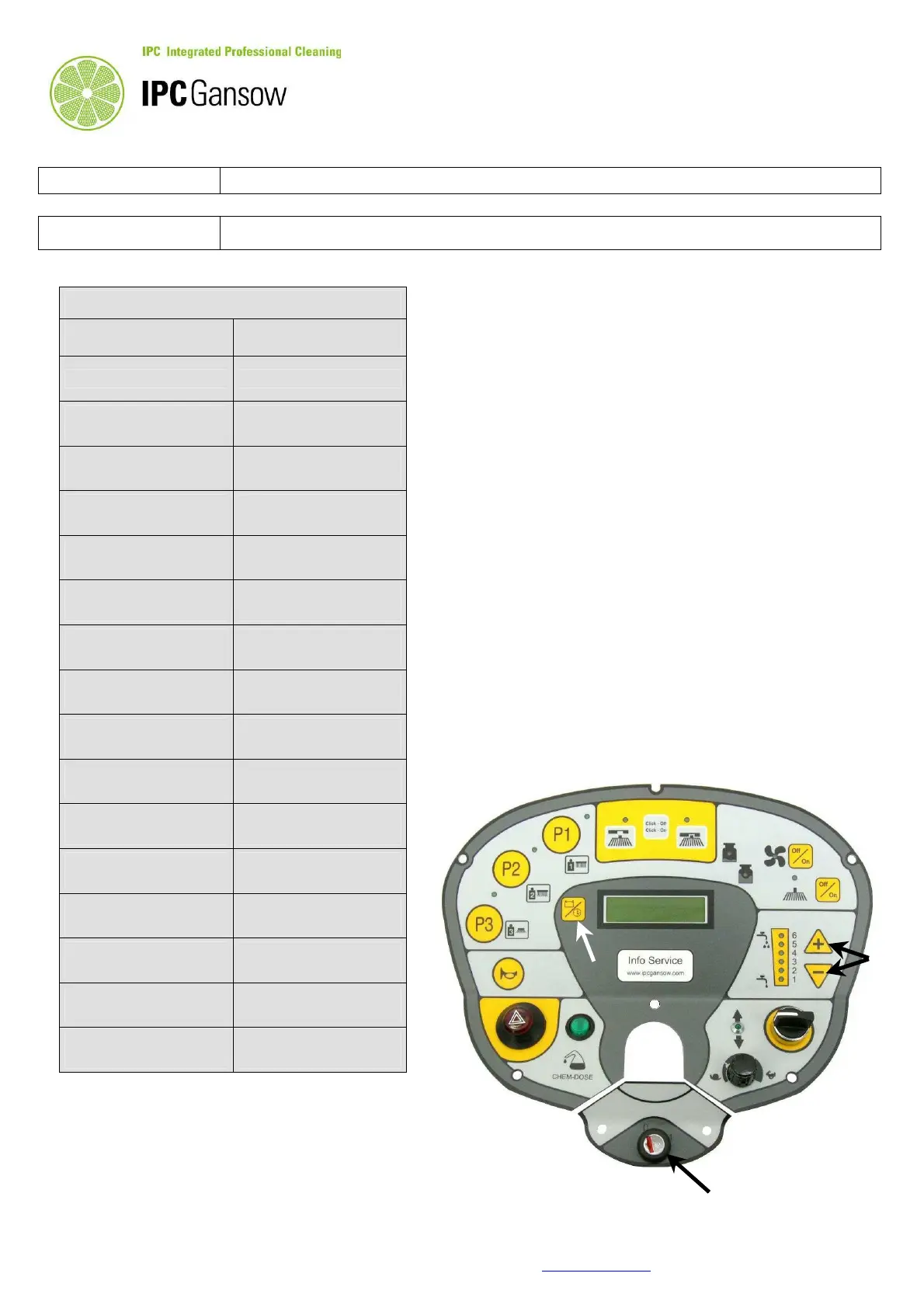
To enter in the user programming, turn to 1 the key
( ref. 1 ) and after 5 seconds, keep pushed the
button ref. 2 for 10 seconds. Display shows the first
parameter ( ITALIANO ), the language. To pass
from a parameter to another one, use the ref. 2
button.
To modify the default value use the water buttons
( ref. 3 ):
push “ – “ to increase or push “ + “ to decrease the
value.
To read the default values table, change to
ENGLISH the language.
To hold the modification and exit, keep pushed the
ref.2 button until display shows the voltage.
Turning to 0 the key ( ref. 1 ) doesn’t erase the
modification and doesn’t turn OFF the machine.
To exit without modification, set with the follow
default list and hold the data.
1
2
3


 To Next Page