PLDC01938
REVISION 00
01/06/2011
TECHNICAL DEPT.
Stavale
- date 05/09/2011
3/195
A1.1 Checking the current draw of the brushes from the control
panel
1
Make sure the batteries are charged and the tank contains detergent.
2
Move the machine to a relatively smooth floor to obtain a mean current reading.
3
Enter the machine's technical programming function, following the procedure given in the "Programming the
circuit board" annex or as described below to activate the function to read current draw, actuator activation
tolerance and maximum brush pressure.
4
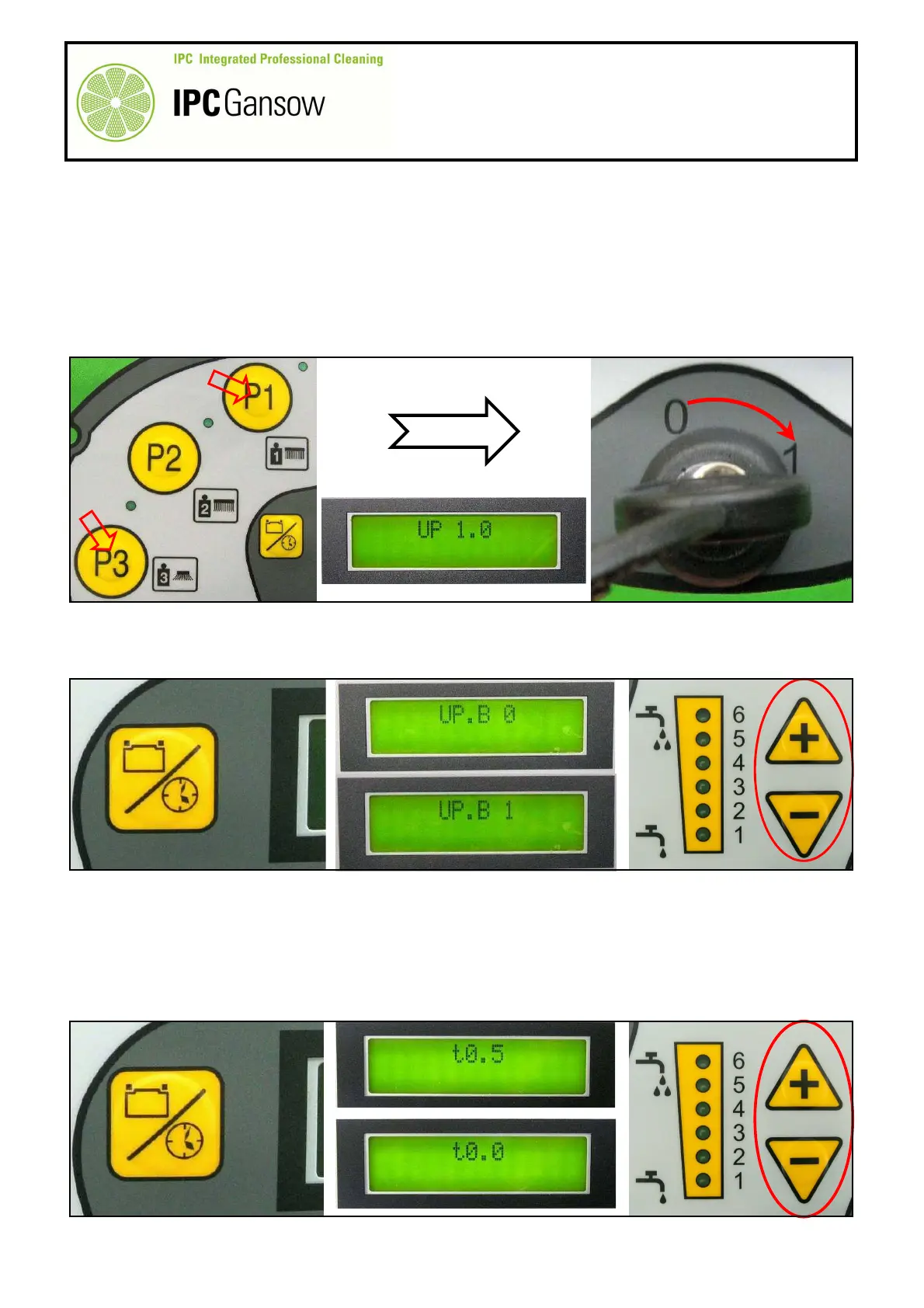
With the machine off and the key in position "0", press and hold the buttons A "P1" and "P3" and at the same
time turn the key B to position "1". Keep the buttons pressed until "UP 1.0" is displayed.
5
Press the display button C to scroll through the menu until you reach UP.B 0. Press the water regulation "+"
and "-" buttons D to select 1 (only two values appear, 0 and 1). This setting enables the current draw of both
motors together during the washing phase to be displayed.
For disk brush versions only (BT 85 - BT 105), modify the activation tolerance setting
(T0.X) in the brush head actuator activation control section.
For roller brush versions (BT 95 R - BT 95 R Sweep) the default setting is "0".
6
Press the display button C again to move on to the next setting in the menu, parameter T0.5. Press the
water regulation "+" and "-" buttons D to set a value of 0 (zero), 10%, the minimum tolerance possible, by
scrolling through the values of 0 - 9.
C
PHOTO 3
A
PHOTO 2
D
PHOTO 4
C


 To Next Page