Chapter 12: Qualification Reports
ValProbe RT User Manual 136
Pass / Fail Criteria Report
Once the Pass / Fail Criteria template has been selected or defined, the User can then define
which groups from the Qualification file they wish included in the Pass / Fail Report.
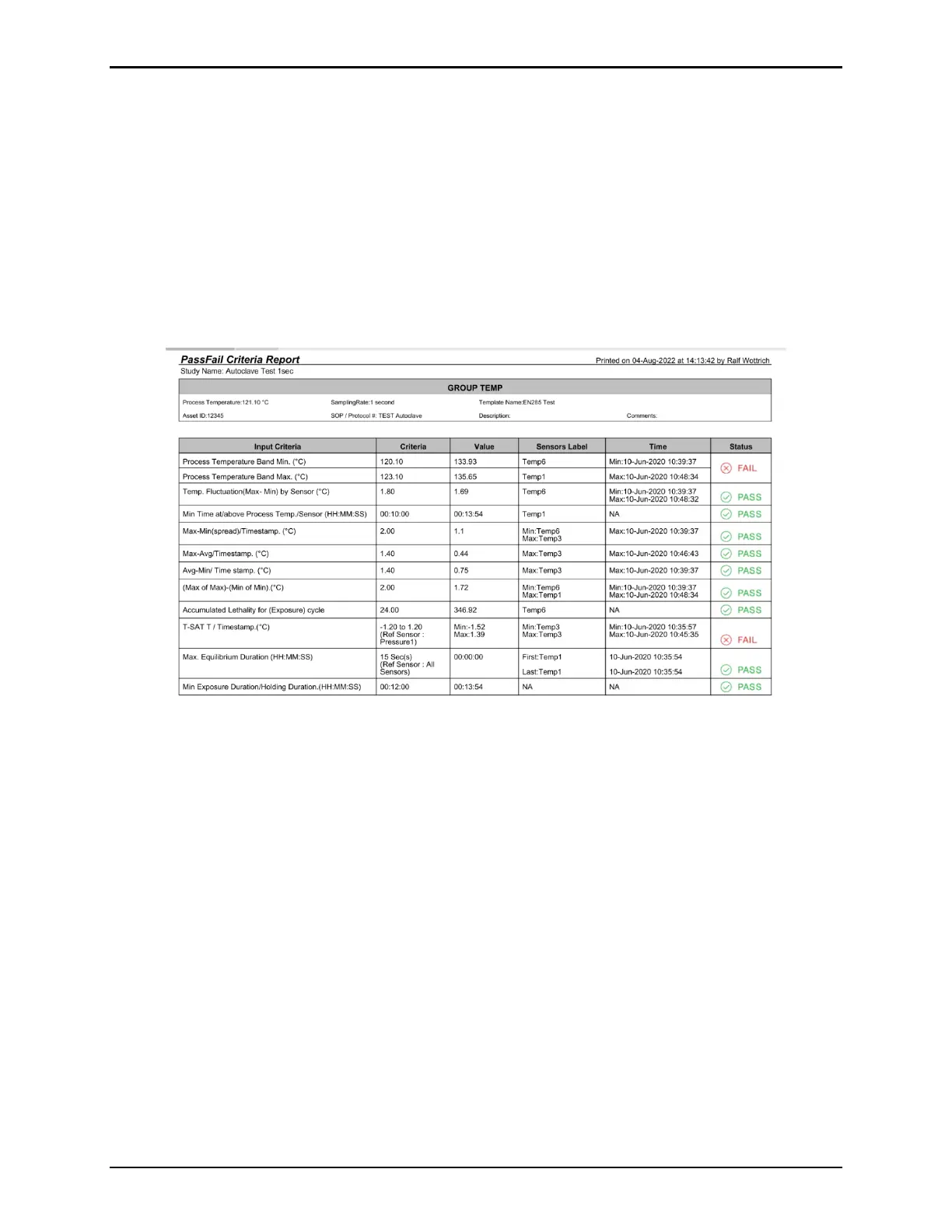
The Pass / Fail Criteria Report contains two sections: Criteria Evaluation and Sensor Detail.
For each Group selected, the Criteria Evaluation page evaluates the performance of the
calculated values against the defined criteria and indicates a “Pass” or “Fail”.
If there is a “Fail”, additional information such as the failed Sensor ID and the timestamp of the
occurrence is listed.
Figure 170: Pass Fail Criteria Report
For each selected Group, the Pass/ Fail Criteria Report contains a Sensor Detail section. This
section provides additional information for certain Pass/Fail criteria on the performance of
each sensor in a group. The Sensor Detail lists each sensor in the group as well as its criteria
and performance. Failed sensors are marked with a red X next to the failed criteria, providing
valuable information as to which sensor or sensors caused the main criteria to “Fail”.
For additional information on the Pass/Fail Criteria report contact technical support or your
local Account Manager.



 To Next Page