Chapter 11: Sensor Verification
ValProbe RT User Manual 111
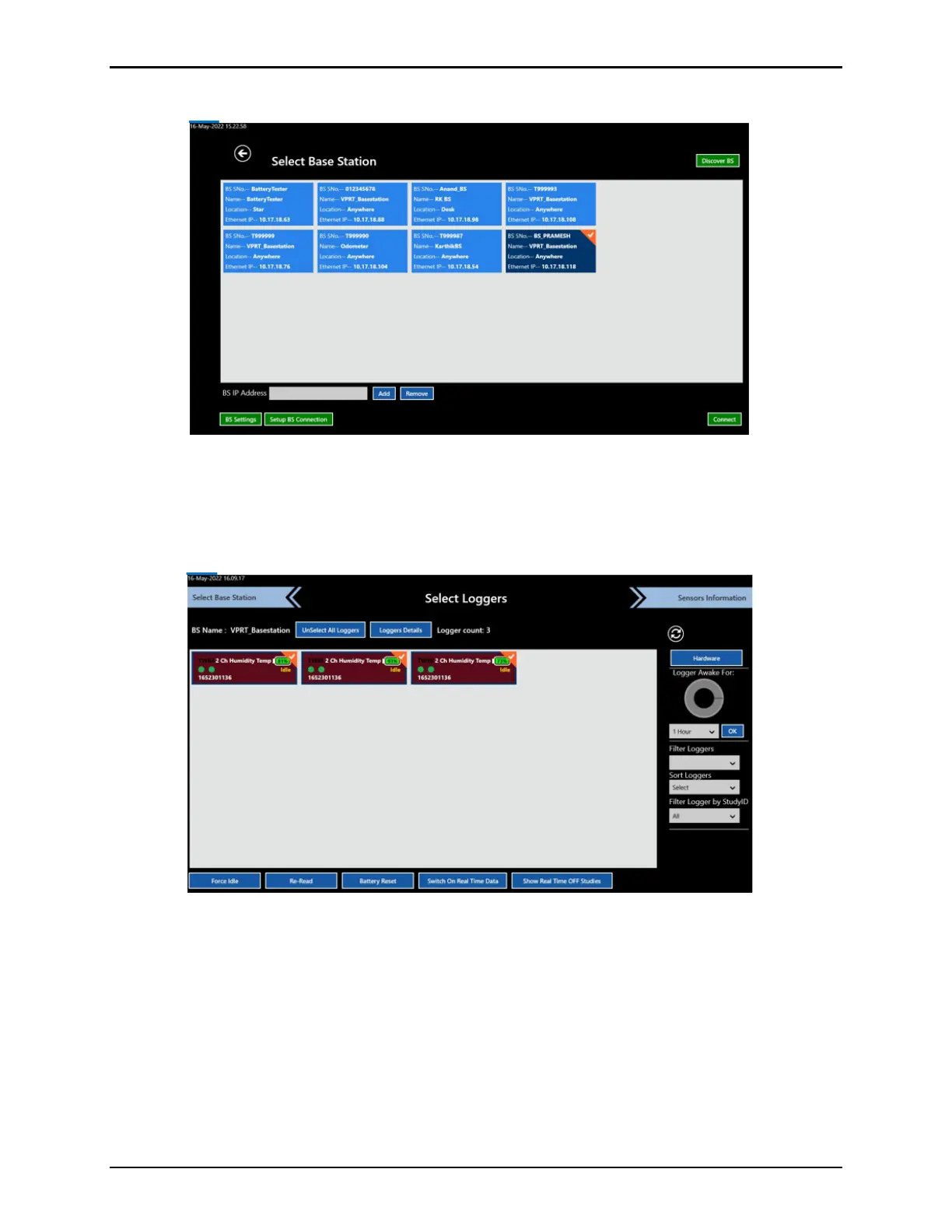
Select the desired Base Station tile, then select Connect.
Figure 146: Select Base Station
11.5. Selecting Sensors
When the desired Base Station is connected, select Loggers to be verified on the Select
Loggers screen. Humidity Loggers are displayed as dark, red-colored boxes.
Figure 147: Select Loggers
Note: When using more than 25 Loggers, ensure that the transmission rate is equal or
greater than the sampling rate. If not, a message displays a warning that you cannot
move forward. Modify the setup and the transmission/sampling rates before proceeding
with 25 or more Loggers.
If there are no Loggers listed on the screen, wake up the Loggers, using the magnetic Wake
Up device or by passing them over the status panel of the Base Station. Once all woken
Loggers appear on screen, select the desired Loggers to be verified individually or all at once
by clicking Select All Loggers. The selected Loggers’ icons color changes to deep blue for
temperature Loggers, purple for pressure Loggers, or dark red for humidity and the checkbox
is enabled. All unselected Loggers are displayed without a checkmark.



 To Next Page