Chapter 4: Initial ValProbe RT Software Setup
ValProbe RT User Manual 42
Setting Up Initial Administrator using Active Director
Security and Policies
Kaye ValProbe RT has built in Active Directory™* system support. You can connect your
company’s users in your Active Directory™* with the ValProbe Rt system, allowing more
freedom to handle user management. To set up initial Active Directory™* security and
policies, follow the instructions below:
Note: To set up Active Directory™*, you must be an administrator with read rights to read
your company’s Active Directory™*.
Note: The ValProbe RT software is only able to connect to one company’s Active
Directory™* at a time.
At the initial Login Screen, enter “Kaye” in the User ID textbox.
Note: “Kaye” is the default System Administrator User ID, and the User ID textbox is case
sensitive. Please ensure that the default User ID is entered exactly as it appears above.
Enter the one-time default System Administrator password “411” in the Password textbox,
the Policies screen opens.
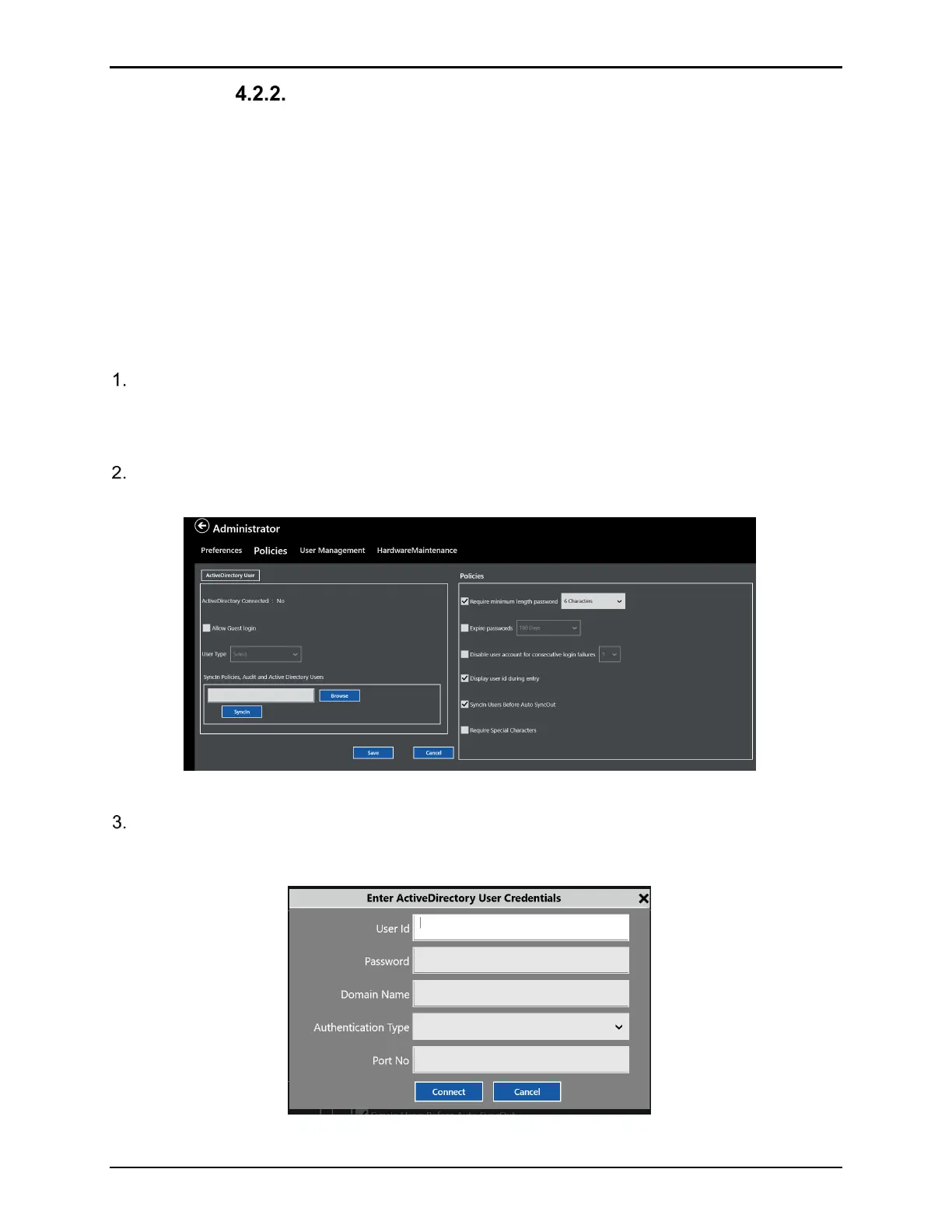
Figure 55: Policies Screen
To enable the utilization of Active Directory™*, ensure the ValProbe RT console is
connected to the domain and select the ActiveDirectory User box. A window appears to
define User Credential and Domain connectivity parameters.
Figure 56: Active Directory* Credentials



 To Next Page