Chapter 4: Initial ValProbe RT Software Setup
ValProbe RT User Manual 41
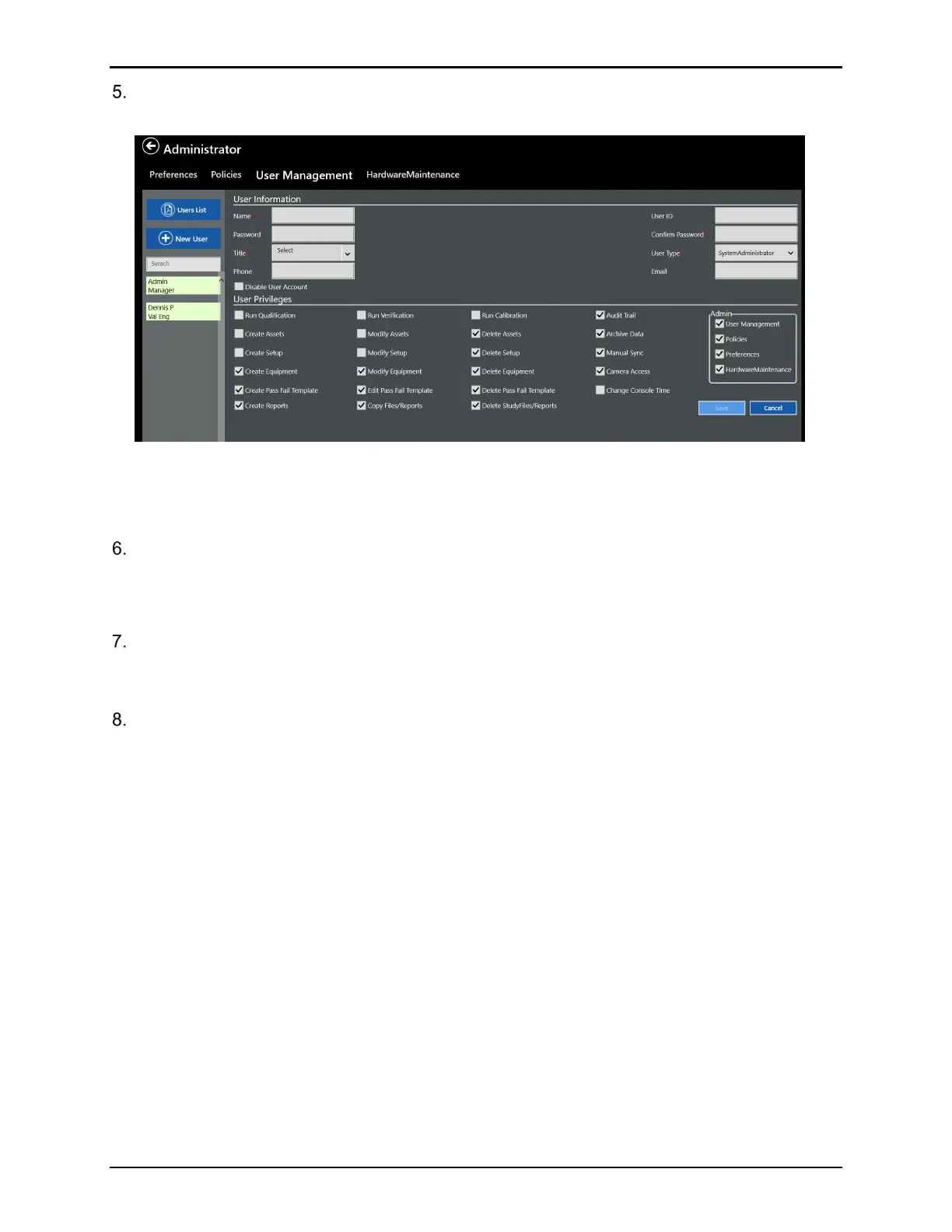
Define a System Administrator to replace the Default Kaye account. For the replacement
Administrator, the New User window opens automatically.
Figure 54: User Management Screen
Note: Red asterisks fields are mandatory: User IDs are unique, and the passwords must
follow the default rules for passwords (minimum of six characters).
Enter a User ID in the User ID textbox.
Note: A User ID can use any combination of numbers and characters, up to a maximum of 75
and a User ID cannot be used by more than one account.
Enter a password in the Password textbox, a password must be at least a combination of
six characters or numbers, up to a maximum of 16. It is recommended for security to use
more than six.
In the Confirm Password field, enter the password and select OK.
Record the new Administrator User ID and password for future reference. If an incorrect User
ID/password combination is entered, access is denied. After the initial administrator account is
created, the default “Kaye” “411” login credentials are automatically deleted.
For the initial system administrator, the User Type and User privileges are preset. Enter a title,
phone, email, and associate a picture by using the built-in camera. After completing the
system administrator User setup, the system logs out. To proceed, open the software, and log
in with the new Administrator account information.
To return to the User Management screen to add additional Administrators or Users, select the
Admin tile.



 To Next Page