bizhub C652/C552 7-16
7.1 System Settings
7
Color Registration Adjust
If color shifts are detected in the print result, adjust the each color print position for each paper type.
0 The procedure for adjusting the color registration is the same for yellow, magenta and cyan.
1 Press the [Utility/Counter] key ö [Administrator Settings] ö [System Settings] ö [Expert Adjustment]
ö [Finisher Adjustment] ö [Color Registration Adjust].
2 Select a color to be corrected.
3 Select a paper type for which color registration is adjusted.
4 Load the paper into the bypass tray.
% The loadable paper size is 11 e 17w, 8-1/2 e 11v, A3 w, or A4 v.
5 Press the [Start] key.
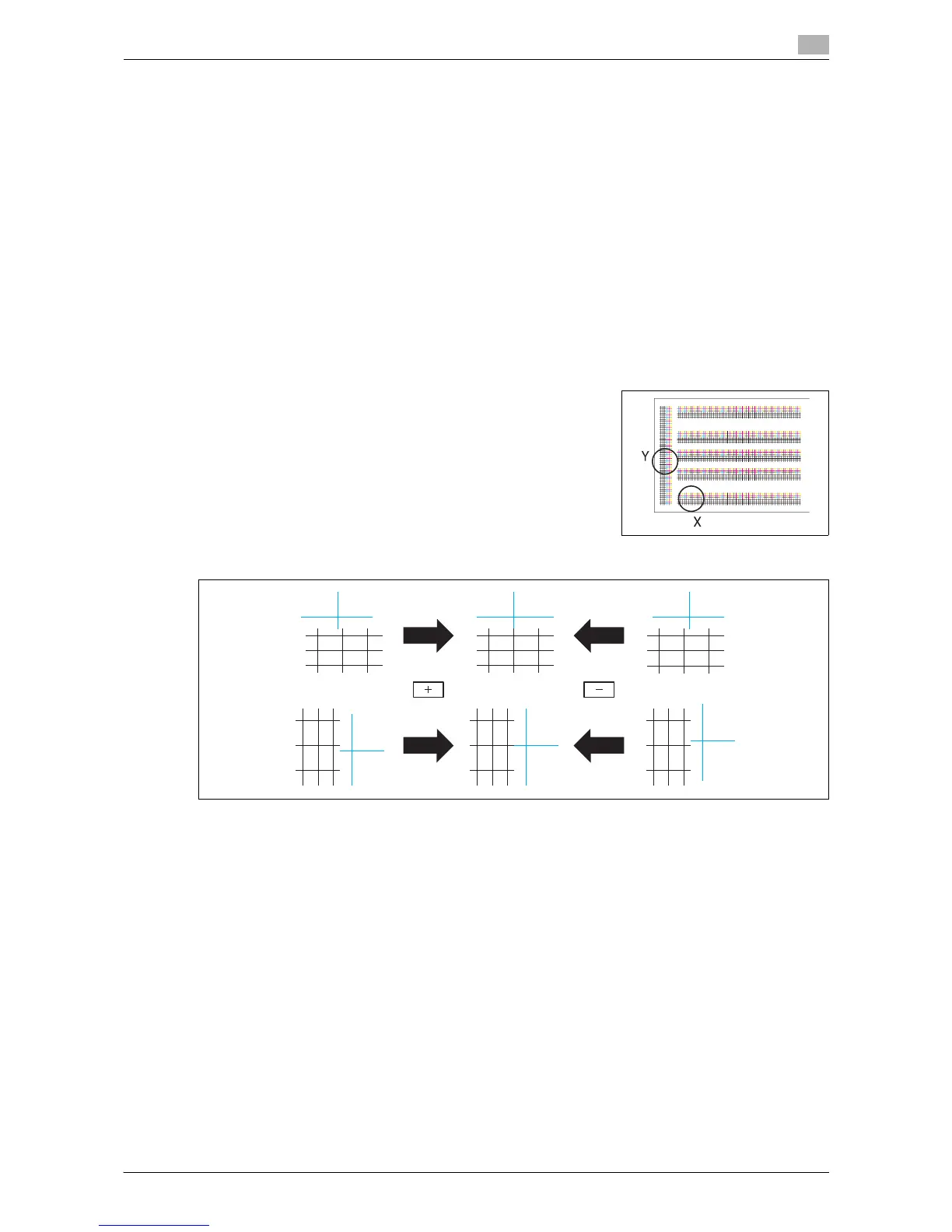
A test pattern is printed.
6 Check that the black line aligns with the color line to be adjusted
at the X and Y positions of the test pattern.
% Press [+] or [-] to adjust the color line to be corrected while checking the sample.
The color registration is adjusted.
7 Press the [Start] key to print a test pattern, and then check the print result.
8 Press [OK].














 To Next Page