bizhub C652/C552 10-4
10.1 Using an authentication unit (biometric type)
10
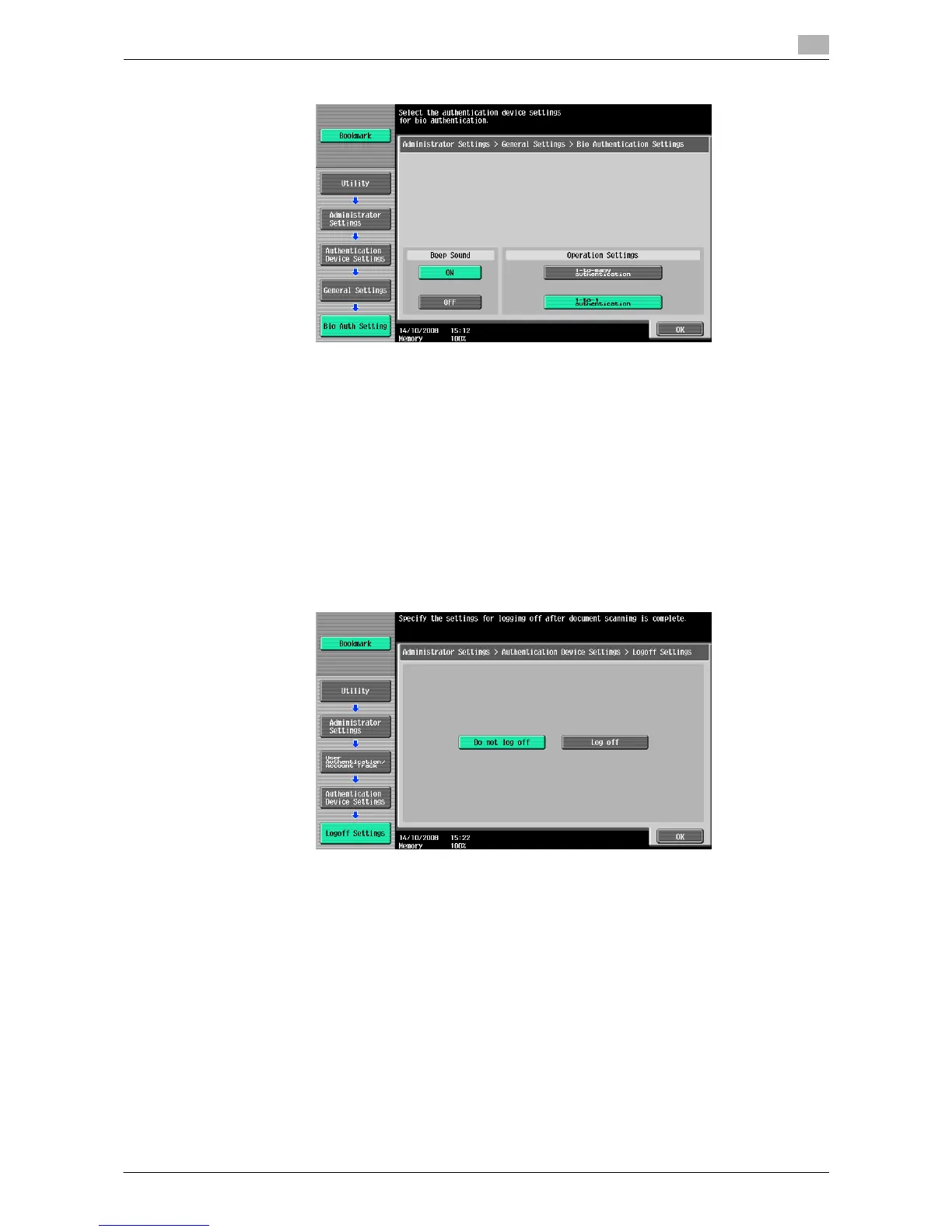
7 Configure "Beep Sound" and "Operation Settings".
% For "Beep Sound", specify whether to give a "blip" sound when the finger vein pattern is scanned
successfully.
% For "Operation Settings", specify how to log in to this machine after registration.
1-to-many authentication: Allows the user to log in by simply placing his or her finger.
1-to-1 authentication: Allows the user to log in by entering the user name and placing his or her
finger. Selecting 1-to-1 authentication for user registration disables the ID & Print function. For
details of the ID & Print function, refer to the "User's Guide [Print Operations]".
For details on how to log in to this machine, refer to page 10-18.
8 Press [OK] twice.
9 Press [2 Logoff Settings].
10 Specify whether to log out the user when scanning the original has finished after the user logged in with
the authentication unit.
11 Press [OK], then [Close].
12 Press [2 User Authentication Settings].
13 Press [1 Administrative Settings].














 To Next Page