bizhub C652/C552 10-5
10.1 Using an authentication unit (biometric type)
10
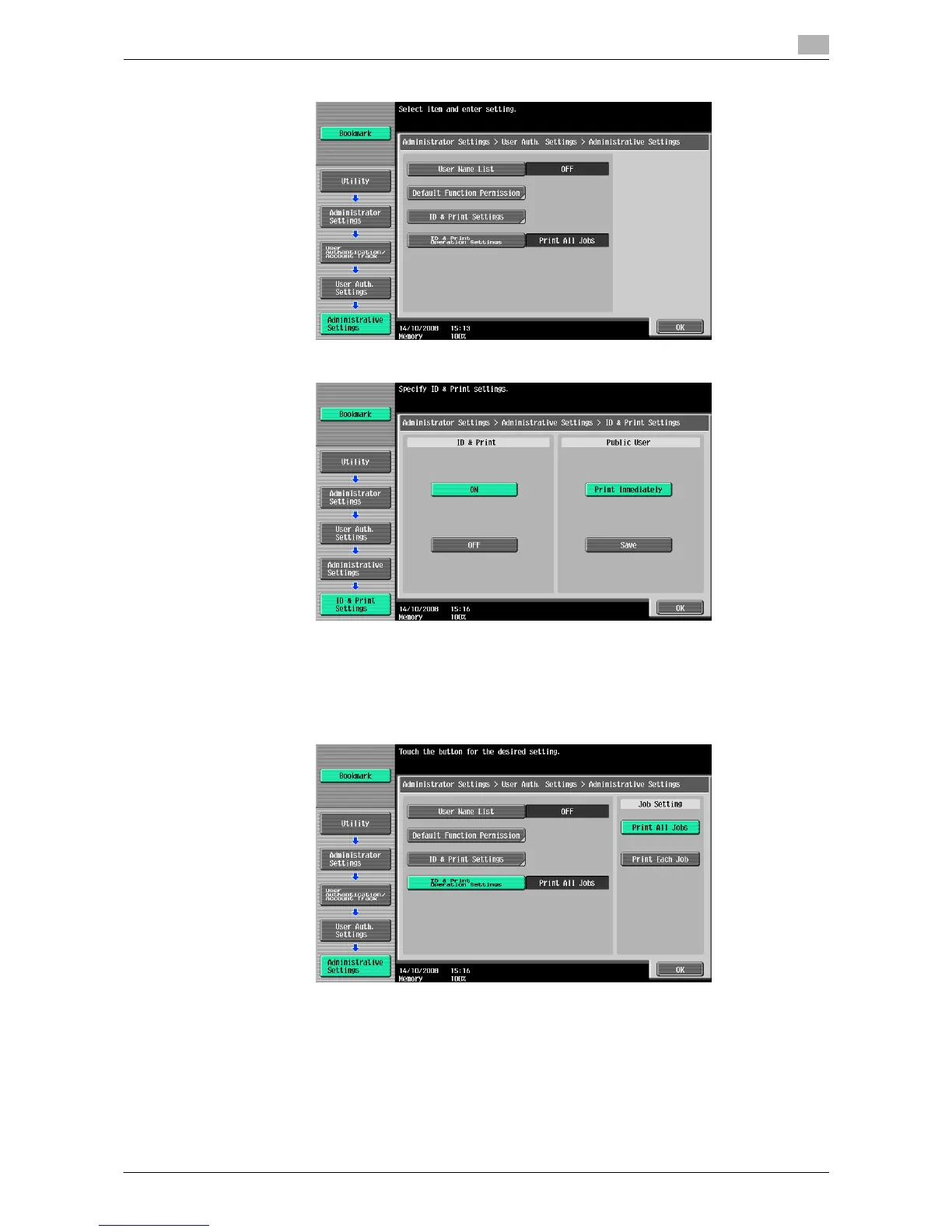
14 Press [ID & Print Settings].
15 Press [ON] under "ID & Print", and then press the [OK] button.
% [ON]: The ID & Print function is used.
% [OFF]: The ID & Print function is not used.
% [Print Immediately]: Any jobs of unauthenticated users or the public user are printed immediately.
% [Save]: Any jobs of unauthenticated users or the public user are saved in the ID & Print User Box.
16 Press [ID & Print Operation Settings] and configure the printing method.
% [Print All Jobs]: Press this button to print all the documents authenticated at one setting when
multiple documents are saved in the ID & Print User Box.
% [Print Each Job]: Press this button to print a document for each authentication when multiple
documents are saved in the ID & Print User Box.
17 Press [OK].
18 Press [Close] twice.














 To Next Page