– Programming Manual 10. Unit Set-up 47
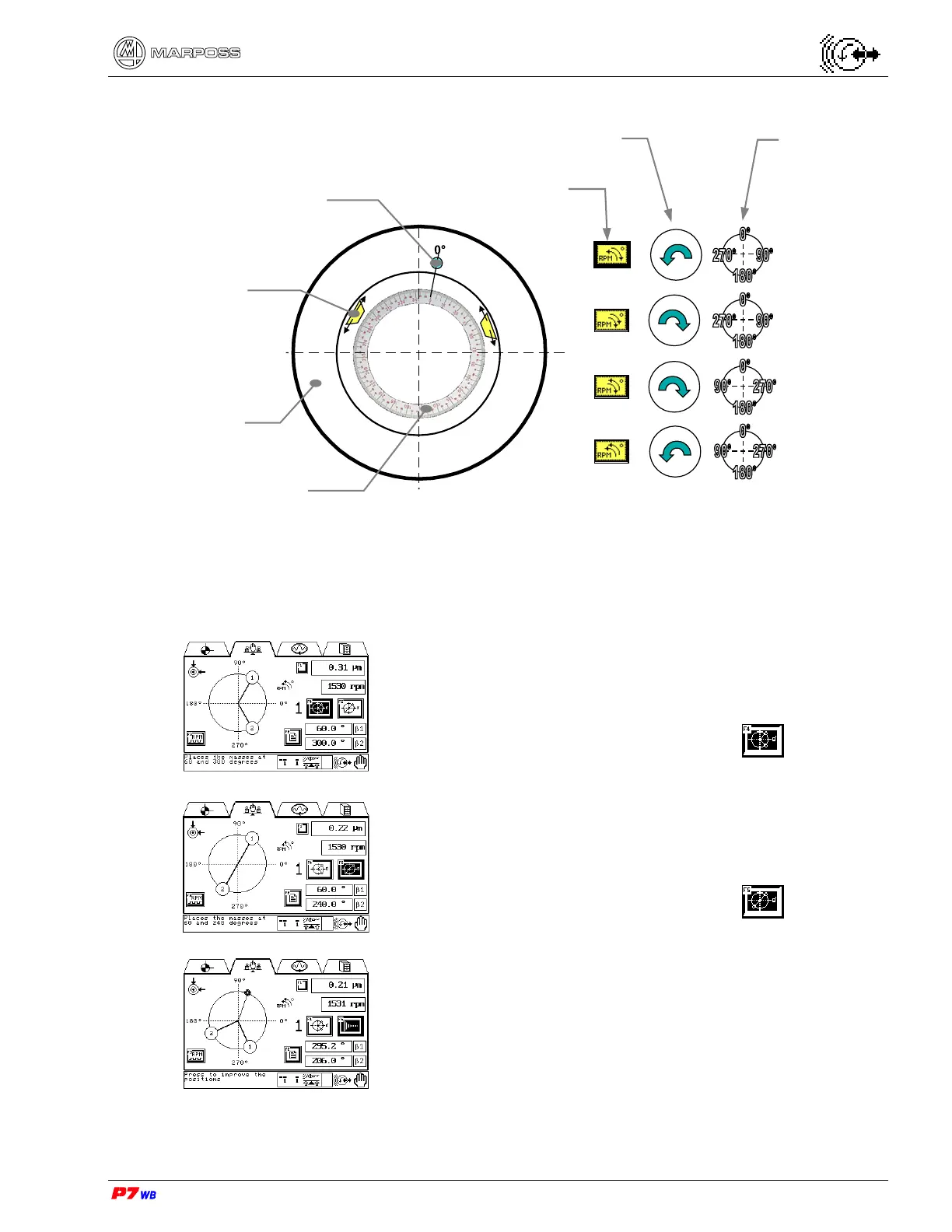
Execution of manual balancing procedure with weights
The wheel rotation speed must be the same in the various steps of the procedure.
Wheel NOT rotating.
• Bring the balancing weights to 60° and 300°.
Wheel rotating (normally at the work speed)
• With stabilized vibration value, press F4 .
Wheel NOT rotating.
• Bring the balancing weights to 60° and 240°.
Wheel rotating (normally at the work speed)
• With stabilized vibration value, press F5 .
The angular values (absolute values) where the weights
shall be positioned to compensate the unbalance are
displayed next to β1 and β2. The graphic representation of
the weight position is updated as well.
Wheel NOT rotating.
• Bring the balancing weights to the indicated angular
values.
Wheel rotating (normally at the work speed).
Indexed scale 360°
Wheel
Compensation
weights
Magnetic disk fo
RPM senso
Indexed scale
direction
Wheel rotation
direction (RPM)
Programmed
condition



 To Next Page