48 10. Unit Set-up – Programming Manual
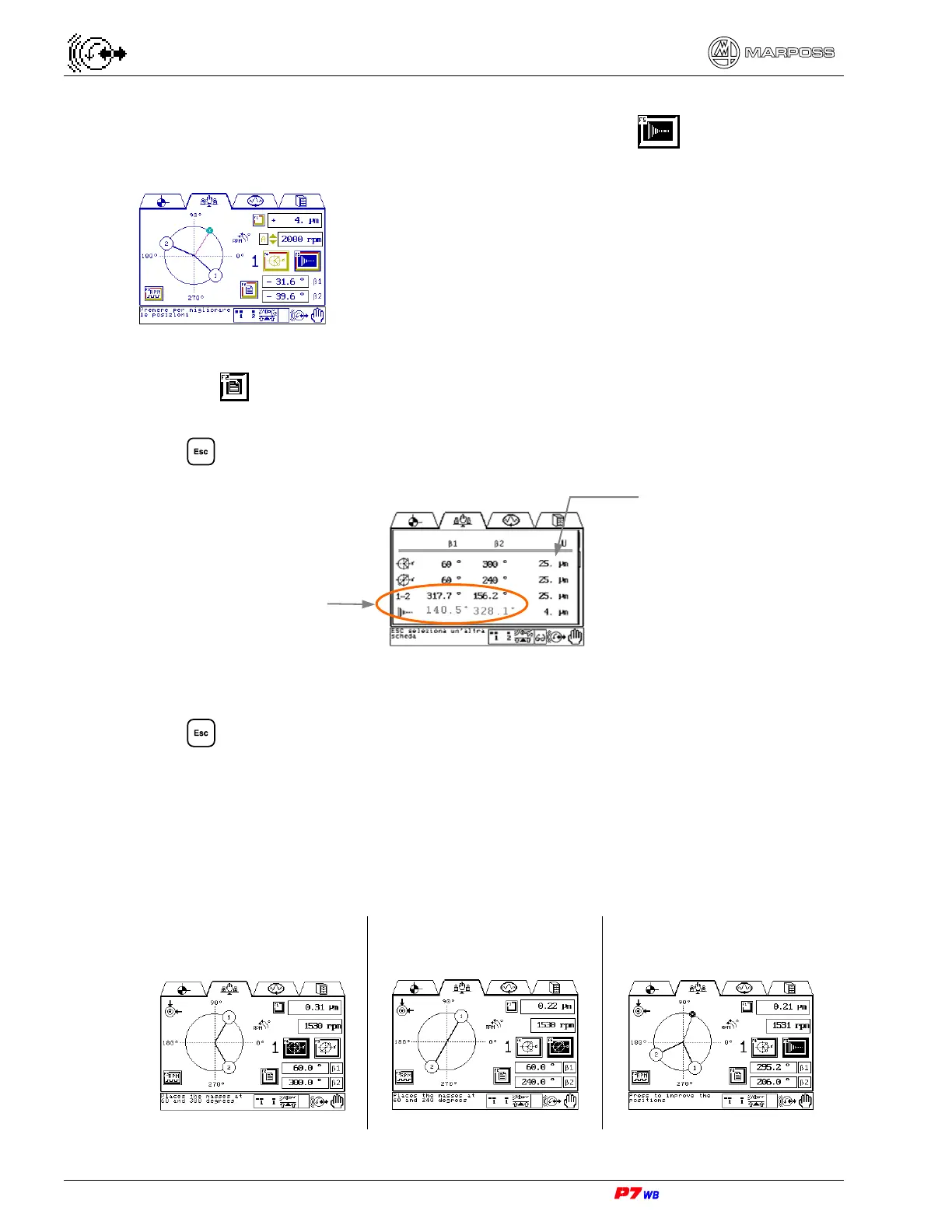
• Evaluate the residual unbalance and, in case, define the
correction values by pressing F5 .
The absolute angular values to which the weights shall be
moved for compensating the residual unbalance are
displayed next to β1 and β2.
Wheel NOT rotating.
• Position the balancing weights on the corresponding
angular positions displayed.
Press F2 to view page that lists the different steps of the manual balancing
procedure with the unbalance values and the weight position.
Press to exit the page.
Press F1 to repeat the entire manual balancing procedure.
Press to exit the manual balancing procedure.
Should the balancing cycle at work speed cause excessive vibrations, such a cycle
can be performed at two different wheel rotation speeds:
Stage 1 – low-speed balancing (normally 50% of the work speed) to avoid excessive
vibrations (procedure similar to the one previously described).
Step 1: weight #1 at 60° and
weight #2 at 300°. Wheel
rotating: press F4.
Step 2: weight #1 at 60° and
weight #2 at 240°. Wheel
rotating: press F5.
Step 3: indication of correction
positions (e.g. weight #1 at 295°
and weight #2 at 206°).
Unbalance values
Calculated absolute
angular position of the
weights



 To Next Page