148
Measurement
5
5.11. Settings related to measurement
5.11.3. Comparative target settings of full
6HWWKHWDUJHWWRFRPSDUHZLWKWKHYDOXHRI>)8//@RI>%5$1'&2'(@
1) Display the screen to set the comparative target of full
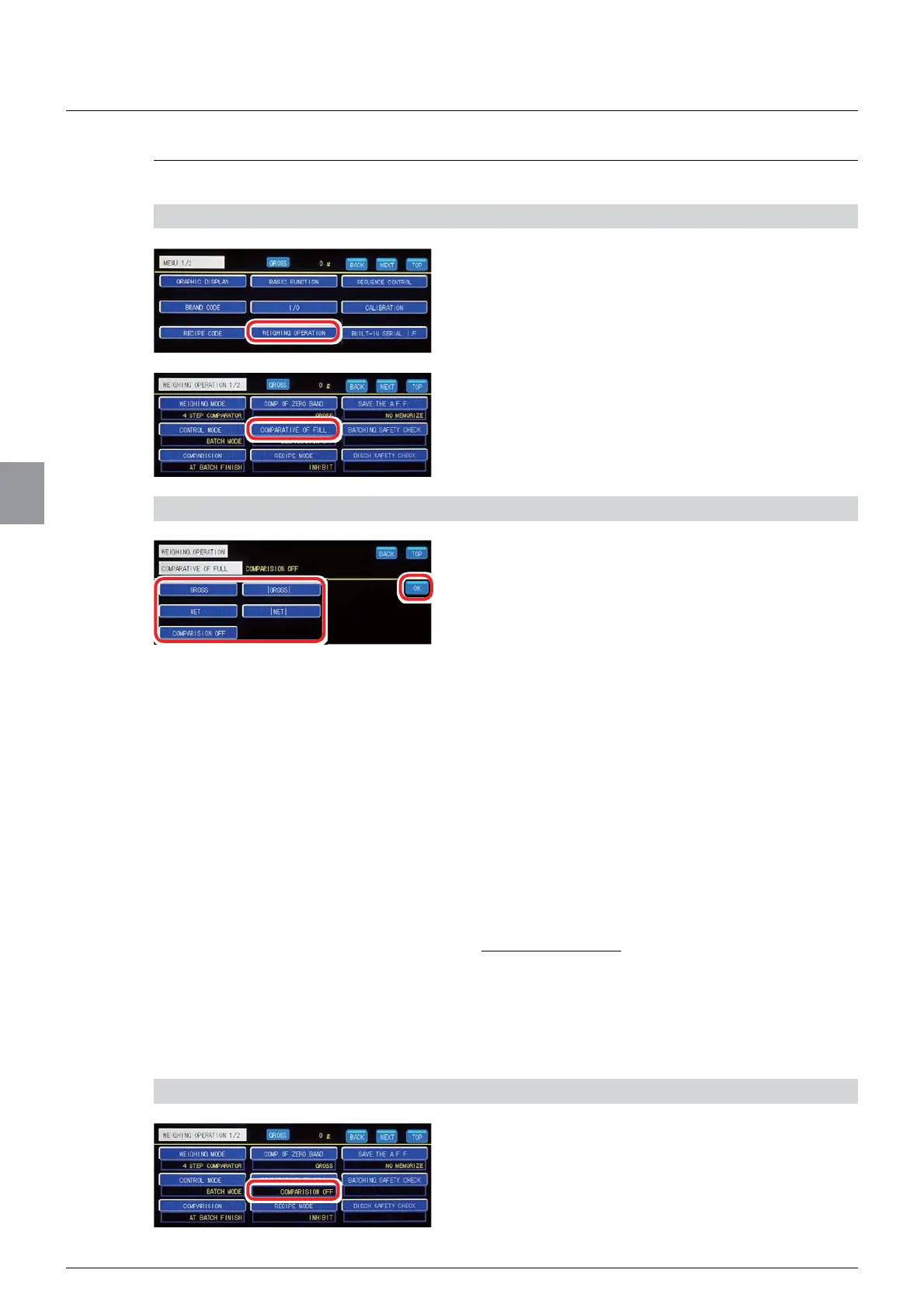
1. Tap [WEIGHING OPERATION] on [MENU 1/2].
>:(,*+,1*23(5$7,21@ZLOOEHGLVSOD\HG
2. Tap [COMPARATIVE OF FULL].
7KHVFUHHQWRVHW>&203$5$7,9(2))8//@ZLOO
be displayed.
2) Set the comparative target
1. Select the comparative target.
[GROSS]:
Compare the value of [FULL] of
>%5$1'&2'(@ZLWKWKHJURVVZHLJKW7KH>)8//@
ODPSOLJKWVLQFDVHRI>*5266@YDOXHRI>)8//@
[NET]: Compare the value of [FULL] of [BRAND
&2'(@ZLWKWKHQHWZHLJKW7KH>)8//@ODPS
OLJKWVLQFDVHRI>1(7@YDOXHRI>)8//@
[COMPARISION OFF]1RWFRPSDUHZLWKWKH
value of [FULL] of [BRAND CODE].
>_*5266_@: Compare the value of [FULL] of
>%5$1'&2'(@ZLWKWKHJURVVZHLJKW7KH
>)8//@ODPSOLJKWVLQFDVHRI>_*5266_@YDOXH
of [FULL]".
>_1(7_@:
Compare the value of [FULL] of [BRAND
&2'(@ZLWKWKHQHWZHLJKW7KH>)8//@ODPSOLJKWV
LQFDVHRI>_1(7_@YDOXHRI>)8//@
Default: [GROSS]
2. Tap [OK].
The comparative target has been set, and
>:(,*+,1*23(5$7,21@ZLOOEHGLVSOD\HG
&RQ¿UPWKHVHWWLQJV
&RQ¿UPWKHFRPSDUDWLYHWDUJHWRIWKHYDOXHRI
[FULL].
The setting is completed if the item set by the step
2) appears under [COMPARATIVE OF FULL].



 To Next Page