172
Graphical display
6
6.1.Graphical display description
&KHFNLQJDZHLJKLQJYDOXHRYHUDVSHFL¿HGGXUDWLRQ
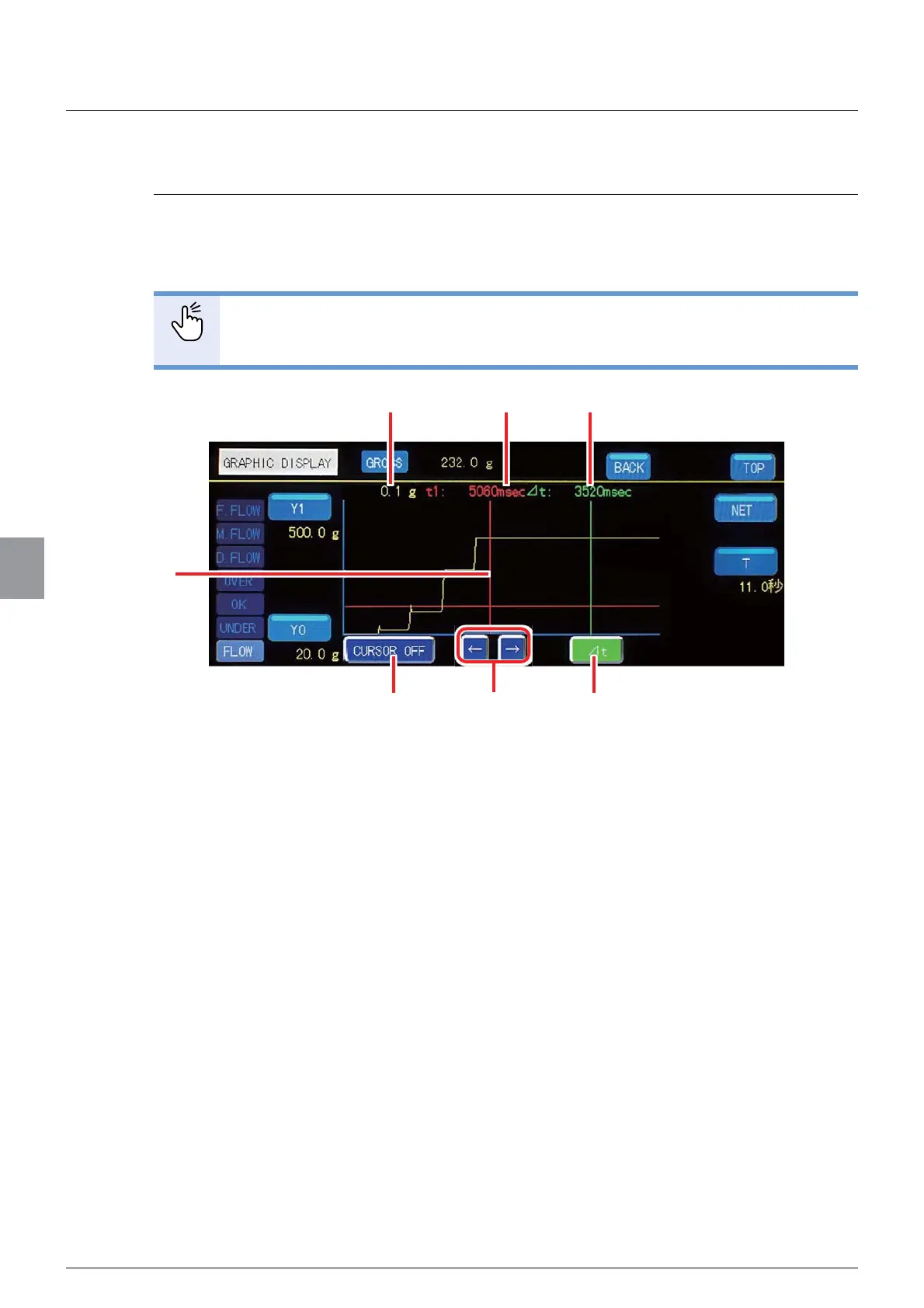
(CURSOR ON)
Displaying a cursor after completion of a weighing operation allows the operator to check the
ZHLJKLQJYDOXHRYHUDVSHFL¿HGGXUDWLRQ:KHQ>&8562521@LVVHOHFWHGWKHJUDSKZLOOEH
as shown below.
POINT
- For non-cursor related items, refer to “6.1.1. Checking the transition of weighing
values (CURSOR OFF)”.
(1) Weighing value at the cursor
Indicates the weighing value at the cursor. When the ⊿t cursor (light green) is OFF, the
weighing value at the t1 cursor (red) is displayed. When the ⊿t cursor (light green) is
ON, the weighing value at the ⊿t cursor (light yellow) is displayed.
(2) t1 time
Indicates the length of time from start of weighing to the t1 cursor.
(3) ⊿t time
Indicates the length of time from the t1 cursor to the ⊿t cursor.
(4) t1 cursor
Displayed in red.
(5) [CURSOR OFF] key
Disables cursor display.
(4)
(7)(6)
(2)
(1)
(5)
(3)



 To Next Page