3.2. How to read the display
17
Basic operations
3
(12) [FINAL] key
Set the value of [FINAL] of the currently selected [BRAND].
(13) [PRELIM1] key
Set the value of [PRELIM1] of the currently selected [BRAND].
(14) [PRELIM2] key
Set the value of [PRELIM2] of the currently selected [BRAND].
(15) [OVER] key
Set the value of [OVER] of the currently selected [BRAND].
(16) [UNDER] key
Set the value of [UNDER] of the currently selected [BRAND].
(17) [F-FALL] key
Set the value of [F-FALL] of the currently selected [BRAND].
POINT
Refer to “5.2.3. Brand settings” for more information about the values of (12)-(17).
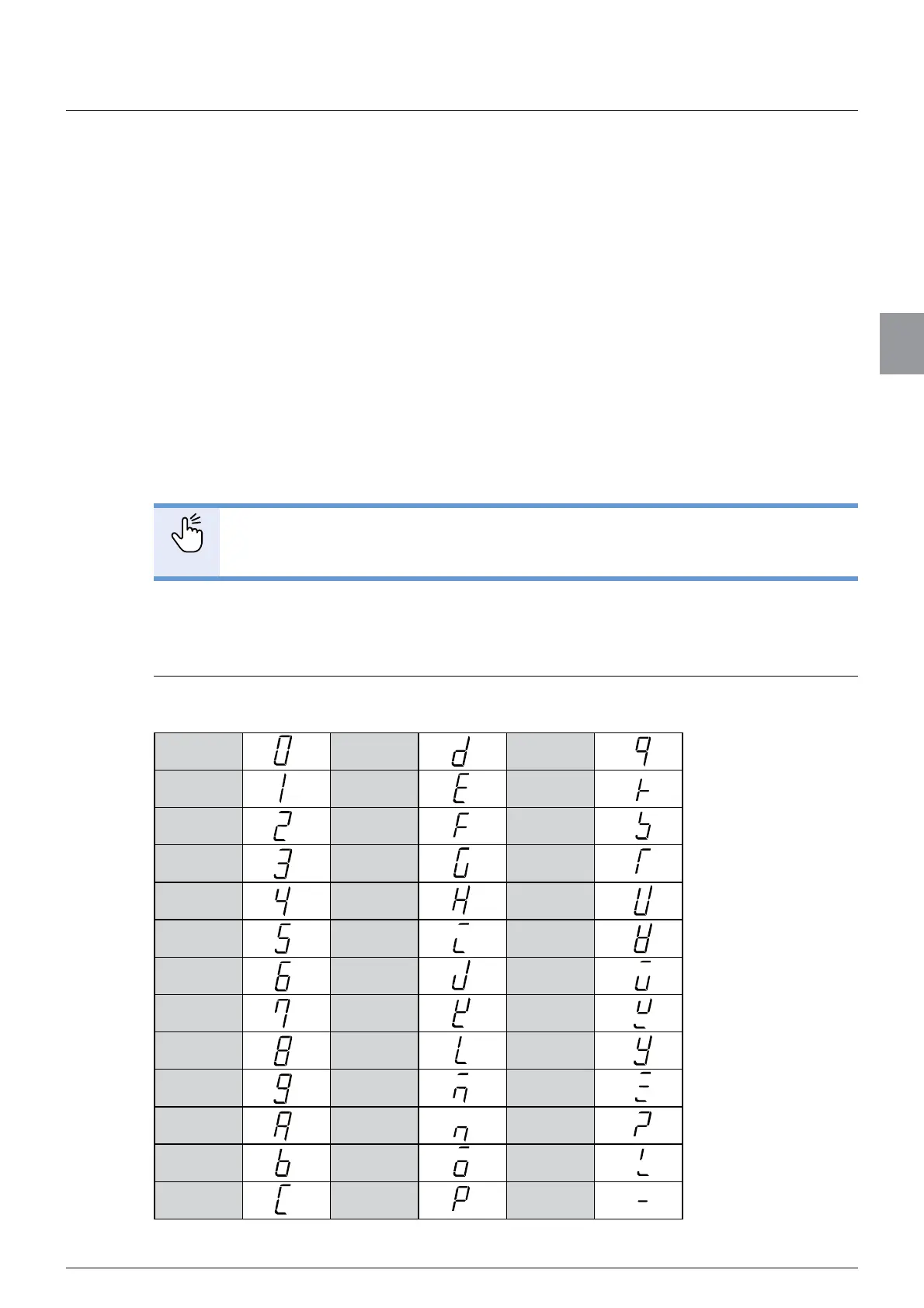
3.2.1. Character display pattern
Numerical values and characters are displayed as follows on the display of CSD-912B.
0DQ
1ER
2FS
3GT
4HU
5IV
6JW
7KX
8LY
9MZ
AN?
BO !
CP -



 To Next Page