182
Various settings
7
7.1.Settings related to the screen display
7.1.3. OL display condition setting
$FRQGLWLRQWRGLVSOD\>2/@RYHUORDGVWDWXVDQG>2/@XQVWDEOHVWDWXVRQWKHVFUHHQLVVHW
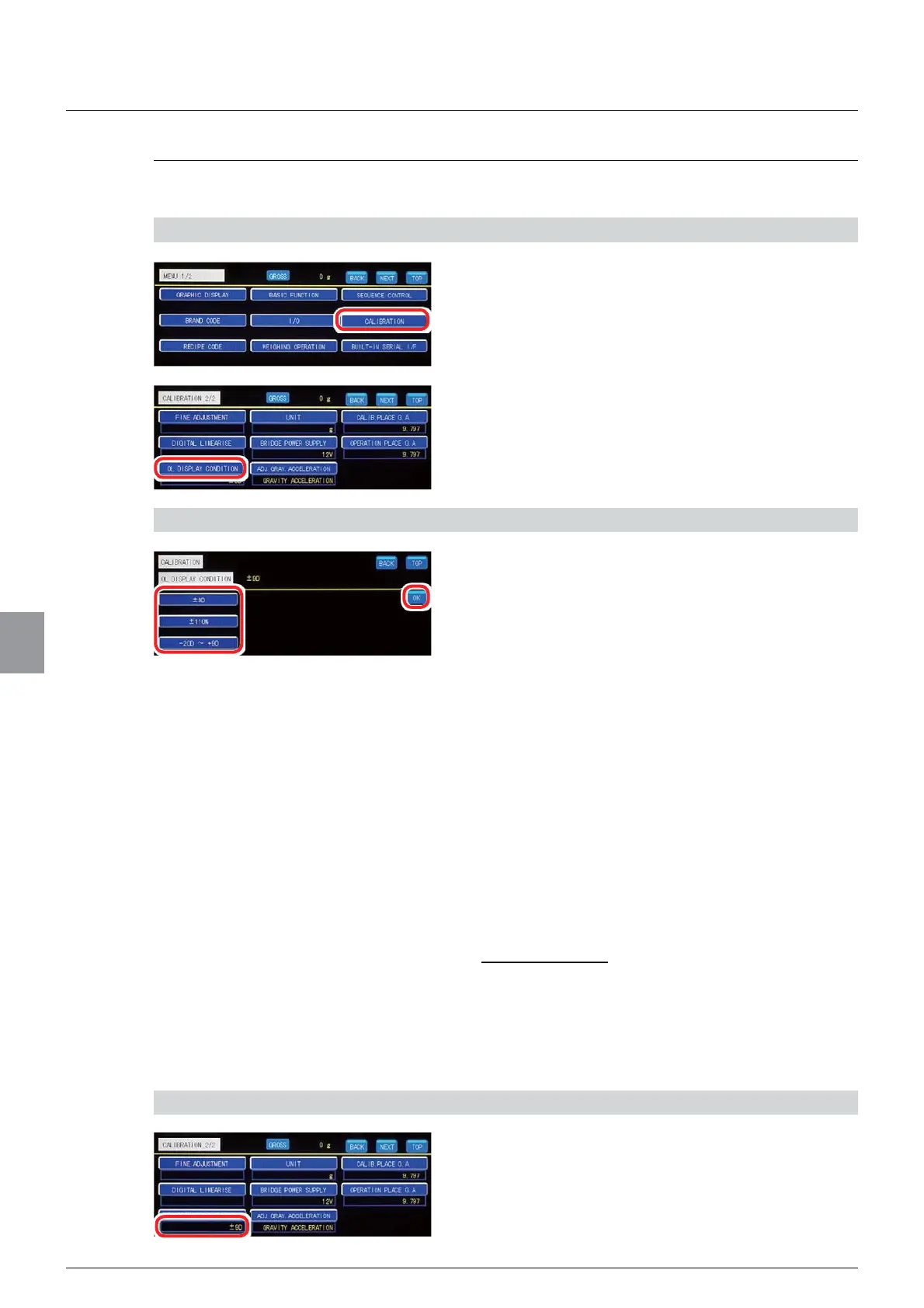
1) Display the OL display condition setting screen
1. Tap [CALIBRATION] on [MENU 1/2].
>&$/,%5$7,21@ZLOOEHGLVSOD\HG
2. Tap [OL DISPLAY CONDITION] on
[CALIBRATION 2/2].
The OL display condition setting screen will be
displayed.
2) Set an OL display condition
1. Select an OL display condition.
±9D: When the weighing value exceeds a value
RIZHLJKLQJFDSDFLW\GLYLVLRQ>2/@ZLOOEH
displayed. When the weighing value is less than a
YDOXHRIZHLJKLQJFDSDFLW\GLYLVLRQ
[-OL] will be displayed.
±110 %: When the weighing value exceeds a
YDOXHRIZHLJKLQJFDSDFLW\[>2/@ZLOO
be displayed. When the weighing value is less
WKDQDYDOXHRIZHLJKLQJFDSDFLW\[
[-OL] will be displayed.
-20D to +9D: When the weighing value exceeds
DYDOXHRIZHLJKLQJFDSDFLW\GLYLVLRQ>2/@
will be displayed. When the weighing value is less
than a value of -20 division, [-OL] will be
displayed.
,QLWLDOYDOXH'
2. Tap [OK].
The OL display condition will be set, and
>&$/,%5$7,21@ZLOOEHGLVSOD\HG
3) Check the setting that you set
1. Check the OL display condition.
The setting is completed if the item set by the step
DERYHDSSHDUVXQGHU>2/',63/$<
CONDITION].



 To Next Page