3.6. Input of characters
22
Basic operations
3
3.6. Input of characters
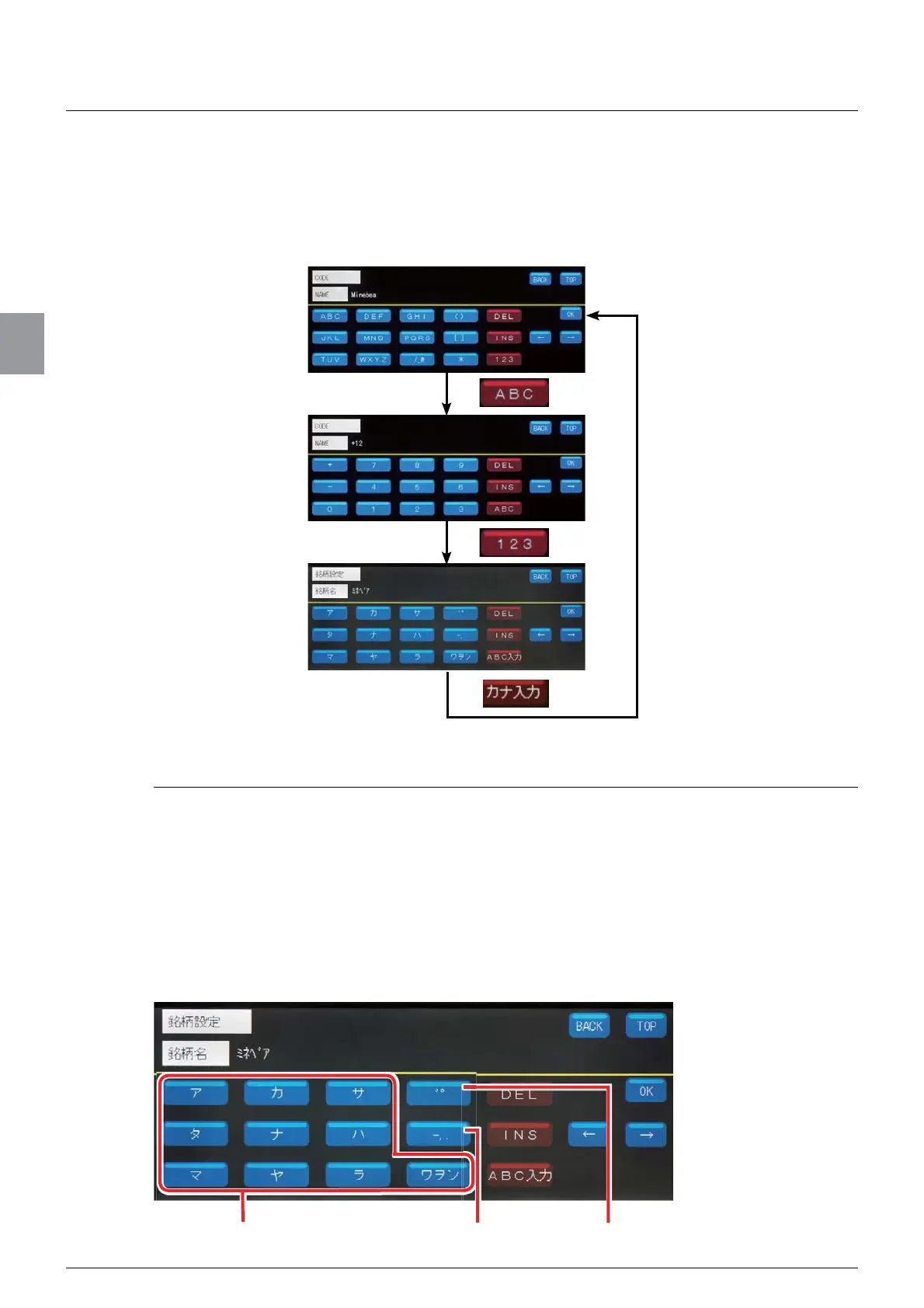
When you select an item to set, for example, names, the screen to enter characters will be
displayed. Three input types are available for the character entry screen: “kana input”,
“alphabetical character input”, and “numeric character input”. They are switched as follows.
3.6.1. Input of katakana
You can enter katakana in the kana input screen. The characters of the Japanese “ア” to “ワ”
column, voiced/semi-voiced sound marks, and punctuation marks are allocated to the
numeric keypad. To enter a katakana, keep pressing the key of the column which contains
the katakana you want to enter until the katakana appears.
ex. ) Characters allocated to [ア]
ア
ĺ
イ
ĺ
ウ
ĺ
エ
ĺ
オ
ĺ
ァ
ĺ
ィ
ĺ
ゥ
ĺ
ェ
ĺ
ォ
ex. ) To enter “ミネベア,”
Tap [
マ
@WZLFHĺ7DS>
ナ
@IRXUWLPHVĺ7DS>
ハ
@IRXUWLPHVĺ7DS>
゛゜
@RQFHĺ7DS>
ア
]
once.
Input of katakana Input of punctuation marks Input of voiced/semi-voiced sound marks



 To Next Page