4.4.Adjustment after calibration
42
Calibration
4
4.4.5. Gravitational acceleration compensation
If the calibration place is far away from the place to use CSD-912B, span errors occurs since
the gravitational acceleration differs among districts. Gravitational acceleration compensation
corrects span errors for two different places with different gravitational acceleration.
The following two methods are available for gravitational acceleration compensation.
- By specifying [DISTRICT No]
Specify [DISTRICT No. ] of the calibration place and the point of use to correct span errors.
- By entering numerical values of the gravitational acceleration
Enter the gravitational acceleration values of the calibration place and the point of use to
correct span errors.
(1) Specify [DISTRICT No. ]
Specify the respective [DISTRICT No. ] of the calibration place and the point of use to
correct span errors.
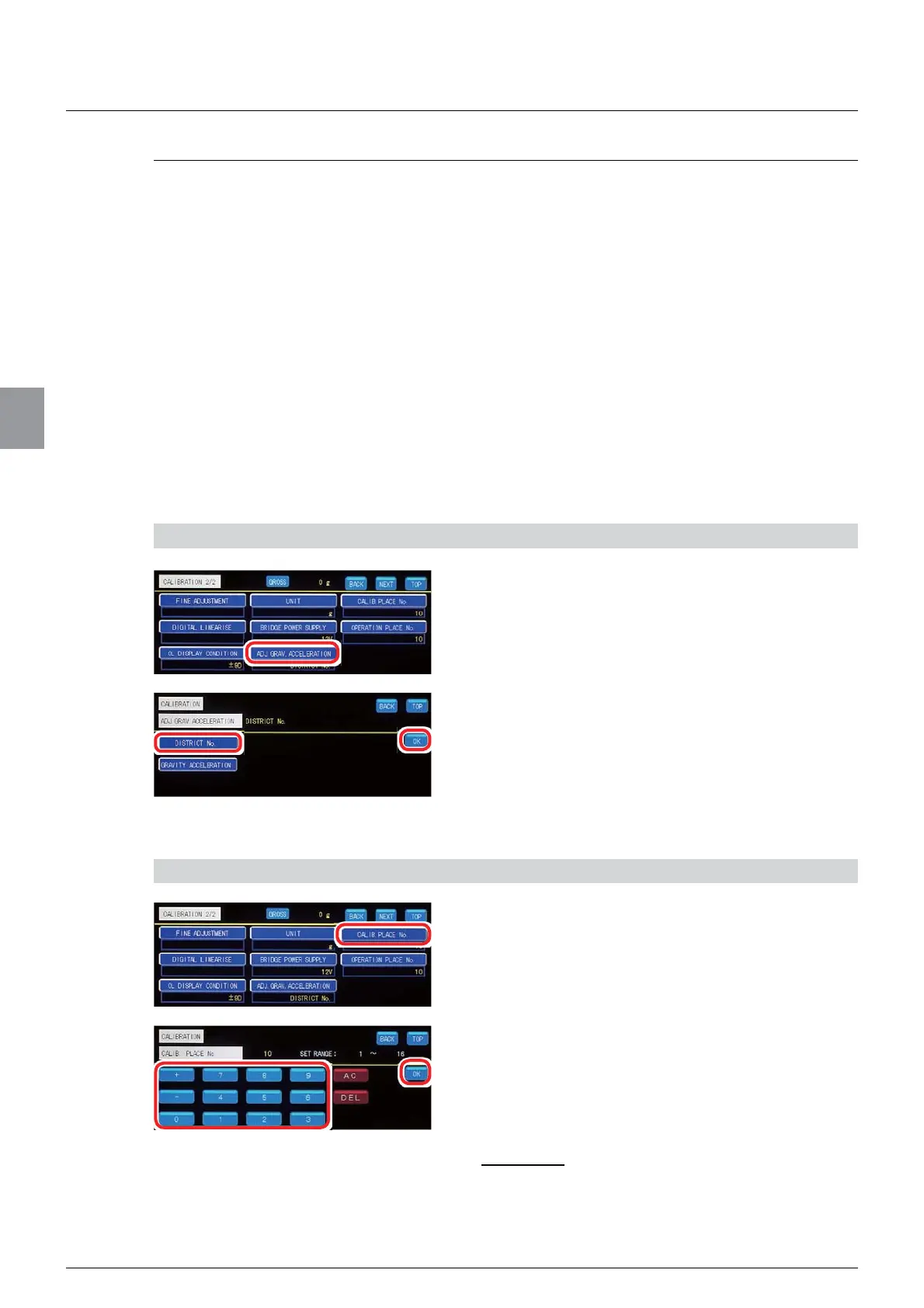
1) Select the compensation method by specifying [DISTRICT No]
1. Tap [ADJ. GRAV. ACCELERATION] on
[CALIBRATION 2/2].
The screen to set [ADJ. GRAV. ACCELERATION]
will be displayed.
2. Tap [DISTRICT No. ].
3. Tap [OK].
[ADJ. GRAV. ACCELERATION] by specifying
[DISTRICT No. ] has been selected, and
[CALIBRATION 2/2] will be displayed.
2) Specify [DISTRICT No] of the calibration place
1.
Tap [CALIB. PLACE No. ] on [CALIBRATION
2/2]
.
The screen to specify [DISTRICT No. ] of the
calibration place will be displayed.
2. Refer to the “Table of gravitational
acceleration compensation” (at the end of 4.4.5.)
to enter district No. of the calibration place.
Allowable range: 1 to 16
Default: 10



 To Next Page