202
Data management
8
8.2.Data storage location setting
8.2. Data storage location setting
Brand setting data, recipe setting data, 4-step comparator setting data can be stored either in
5$0RUÀDVK520
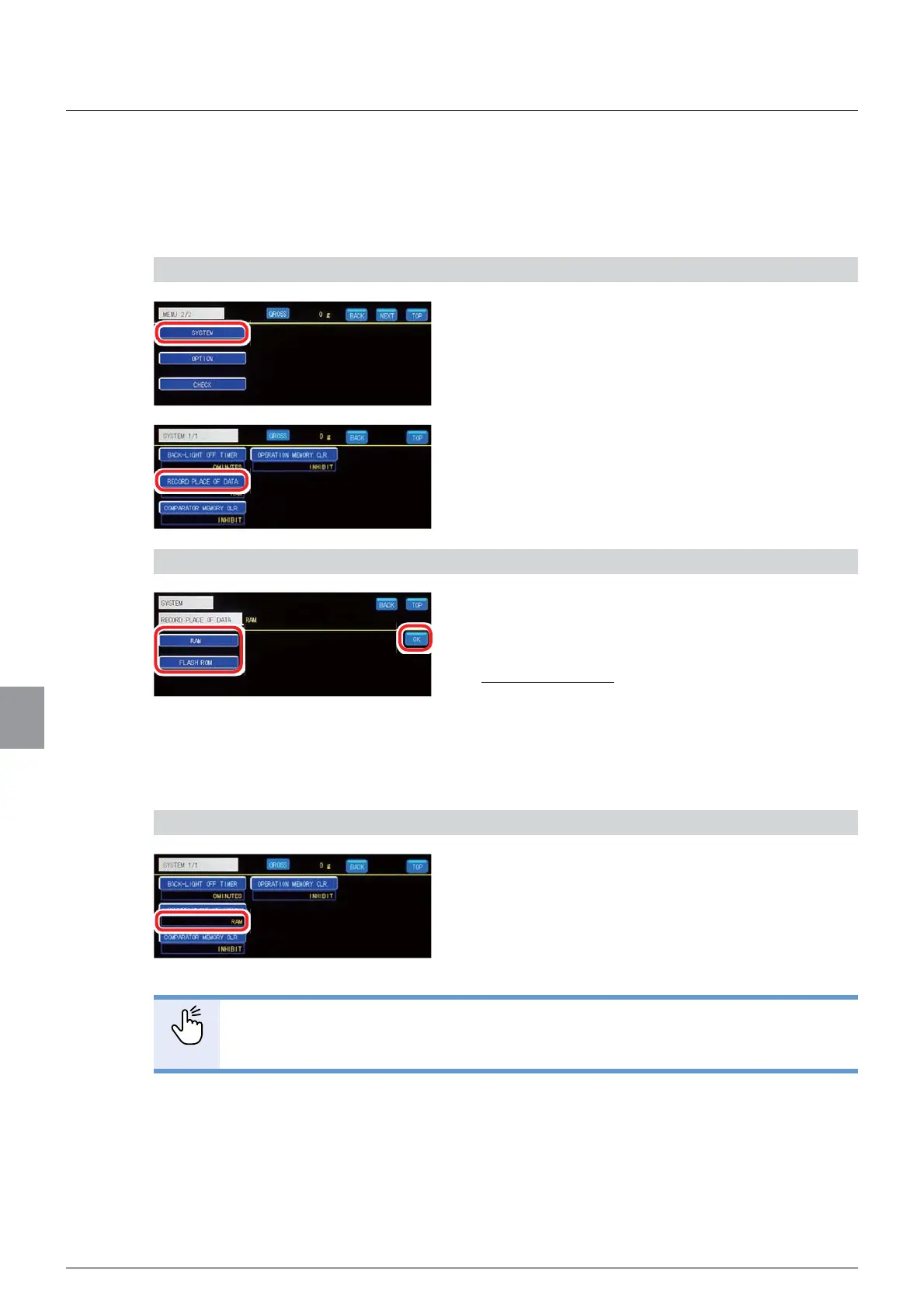
1) Display the data storage location setting screen
1. Tap [SYSTEM] on [MENU 2/2].
[SYSTEM] will be displayed.
2. Tap [RECORD PLACE OF DATA].
The data storage location setting screen will be
displayed.
2) Set a data storage location
1. Select a data storage location.
RAM: Stores data in RAM.
)ODVK5206WRUHVGDWDLQÀDVK520
Initial value: RAM
2. Tap [OK].
The data storage location will be set, and [SYSTEM]
will be displayed.
3) Check the setting that you set
1. Check the data storage location.
The setting is completed if the item set by the step
2) above appears under [RECORD PLACE OF
DATA].
POINT
- Accumulation value data and accumulation times data are stored only in RAM.



 To Next Page