4.3.Calibration
30
Calibration
4
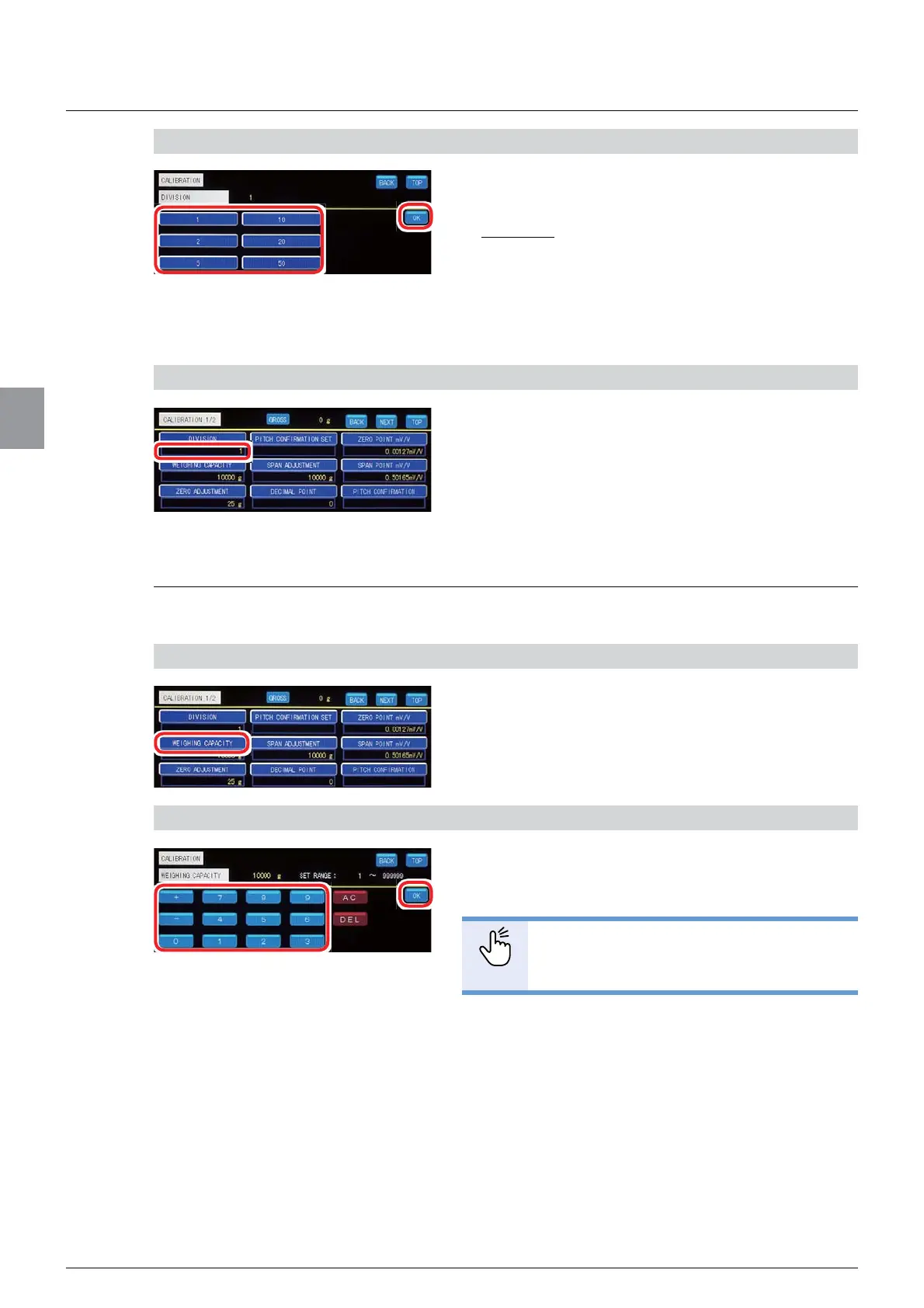
2) Set [DIVISION]
1. Select [DIVISION].
Selectable items: 1, 2, 5, 10, 20, 50
Default: 1
2. Tap [OK].
[DIVISION] has been set, and [CALIBRATION 1/2]
will be displayed.
&RQ¿UPWKHVHWWLQJV
&RQ¿UPWKHVHWWLQJVRI>',9,6,21@
The setting is completed if the item set by the step
2) appears under [DIVISION].
4.3.3. Set the weighing capacity
Set the maximum load value to weight.
1) Display the screen to set [WEIGHING CAPACITY]
1. Tap [WEIGHING CAPACITY] on
[CALIBRATION 1/2].
The screen to set [WEIGHING CAPACITY] will be
displayed.
2) Set [WEIGHING CAPACITY]
1. Enter [WEIGHING CAPACITY].
Allowable range: 1 to 999 999
POINT
- Refer to “3.5. Input of numerical values”
for more information about how to enter
numerical values.
2. Tap [OK].
[WEIGHING CAPACITY] has been set, and
[CALIBRATION 1/2] will be displayed.



 To Next Page